Module 9 · Linux and Networking Basics
Shell scripts and cron
Turn commands into a reusable script with variables, conditions and exit codes, run it on a schedule with cron, and build a small health check that would have raised the alarm on 31 August.
About 25 minutes
Open in ColabEvery example as a notebook you can run, edit and save to your Google Drive.
The problem
Every check in this course so far was typed by hand, after the fact. The month-end outage, the full disk and the miner all left clear traces that a few lines of shell could have spotted automatically, minutes after they started.
Engineers automate checks like these with shell scripts, run on a schedule by cron (or by a monitoring system that calls the same kind of check). The attacker in lesson 6 used exactly the same tool to keep their miner running.
The concept
A script is a file of commands. The first line, #!/bin/bash, says which program runs it. Make it executable with chmod +x script.sh and run it with ./script.sh.
Building blocks
| Feature | Example |
|---|---|
| Variables | LOG=access.log then "$LOG" |
| Arguments | $1 is the first argument passed to the script |
| Command output | ERRORS=$(grep -c ' 504 ' "$LOG") |
| Conditions | if [ "$ERRORS" -gt 10 ]; then ... fi (-gt greater than, -lt less than) |
| Exit codes | exit 0 means OK, anything else means a problem; monitoring tools rely on them |
cron
A cron line has five time fields then the command:
Output
# minute hour day-of-month month day-of-week  command
*/5 * * * *  /srv/scripts/health_check.sh /var/log/nginx/access.log
0 3 * * * /usr/sbin/logrotate /etc/logrotate.confThe first runs every 5 minutes; the second at 03:00 every day. crontab -l lists a user's jobs, and reviewing them is part of every security check (lesson 6's intruder added one).
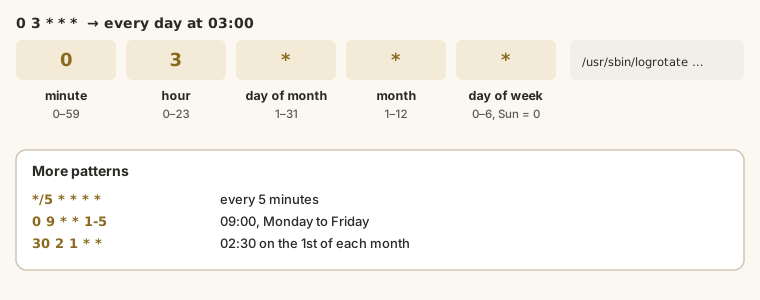
Example
A health check: given a log and a time window, count server errors and slow requests, and exit with a warning code if either crosses a threshold. The cat > ... <<'EOF' line writes everything up to EOF into the file.
Shell (bash)
%%bash
cat > health_check.sh <<'EOF'
#!/bin/bash
# Usage: health_check.sh LOGFILE FROM TO   (times as HH:MM)
LOG="$1"; FROM="$2"; TO="$3"
MAX_ERRORS=5
MAX_SLOW=10

read TOTAL ERRORS SLOW <<< "$(awk -v from="$FROM" -v to="$TO" '
  { t = substr($4, 14, 5) }
  t >= from && t < to { n++; if ($9 >= 500) e++; if ($NF > 2) s++ }
  END { print n + 0, e + 0, s + 0 }' "$LOG")"

echo "$FROM-$TO: $TOTAL requests, $ERRORS server errors, $SLOW slower than 2 s"
if [ "$ERRORS" -gt "$MAX_ERRORS" ] || [ "$SLOW" -gt "$MAX_SLOW" ]; then
  echo "ALERT: thresholds exceeded"
  exit 1
fi
echo "OK"
EOF
chmod +x health_check.sh
ls -l health_check.sh | cut -d' ' -f1Output
-rwxr-xr-xRun it on three 5-minute windows: before the outage, the start of it, and after.
Shell (bash)
%%bash
curl -sO https://academy.cloudtechanalytics.com/datasets/linux/access.log
for window in "09:30 09:35" "09:40 09:45" "10:40 10:45"; do
  ./health_check.sh access.log $window
  echo "exit code: $?"
doneOutput
09:30-09:35: 44 requests, 0 server errors, 0 slower than 2 s
OK
exit code: 0
09:40-09:45: 37 requests, 17 server errors, 26 slower than 2 s
ALERT: thresholds exceeded
exit code: 1
10:40-10:45: 47 requests, 0 server errors, 0 slower than 2 s
OK
exit code: 0Run every five minutes by cron, this script would have alerted in the first window of the outage, at 09:45, and its exit code could page the on-call engineer automatically. Lesson 6's intruder used the same scheduler to restart their miner: listing all users' cron jobs is how you'd find theirs.
Walkthrough
- Run the cells. Change
MAX_ERRORSto 20. Does the alert still fire at 09:40? - Add a disk check to the script: read the
/varline ofdf.txtand alert above 90%. - Write the cron line that runs your script every 5 minutes, and one that runs it at 07:00 on the last day of each month only (hint: cron can't say "last day" directly; what could you do instead?).
- Write a second script that lists processes using more than 50% CPU from
ps.txt, not run bytallyb+,www-dataorroot.
Practice
Practice
How many server errors does the script report for the window 09:40 to 09:45?
Task
8 minWrite a short script check_miner.sh that reads ps.txt, prints any process using more than 50% CPU whose user is not tallyb+, www-data or root, and exits with 1 if it finds one (0 otherwise).
Your work is checked for
- Starts with #!/bin/bash
- Reads ps.txt
- Compares CPU with 50
- Excludes the expected users
- Exits with 1 when found and 0 otherwise
Check your understanding
Answer every question to check.