Module 1 · Digital Skills for Students
Files and Cloud Storage
Organise your files so you can always find them, back them up to the cloud, and share them safely.
About 20 minutes
Why it matters
Losing an assignment the night before it's due, or searching for "that PDF" for twenty minutes, costs you time and marks. A simple system fixes both.
A folder structure that works
Make one main folder for school, then one folder per session and course:
Output
School/
  2025-2026/
    ECO 201 - Microeconomics/
      Lecture notes/
      Assignments/
      Past questions/
    STA 211 - Statistics/
  Personal/
    CV and applications/
Certificates/Keep it shallow: three or four levels is enough.
Name files well
A good file name tells you what it is without opening it:
| Weak | Strong |
|---|---|
Document1.docx | ECO201-assignment-2-demand-curves.docx |
final final.pdf | CV-Amaka-Obi-2026-03.pdf |
IMG_2045.jpg | STA211-lecture-5-board.jpg |
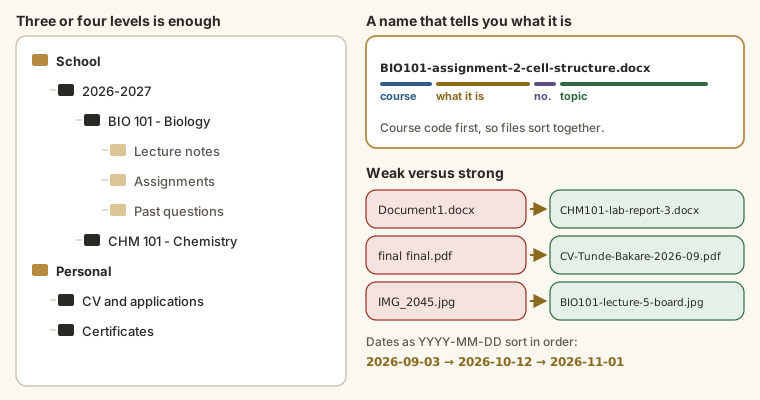
Tips: put the course code first so files sort together, use dates as YYYY-MM-DD so they sort in order, and avoid spaces and symbols in files you'll upload.
Back up to the cloud
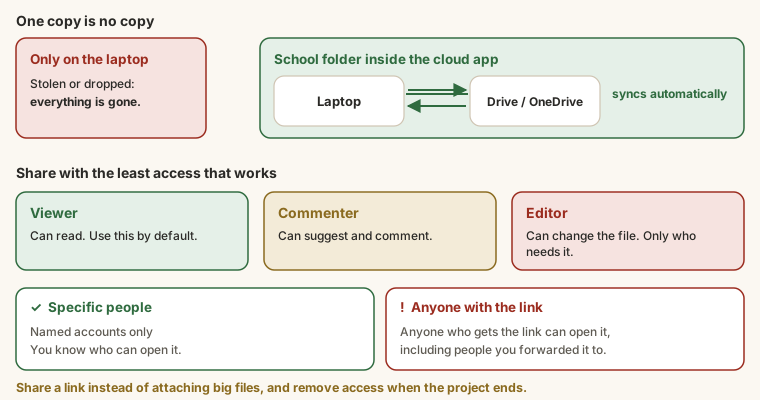
If your laptop is stolen or your phone falls in water, anything that's only on the device is gone. Cloud storage keeps a copy online:
| Service | Free storage | Good for |
|---|---|---|
| Google Drive | 15 GB (shared with Gmail and Photos) | Google Docs, Sheets and Slides, sharing |
| OneDrive | 5 GB (more with a school Microsoft account) | Word, Excel and PowerPoint |
| Dropbox | 2 GB | Simple syncing |
Install the desktop app (Google Drive for desktop or OneDrive) and keep your School folder inside it. It then backs up automatically.
Share safely
- Share with specific people when you can, rather than "anyone with the link".
- Give Viewer access unless someone needs to edit.
- To send a big file, share a link instead of attaching it.
- Remove access when a group project is finished.
Try it
Task
6 minRename these five files using the rules in this lesson (course code first, hyphens instead of spaces, dates as YYYY-MM-DD, says what it is). One per line, in the same order, keeping each file's extension.
Document1.docx: your ECO 201 Assignment 3 on price elasticityscan 0003.pdf: STA 211 past questions from 2024IMG_2045.jpg: a photo of the board in CSC 201, lecture 7final final CV.pdf: your CV, updated in March 2026New Microsoft Excel Worksheet.xlsx: your semester budget
Your work is checked for
- Five file names, one per line
- No spaces in any file name
- Every name keeps its extension (.docx, .pdf, .jpg, .xlsx)
- Course codes first for the course files (ECO201, STA211, CSC201)
- The CV's date written as 2026-03
- No "final", "document", "scan" or "new" left in the names
Task
8 minCreate your School folder structure for this session's courses, inside Google Drive or OneDrive so it backs up. Type the structure here, one folder per line, indenting sub-folders with spaces.
Your work is checked for
- A top-level School folder
- A session folder (e.g. 2025-2026)
- At least two course folders with course codes
- Sub-folders are indented
- At least six folders
Then share one file with a friend as Viewer and ask them what they can see.
Earn your badge
Take the module check
Questions on this module. Pass and you earn the Cloud Storage badge, free.
Create a free account to earn the badge