Module 4 · Digital Skills for Students
Stay Safe Online
Protect your accounts with strong passwords and two-step verification, spot phishing and scams, and manage your digital footprint.
About 20 minutes
Strong passwords
Most accounts are hacked because of weak or reused passwords.
- Use a long passphrase:
Jollof-Rice-At-Eight-Tonight!is long and easy to remember, and far stronger thanTunde1234. - Never reuse the same password on important accounts. If one site is hacked, attackers try it everywhere.
- Use a password manager such as Bitwarden (free) or the one built into Chrome or your phone to remember them for you.
Turn on two-step verification
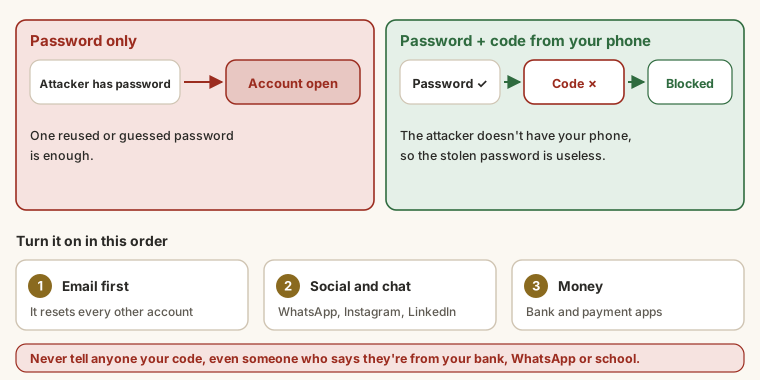
Two-step verification (2SV or 2FA) asks for a code from your phone as well as your password. Even if someone steals your password, they can't get in.
Turn it on for your email first (email resets every other account), then WhatsApp, Instagram, LinkedIn and your bank app.
Spot phishing
Phishing is a fake message that tries to get your password, money or personal details. Warning signs:
- Urgency or threats: "Your account will be closed in 24 hours."
- Too good to be true: "You've won a scholarship! Pay ₦5,000 to process it."
- Odd links: hover over (or long-press) a link to see where it really goes.
unilag-portal.xyzisn't your school. - Requests for codes, PINs or passwords.
- Messages from friends asking for money out of the blue. Their account may be hacked. Call them to check.
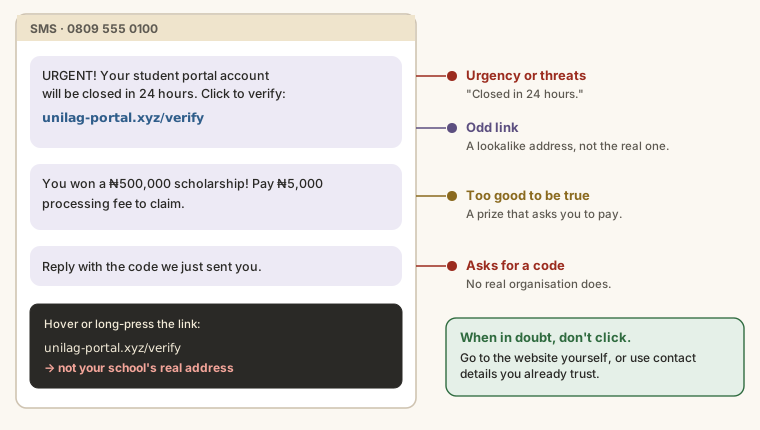
When in doubt, don't click. Go to the website yourself or contact the organisation using details you already trust.
Common scams targeting students
- Fake scholarships or admission offers that ask for a fee.
- Job offers that ask you to pay for training, a uniform or a "registration fee".
- Investment schemes promising big, fast returns.
- Fake accommodation listings that want a deposit before you've seen the room.
Your digital footprint
Everything you post can be seen by future employers and scholarship panels.
- Search your own name on Google and see what comes up.
- Review old posts and privacy settings on each social account.
- Don't post your home address, phone number, exam number or travel plans publicly.
Try it
This SMS arrived on a student's phone:
Output
UNILAG BURSARY: Dear student, your 2025/2026 school fees record shows an
unpaid balance and your portal will be DEACTIVATED in 24hrs. To avoid
suspension, verify your payment now at unilag-feesportal.xyz/verify and
enter the 6-digit code we will send to your phone.Task
6 minList the warning signs in this message, one per line, and finish with what the student should do instead.
Your work is checked for
- Spots the urgency or threat
- Spots the fake web address
- Spots the request for a code
- Says what to do instead (official portal, bursary office, don't click…)
- At least four lines
Which of these web addresses is most likely genuine for logging in to Gmail?
- A.
gmail-secure-login.com - B.
accounts.google.com - C.
google.accounts-verify.net - D.
gmaiil.com
Practice
Type the letter.
Task
6 minTurn on two-step verification for your main email account. Write the steps you followed and which second step you chose (an app, SMS, a passkey…). Don't write any password or code here.
Your work is checked for
- Mentions where you found it (settings, security, account…)
- Names the second step you chose
- At least three steps
- No password or code typed in (no long digit runs)
Earn your badge
Take the module check
Questions on this module. Pass and you earn the Online Safety badge, free.
Create a free account to earn the badge