Module 1 · pandas Quick Start
Load and Explore Data
Load a real sales dataset into pandas in Google Colab and find out what's in it with head, shape, info and describe.
About 15 minutes
Open in ColabEvery example as a notebook you can run, edit and save to your Google Drive.
Meet pandas
pandas is the Python library for working with tables of data, like Excel but with code. It's already installed in Google Colab. If you're new to Python, take Python for Beginners first.
You'll use a practice dataset from a fictional drinks and household goods distributor: every order line from January 2025 to June 2026.
Load the data
Open a new notebook at colab.research.google.com and run:
Edit the code and press Run (Ctrl + Enter). Examples on this page share their variables, like cells in a notebook.
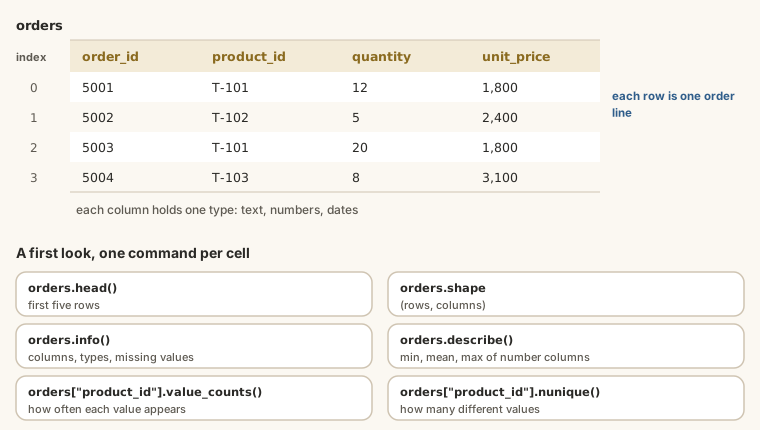
orders is now a DataFrame: a table with rows and named columns. pd is the usual short name for pandas.
Take a first look
Run each line in its own cell:
Edit the code and press Run (Ctrl + Enter). Examples on this page share their variables, like cells in a notebook.
You should see 4,266 rows and 7 columns:
| Column | Meaning |
|---|---|
order_id | Unique ID for each order line |
order_date | Date of the order |
customer_id | Which customer (links to a customers table) |
product_id | Which product (links to a products table) |
quantity | Cartons ordered |
unit_price | Price per carton in naira |
discount_pct | Discount given: 0, 5 or 10 |
Understand the columns
Edit the code and press Run (Ctrl + Enter). Examples on this page share their variables, like cells in a notebook.
info() shows each column's type and how many values are filled in. Here nothing is missing, but order_date is stored as text (object). You'll fix that in the next module.
Edit the code and press Run (Ctrl + Enter). Examples on this page share their variables, like cells in a notebook.
describe() gives quick statistics for the number columns: count, mean, min, max and quartiles. For example, the average quantity is about 13.8 cartons and unit prices run from ₦3,600 to ₦24,600.
Select columns and count values
Edit the code and press Run (Ctrl + Enter). Examples on this page share their variables, like cells in a notebook.
value_counts() shows how often each value appears: 2,519 lines had no discount, 1,222 had 5% and 525 had 10%.
Try it
Load the orders in a Colab notebook and answer these with pandas.
Practice
What is the largest single quantity ordered on one order line?
Practice
Which product_id appears in the most order lines?
Practice
How many different customers placed orders?
Then write two sentences in a text cell describing the dataset in your own words: what one row is, and the period it covers.
Earn your badge
Take the module check
Questions on this module. Pass and you earn the pandas Basics badge, free.
Create a free account to earn the badge