Module 1 · Research Skills for Students
Search Like a Pro
Find good sources in minutes: turn questions into keywords, use Google's search operators to cut out noise, search Google Scholar and official sites, and keep a short log of what you found and how.
About 25 minutes
From question to keywords
Search engines match words, not questions. A whole question brings back pages that happen to use the same everyday words, often forums and blogs. Pull out the key terms instead:
| Your question | Better search |
|---|---|
| What are the effects of youth unemployment in Nigeria? | youth unemployment Nigeria effects |
| How does mobile money help small businesses? | mobile money small business growth |
| Is social media bad for students' grades? | social media use academic performance students |
Then add synonyms, the other words experts use for the same thing: unemployment / joblessness; small business / SME / micro-enterprise; grades / academic performance / CGPA. Different words find different sources.
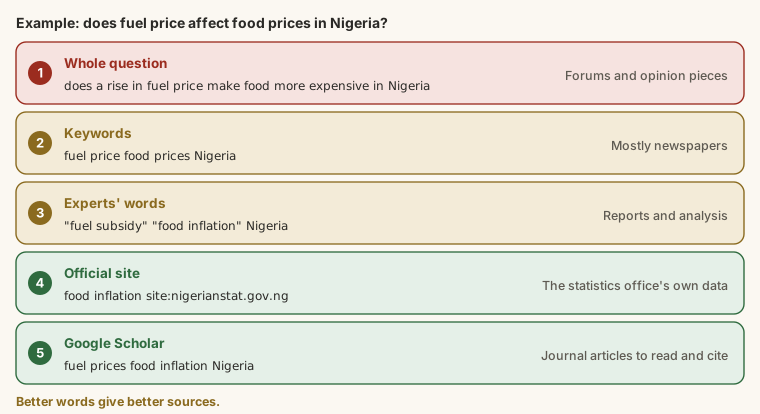
A worked example. Amaka's assignment asks about the impact of youth unemployment on crime in Nigeria.
- First search:
does youth unemployment cause crime in Nigeria→ news opinion pieces and a forum thread. - Keywords:
youth unemployment crime Nigeria→ better, but mostly newspapers. - She notices articles use the phrase "unemployment rate" and the word "insecurity", and searches:
"youth unemployment" insecurity Nigeria→ more relevant, including reports. - Narrowed to official data:
unemployment site:nigerianstat.gov.ng→ the National Bureau of Statistics' own labour force reports. - Same keywords in Google Scholar → journal articles, some with hundreds of citations.
Five focused searches, each using what the last one taught her. That's the skill.
Search operators
Operators are short codes you type into Google's search box to control the results:
| Operator | What it does | Example |
|---|---|---|
"quotes" | This exact phrase | "youth unemployment rate" |
site: | Only this website or domain | unemployment site:nigerianstat.gov.ng |
filetype: | Only this type of file | SME survey filetype:pdf |
- | Leave this word out | python -snake |
OR | Either word (in capitals) | SME OR "small business" |
after: / before: | Pages dated after or before | fintech Nigeria after:2023-01-01 |
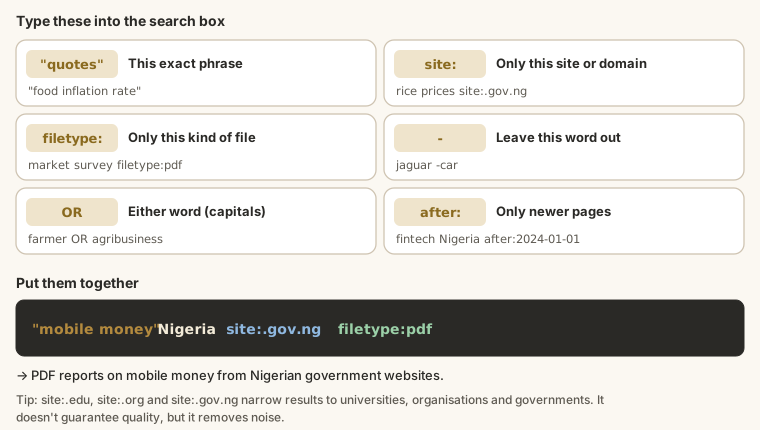
Combine them: "mobile money" Nigeria site:.gov.ng filetype:pdf finds PDF reports on mobile money from Nigerian government websites.
Search where the research is
For assignments you usually need academic and official sources:
- Google Scholar (scholar.google.com) searches journal articles, theses and books. Two features worth knowing: Cited by (newer work that builds on an article: often the most useful click) and the date filter on the left for recent work.
- Your school's library portal often gives free access to databases your lecturers expect you to use.
- Official statistics come from the organisation itself: the National Bureau of Statistics (nigerianstat.gov.ng), the Central Bank of Nigeria (cbn.gov.ng), the World Bank, the WHO. Use the original, not a blog quoting it.
Keep a search log
As you go, note each useful source and the search that found it. When your lecturer asks where a figure came from, or you need more sources at midnight before the deadline, you'll know exactly what to do.
Output
Source: NBS, Nigeria Labour Force Survey, latest quarter (nigerianstat.gov.ng)
Search: unemployment site:nigerianstat.gov.ng filetype:pdf
Why useful: official unemployment figures by age groupTry it
Task
3 minWrite one Google search that finds PDF files about unemployment from the National Bureau of Statistics' website (nigerianstat.gov.ng) only.
Your work is checked for
- Searches for unemployment
- Limited to the NBS website with site:
- Only PDF files with filetype:
Task
5 minTake a research question of your own (or: Is social media bad for students' grades?). Write, one per line: your keywords, then two synonyms for one of them, then one search with an operator that you'd actually run.
Your work is checked for
- At least three lines
- Lists synonyms
- One search uses an operator ("quotes", site:, filetype:, OR, -, after:)
- Keywords, not a full question (no question mark)
Task
2 minRun your searches in Google and Google Scholar. Write a search log entry for the best source you found: the source with its website, the exact search that found it, and why it's useful.
Your work is checked for
- Names the source and where it's from (a website, journal or link)
- Includes the search you used
- Says why it's useful
Earn your badge
Take the module check
Questions on this module. Pass and you earn the Smart Search badge, free.
Create a free account to earn the badge