Module 2 · Design & Content Essentials
Design with Canva
Design a clean, professional social post or flyer in Canva, using templates and four rules (contrast, alignment, space, few fonts), check it the way viewers will see it, and download it in the right format.
About 35 minutes
Get started
Canva is a free online design tool at canva.com, with apps for phone and computer. Sign up with your email or Google account. The free plan is enough for this module; items marked with a crown need a paid plan.
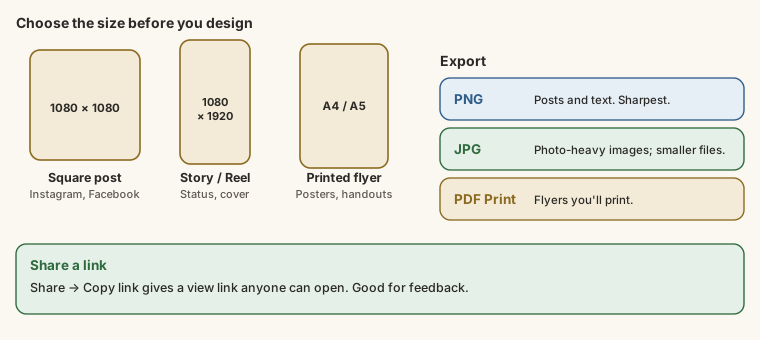
On the home page, search for what you want to make, and Canva opens a blank page in the right size:
| You're making | Search for | Size |
|---|---|---|
| A square Instagram or Facebook post | "Instagram post" | 1080 × 1080 pixels |
| A story, Reel cover or WhatsApp status | "Instagram story" | 1080 × 1920 pixels (tall) |
| A printed flyer | "Flyer" | A4 or A5 |
Pick a template and click it to open it in the editor. Starting from a template isn't cheating; it gives you a layout that already works, and you'll change everything that matters.
What goes wrong: a flyer, before and after
Here's a real-style flyer described element by element. It's for a weekend coding bootcamp.
Before:
- A busy photo of a computer lab fills the background.
- On top of it, in thin white letters: "LEARN CODING", then "Weekend Bootcamp for Beginners Aged 16-25 in Port Harcourt, Saturday and Sunday 10am to 4pm, ₦15,000 Only, Limited Spaces, Laptops Provided, Lunch Included, Certificate at the End, Call or WhatsApp 0806 555 0199 to Register".
- Five different fonts: one handwritten, one bold, one italic, one "techy", one plain.
- Text placed wherever there was space; some lines start at the left edge, some centred, one squeezed against the right edge.
- The logo is the same size as the headline.
It's hard to read, nothing stands out, and it looks rushed. Every problem is one of four rules:
| Rule | What it means | What went wrong | The fix |
|---|---|---|---|
| Contrast | Text must stand out from what's behind it | Thin white text on a busy photo | A dark solid shape behind the text, or a plain background with the photo beside it |
| Alignment | Things line up along invisible lines | Left, centred and right all mixed | Align everything left (or everything centred). Drag until Canva's pink guide lines appear |
| Space | Empty space around things lets the eye rest | One wall of text, nothing left out | Cut the text to essentials; keep a margin from every edge |
| Few fonts | One or two fonts at most | Five | One bold font for the headline, one plain font for everything else |
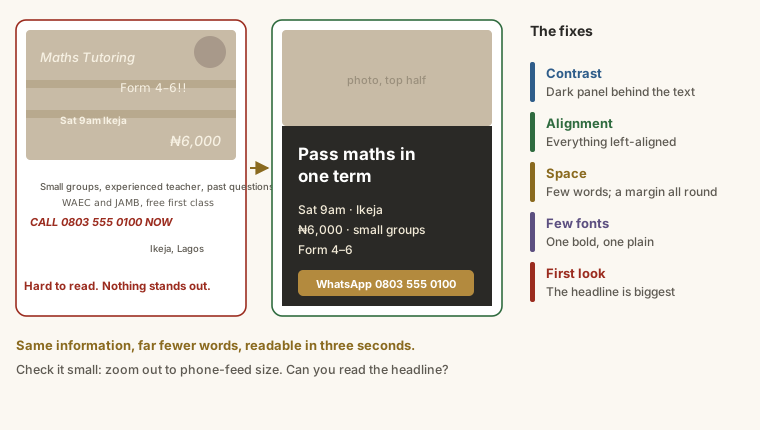
And one more decision above all four: what should people see first? Make that the biggest thing.
After:
- Headline, big and bold: "Learn to code in one weekend".
- Below it, three short lines: Sat & Sun, 10am-4pm · Port Harcourt / ₦15,000, laptops and lunch included / Ages 16-25, no experience needed.
- At the bottom, the action, clearly separated: WhatsApp 0806 555 0199 to book.
- The photo moved to the top half, text on a plain dark panel below it. Two fonts. Everything aligned left. The logo small, in a corner.
Same information, far fewer words, and you can read it in three seconds.
Make it yours
Replace the template's content with your own:
- Text: click any text box to edit it. Headlines of five or six words beat sentences.
- Photos: use Uploads to add your own pictures, then drag one onto a template photo to swap it in.
- Colours: click an element, then the colour square in the toolbar. Use two or three brand colours, consistently.
- Logo: upload it and place it in a corner, small.
Check, download and share
Check it small. Zoom out until the design is the size of a phone post in a feed. Can you read the headline? Is it obvious what to do next? If not, make the important thing bigger and cut something.
Download with Share → Download:
- PNG for social posts and anything with text (sharpest).
- JPG for photo-heavy images where a smaller file matters.
- PDF Print for flyers you'll print.
Share a link. Share → Copy link gives a view link anyone can open: useful for getting feedback, and for this module's last task.
To make the same design in another size (a post into a story), use Resize (a paid feature), or create a new design in the new size and copy your elements across.
Try it
Practice
A poster has bright yellow text on a light grey background, and people say they can't read it from a distance. Which of the four rules is it breaking? (One word.)
Practice
You're sending a flyer to a print shop. Which download type should you choose in Canva? (Two words.)
Task
6 minBefore you design, write a design brief for a real post or flyer, one item per line: the size (e.g. Instagram post), the headline (6 words or fewer), up to three short detail lines, the call to action, and your two fonts or colours.
Your work is checked for
- Says the size or format (Instagram post, story, flyer, A4…)
- Has a headline line of six words or fewer
- Has a call to action (book, call, WhatsApp, visit, register, order…)
- Names your fonts or colours
- At least five lines
Task
2 minMake the design in Canva from your brief, check it against the four rules, download it, then paste its Canva view link here (Share → Copy link). Add one line saying which rule you had to fix.
Your work is checked for
- A Canva design link
- Says which rule you fixed (contrast, alignment, space or fonts)
Earn your badge
Take the module check
Questions on this module. Pass and you earn the Canva Design Essentials badge, free.
Create a free account to earn the badge