Module 3 · Design & Content Essentials
Video Editing with CapCut
Plan and edit a short vertical video in CapCut, the free editor for phone and computer. Write a shot list, cut to the point in two seconds, add text and corrected captions, add sound, and export in good quality.
About 40 minutes
Plan before you film
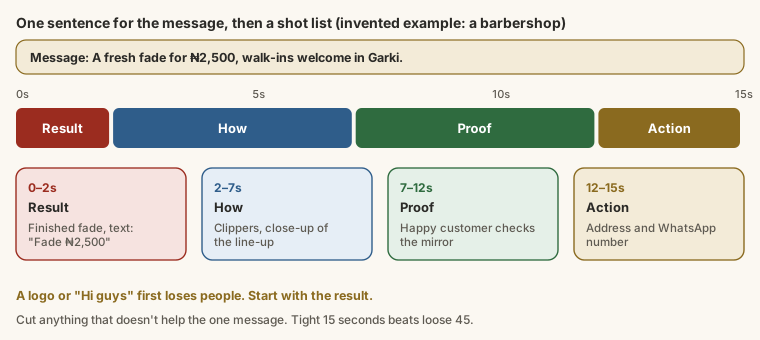
Most short videos that don't work have the same problem: they take too long to get to the point. Before you record anything, write one sentence for what the video says, and a shot list with timings.
For a small food business in Ikeja:
Message: Our new jollof party pack feeds four for ₦8,000, delivered in Ikeja.
Shot list (20 seconds):
Output
0-2s    Steam rising as the lid comes off a full pack of jollof. Text: "Feeds 4 for ₦8,000"
2-6s    Spoon scooping rice, chicken and plantain into a takeaway pack.
6-11s   Four friends at a table sharing it, laughing.
11-16s  Rider handing the bag over at a gate in Ikeja.
16-20s The pack, the price and how to order. Text: "WhatsApp 0803 555 0177"Notice the order: the result first, then how, then proof, then the action. Most people decide in the first two seconds whether to keep watching, so a logo or "Hi guys, welcome back" in the opening seconds loses them.
Set up the project
CapCut is a free video editor for phone and computer, with a browser version too. Menu names differ slightly between versions and devices; if a button here looks different, look for the nearest match.
- Open CapCut and tap New project.
- Select your clips in roughly the right order and tap Add.
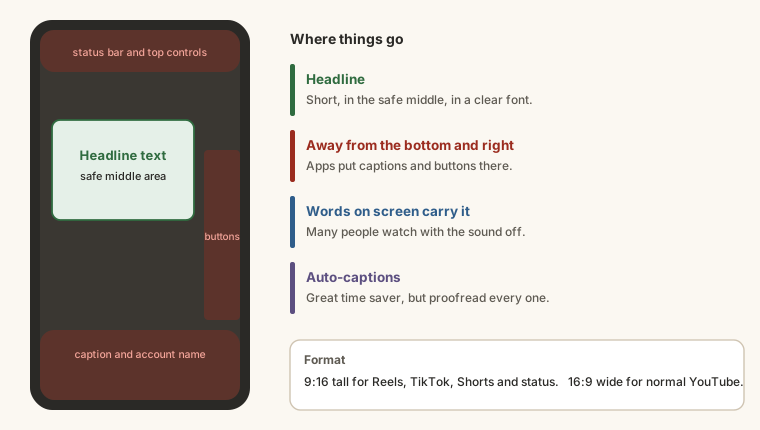
- Set the aspect ratio (the video's shape): 9:16 (tall) for Reels, TikTok, YouTube Shorts and WhatsApp status; 16:9 (wide) for normal YouTube videos.
Cut to the point
On the timeline at the bottom:
- Trim: tap a clip and drag its white edges inward to remove the slow start or end.
- Split: move the playhead (the white line) to a point, tap Split, select the part you don't want, and tap Delete.
- Reorder: press and hold a clip and drag it.
Be ruthless. If a moment doesn't help the one message, cut it. A tight 20 seconds beats a loose 45.
Text and captions
Many people watch with the sound off, so words on screen carry the message.
- Headline text: Text → Add text. Keep it short ("Feeds 4 for ₦8,000"), in a clear font, and away from the very bottom and right edge, where app buttons and captions cover it.
- Automatic captions: under Captions (or Text → Auto captions), CapCut listens to the speech and writes subtitles. They're a huge time saver, and they're often wrong on names, places and Nigerian words. Read every line.
Here's what auto-captions produced for a 10-second voiceover:
Output
Our new jolo off party pack is here.
It feeds four people for just 8000 naira.
Fresh from our kitchen in Ikea, delivered to your door.
Order on whats up today.The speaker said jollof, ₦8,000, Ikeja and WhatsApp. Left uncorrected, "Ikea" and "jolo off" make a business look careless. Tap each caption to edit it.
Sound, export and check
- Audio → Music or Sounds to add music or effects, or Voiceover to record yourself.
- Lower the music when someone speaks, so the voice is clear.
Export:
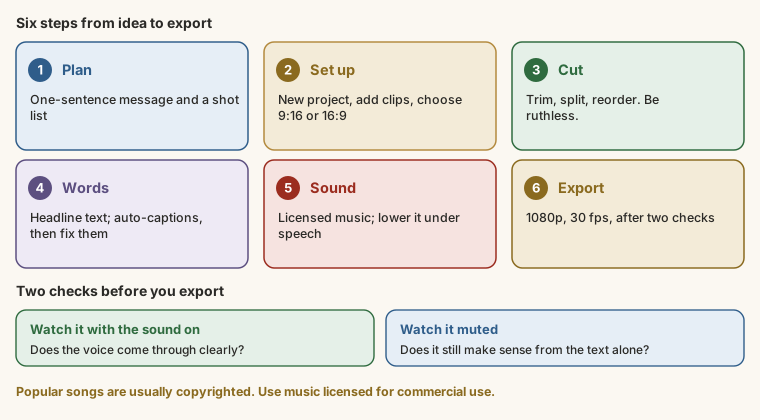
- Watch the whole video twice: once with sound, once muted. Does it still make sense muted?
- Tap Export (often an arrow at the top). Choose 1080p and 30 fps: good quality without a huge file.
- Save it to your phone or computer. Some versions add a CapCut ending clip; you can usually delete it from the timeline before exporting.
Share a link to your video, for this module's last task: post it (Reel, TikTok, Short, status), or upload it to Google Drive and copy a link with "Anyone with the link" access.
Try it
Practice
Which aspect ratio should you choose for an Instagram Reel or TikTok? Type it like 16:9.
Task
3 minCorrect the auto-captions from the lesson. Type all four lines with every mistake fixed.
Your work is checked for
- "jolo off" corrected to jollof
- "Ikea" corrected to Ikeja
- "whats up" corrected to WhatsApp
- No uncorrected mistakes left
- All four lines
Task
8 minWrite the message sentence and shot list for your own 15-30 second video: the message on the first line, then one line per shot starting with its time (e.g. 0-2s:). The first shot must show the result or the hook, not a logo.
Your work is checked for
- A message line first
- At least four timed shots (0-2s: …)
- The first shot starts at 0 seconds
- The opening shot isn't a logo or a greeting
- Ends with an action (order, book, follow, visit, DM…)
Task
2 minFilm and edit your video in CapCut (9:16, cut to the point, headline text, corrected captions, sound, exported in 1080p). Paste a link to it (a post, or Google Drive with link sharing on), and one line on what you cut to make it tighter.
Your work is checked for
- A link to your video
- Says what you cut or tightened
Earn your badge
Take the module check
Questions on this module. Pass and you earn the CapCut Video Essentials badge, free.
Create a free account to earn the badge