Module 7 · Python for Beginners
Loops: for and while
Repeat work without repeating code. for loops over lists, text and range, running totals and counters, enumerate and zip, while loops, break and continue, and a first look at list comprehensions.
About 40 minutes
Open in ColabEvery example as a notebook you can run, edit and save to your Google Drive.
Why loops
Suppose you want to print a grade for each of 40 students. Writing 40 print lines is slow, error-prone and has to change every time the class changes. A loop runs the same code once for each item, however many there are.
Python has two kinds:
| Loop | Repeats | Use when |
|---|---|---|
for | once for each item in a collection | you have a list, a string or a range |
while | as long as a condition is true | you don't know in advance how many times |
for loops
Edit the code and press Run (Ctrl + Enter). Examples on this page share their variables, like cells in a notebook.
Output
Registered: ECO 201
Registered: STA 211
Registered: GST 201
All doneHow to read it:
for course in courses:takes the first item and calls itcourse.- The indented block runs with that value.
- Python takes the next item, and runs the block again, until the list runs out.
- Then it carries on with the first unindented line.
course is a variable name you choose. Pick one that describes a single item: for score in scores, for name in names.
Looping over text
A string is a sequence of characters, so a for loop goes through it one character at a time:
Edit the code and press Run (Ctrl + Enter). Examples on this page share their variables, like cells in a notebook.
Output
L
a
g
o
srange: counting
range() produces a series of numbers, perfect for repeating something a set number of times:
| Write | Gives |
|---|---|
range(5) | 0, 1, 2, 3, 4 |
range(1, 5) | 1, 2, 3, 4 |
range(0, 20, 5) | 0, 5, 10, 15 |
range(10, 0, -2) | 10, 8, 6, 4, 2 |
range always stops before the stop number. The third number is the step.
Edit the code and press Run (Ctrl + Enter). Examples on this page share their variables, like cells in a notebook.
Output
Week 1
Week 2
Week 3
Week 4Building up a result
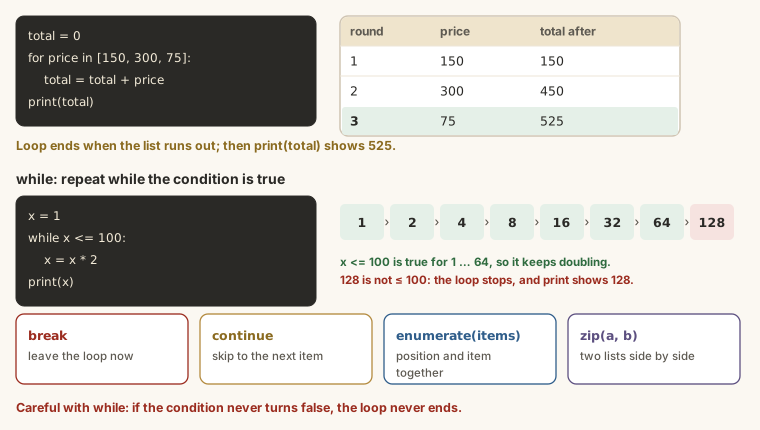
Most useful loops accumulate something: a total, a count or a new list. The pattern is always the same: start with an empty value before the loop, update it inside, use it after.
A running total
Edit the code and press Run (Ctrl + Enter). Examples on this page share their variables, like cells in a notebook.
Output
Total spent: ₦10,500(Python's sum(spending) does this in one step, but the pattern works for anything, not just adding.)
A counter
How many scores are 70 or above? Start at 0 and add 1 each time the condition is true:
Edit the code and press Run (Ctrl + Enter). Examples on this page share their variables, like cells in a notebook.
Output
2 scores are 70 or abovecount += 1 is short for count = count + 1.
Building a new list
Start with an empty list and append to it:
Edit the code and press Run (Ctrl + Enter). Examples on this page share their variables, like cells in a notebook.
Output
[67, 81, 54, 72]Loops with decisions
Put an if inside the loop to treat items differently. The if block is indented one more level:
Edit the code and press Run (Ctrl + Enter). Examples on this page share their variables, like cells in a notebook.
Output
67: B
81: A
54: C
72: A
45: Fenumerate: the position as well as the item
Sometimes you need each item's position too. enumerate() gives both:
Edit the code and press Run (Ctrl + Enter). Examples on this page share their variables, like cells in a notebook.
Output
1. ECO 201
2. STA 211
3. GST 201zip: two lists side by side
zip() pairs up items from two lists, first with first, second with second:
Edit the code and press Run (Ctrl + Enter). Examples on this page share their variables, like cells in a notebook.
Output
ECO 201: 67 (pass)
STA 211: 81 (pass)
GST 201: 54 (pass)while loops
A while loop keeps going as long as its condition is true. Use it when you don't know how many repeats you'll need.
You save ₦4,500 a week towards a ₦40,000 phone. How many weeks?
Edit the code and press Run (Ctrl + Enter). Examples on this page share their variables, like cells in a notebook.
Output
9 weeks: you'll have ₦40,500Each time round, Python checks saved < 40000. While it's true, it runs the block. After week 9, saved is 40,500, the condition is false, and the loop stops.
break and continue
break stops a loop immediately. continue skips the rest of this round and moves on to the next item.
The first score below 50:
Edit the code and press Run (Ctrl + Enter). Examples on this page share their variables, like cells in a notebook.
Output
First fail: 44The loop stops at 44 and never looks at 72 or 45.
Skip blank entries:
Edit the code and press Run (Ctrl + Enter). Examples on this page share their variables, like cells in a notebook.
Output
Hello Adaeze
Hello Musa
Hello TobiLoops inside loops
A loop can contain another loop. The inner one runs completely for each round of the outer one:
Edit the code and press Run (Ctrl + Enter). Examples on this page share their variables, like cells in a notebook.
Output
Mon 1
Mon 2
Mon 3
Tue 1
Tue 2
Tue 3List comprehensions: a loop in one line
Building a new list from an old one is so common that Python has a short form, a list comprehension:
Edit the code and press Run (Ctrl + Enter). Examples on this page share their variables, like cells in a notebook.
Output
[67, 81, 54, 72]
[72, 86, 59, 77, 50]Read [score + 5 for score in scores] as "score + 5, for each score in scores". It does exactly what the append loop does. Use it for simple cases; write the full loop when the logic gets longer.
When it goes wrong
for course in courses
print(course)Output
SyntaxError: expected ':'Missing colon after the for line.
for course in courses:
print(course)Output
IndentationError: expected an indented block after 'for' statement on line 1Missing indentation inside the loop.
total = 0
for amount in [100, 200, 300]:
    total = 0
    total += amount
print(total)Output
300Resetting inside the loop. total = 0 belongs before the loop. Inside, it wipes the total each time, so only the last amount survives.
Summary
| You want to... | Write |
|---|---|
| do something for each item | for item in items: |
| repeat n times | for i in range(n): |
| a running total | total = 0 before, total += x inside |
| a count | count = 0 before, count += 1 inside an if |
| the position too | for i, item in enumerate(items, start=1): |
| two lists together | for a, b in zip(list_a, list_b): |
| repeat until a condition changes | while condition: (and change it inside) |
| stop early / skip one | break / continue |
| a new list in one line | [x * 2 for x in items if x > 0] |
Try it
Use these scores in Colab:
Edit the code and press Run (Ctrl + Enter). Examples on this page share their variables, like cells in a notebook.
Practice
Using a loop and a running total (or sum), what is the average of my_scores? One decimal place.
Practice
Using a loop and a counter, how many scores are 70 or above?
Practice
You save ₦3,000 a week towards ₦25,000. Using a while loop, how many weeks until you reach it?
Task
10 minWrite a program that loops through a list of five scores (yours or my_scores) and prints each score with its grade using if, elif and else, then prints how many are 70 or above. Run it, then paste your code.
Your work is checked for
- A list of scores in square brackets
- A for loop over the list, ending with a colon
- if, elif and else, each ending with a colon
- Lines inside blocks are indented
- A counter that goes up (count += 1 or count = count + 1)
- Compares with == or >= / <=, not a single =
Earn your badge
Take the module check
Questions on this module. Pass and you earn the Python Loops badge, free.
Create a free account to earn the badge