Module 9 · Python for Beginners
Functions and a Mini Project
Write your own functions: parameters and arguments, return versus print, default and keyword arguments, returning several values, scope and docstrings. Then put everything together in a budget tracker for your portfolio.
About 35 minutes
Open in ColabEvery example as a notebook you can run, edit and save to your Google Drive.
What a function is
You've been using functions since the first lesson: print(), len(), round(), sum(). A function is a named block of code that does one job. You can also write your own, so that a calculation you need often is written once and reused:
- Less repetition: fix a bug in one place, not ten.
- Clearer code:
vat(price)says what it does. - Easier testing: check the function on its own.
Defining and calling a function
Edit the code and press Run (Ctrl + Enter). Examples on this page share their variables, like cells in a notebook.
Output
Welcome to CloudTech Academy
Welcome to CloudTech Academydefstarts the definition, followed by the function's name, brackets and a colon.- The indented block is the body: the code that runs when the function is called.
- Defining a function doesn't run it. Calling it,
greet(), does, as many times as you like.
Name functions like variables (lowercase with underscores), ideally with a verb: calculate_vat, print_report.
Parameters and arguments
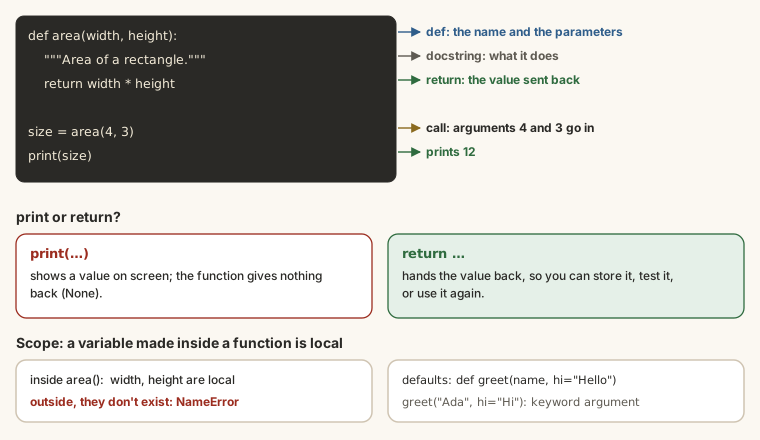
A function becomes useful when you can give it inputs. Parameters are the names in the definition; arguments are the values you pass when you call it:
Edit the code and press Run (Ctrl + Enter). Examples on this page share their variables, like cells in a notebook.
Output
Welcome, Adaeze!
Welcome, Musa!With several parameters, arguments are matched in order:
Edit the code and press Run (Ctrl + Enter). Examples on this page share their variables, like cells in a notebook.
Output
Tobi is in 200 levelreturn: sending a result back
print shows a value on screen. return sends it back to the code that called the function, so it can be stored and used:
Edit the code and press Run (Ctrl + Enter). Examples on this page share their variables, like cells in a notebook.
Output
3000.0
43000.0return also ends the function: any lines after it in the same block don't run. A grading function can return as soon as it knows the answer:
Edit the code and press Run (Ctrl + Enter). Examples on this page share their variables, like cells in a notebook.
Output
A
Fprint or return?
print inside the function | return from the function | |
|---|---|---|
| Shows the value | yes | no (unless you print it) |
| Can you use the value afterwards? | no | yes: store it, add it, compare it |
| Good for | messages to the user | calculations |
Most functions that calculate should return. A function with no return gives back None.
Default values
Give a parameter a default with = in the definition. If the caller leaves it out, the default is used:
Edit the code and press Run (Ctrl + Enter). Examples on this page share their variables, like cells in a notebook.
Output
43000.0
44000.0Parameters with defaults must come after those without.
Keyword arguments
You can name arguments when you call a function, so their order doesn't matter and the call explains itself:
Edit the code and press Run (Ctrl + Enter). Examples on this page share their variables, like cells in a notebook.
Output
22000.0
22000.0Returning several values
Return several values separated by commas, and unpack them into several variables:
Edit the code and press Run (Ctrl + Enter). Examples on this page share their variables, like cells in a notebook.
Output
45 81 63.8(Python packs the values into a tuple and unpacks them for you.)
Scope: variables inside functions
Variables created inside a function exist only inside it. They're local:
Edit the code and press Run (Ctrl + Enter). Examples on this page share their variables, like cells in a notebook.
Output
200Outside, result doesn't exist: print(result) would give a NameError. That's a good thing: functions don't accidentally overwrite each other's variables. Pass values in as arguments and get them out with return.
Docstrings
A docstring is a description in triple quotes on the first line of the body. It tells other people (and you, later) what the function does:
Edit the code and press Run (Ctrl + Enter). Examples on this page share their variables, like cells in a notebook.
Output
₦12,500
Format an amount as naira with thousands separators, e.g. ₦12,500.In Colab, typing naira( also shows the docstring in a pop-up, and help(naira) prints it with the function's details.
Functions that use functions
Functions can call other functions, so you build bigger jobs out of small, tested pieces:
Edit the code and press Run (Ctrl + Enter). Examples on this page share their variables, like cells in a notebook.
Output
₦53,750Mini project: a monthly budget tracker
Put everything together: variables, a dictionary, functions, a loop, maths, f-strings and decisions. Copy this into Colab and run it:
Edit the code and press Run (Ctrl + Enter). Examples on this page share their variables, like cells in a notebook.
Output
Monthly spending
Food          ₦28,000  50.0%
Transport     ₦12,500  22.3%
Data           ₦6,000  10.7%
Books          ₦4,500   8.0%
Other          ₦5,000   8.9%
------------------------------
Total         ₦56,000
You have ₦4,000 left.Read it line by line. You've met every piece in this course: the spending dictionary, the naira function, the loop over .items(), the percentage maths, the aligned f-strings and the final if.
When it goes wrong
def total_cost(price, quantity):
    price * quantity

print(total_cost(500, 4))Output
NoneForgetting return. The function calculated the value, then threw it away. Add return price * quantity.
def greet(name):
    print(f"Hello {name}")

greet()Output
TypeError: greet() missing 1 required positional argument: 'name'Missing an argument. The function needs a name; give it one, or a default (name="friend").
greet("Ada")

def greet(name):
print(f"Hello {name}")Output
NameError: name 'greet' is not definedCalling before defining. Python reads top to bottom, so define functions before you call them (in Colab, run the cell with the def first).
Show it off
Save your notebook, then in Colab choose File → Save a copy in GitHub to put it in a repository (see the Git & GitHub course). It's a small but real project for your portfolio.
Summary
| You want to... | Write |
|---|---|
| define a function | def name(params): + indented body |
| call it | name(args) |
| send back a result | return value |
| an optional input | def f(x, rate=7.5): |
| name the inputs when calling | f(amount=100, months=6) |
| return several values | return a, b then x, y = f() |
| describe it | """Docstring.""" on the first line |
Try it
Run the budget tracker as it is in the lesson, then answer these about its numbers.
Practice
How much money is left from the ₦60,000 budget?
Practice
What percentage of total spending goes on Food? One decimal place.
Task
12 minExtend the tracker with your own month's numbers. Add a function biggest(spending) that returns the item you spend most on, print it, and print a warning for any item over 40% of the total. Run it, then paste your code.
Your work is checked for
- A spending dictionary with at least four items
- A function called biggest
- It returns a value
- It finds the largest item (max with key=, or a loop)
- Loops through items with .items()
- Checks for more than 40%
- Prints a warning
Earn your badge
Take the module check
Questions on this module. Pass and you earn the Python Functions badge, free.
Create a free account to earn the badge