Module 1 · Python for Beginners
First Steps in Python
What programming is, how to run Python in your browser with Google Colab, print, comments, how Python reads your code, and how to read an error message.
About 25 minutes
Open in ColabEvery example as a notebook you can run, edit and save to your Google Drive.
Why Python
A program is a list of instructions for a computer, written in a language it understands. Python is one of the most popular programming languages in the world, and one of the easiest to read: its instructions look close to plain English. It's used for:
- data analysis: cleaning, summarising and charting data (pandas, matplotlib);
- automation: renaming files, sending reports, filling spreadsheets;
- websites and apps: Instagram's servers run Python;
- AI and machine learning: most AI tools are built with it.
If you want a career in data or tech, it's a strong first language, and everything you learn here carries over to other languages.
Open Google Colab
You don't need to install anything. Google Colab runs Python in your browser, for free, on Google's computers.
- Go to colab.research.google.com and sign in with a Google account.
- Click New notebook. It opens with one empty code cell.
- Click Untitled0.ipynb at the top and rename it, for example "Python practice".
A notebook is made of cells:
| Cell | Holds | How to add |
|---|---|---|
| Code cell | Python code you can run | + Code |
| Text cell | notes and headings | + Text |
To run a code cell, click the ▶ button on its left, or press Shift + Enter (run and move to the next cell). The output appears under the cell. The notebook saves to your Google Drive automatically.
Your first line of code
Type this in a code cell and run it:
Edit the code and press Run (Ctrl + Enter). Examples on this page share their variables, like cells in a notebook.
Output
Hello, I'm learning Python!print() is a function: a built-in command that does a job. Its job is to show whatever you put inside the brackets. The text is in quotation marks so Python knows it's text, not code.
You can print several things at once, separated by commas. print puts a space between them:
Edit the code and press Run (Ctrl + Enter). Examples on this page share their variables, like cells in a notebook.
Output
Lagos Abuja Kano
Total: 2500Python can also calculate. Without quotes, 2 + 3 is a sum:
Edit the code and press Run (Ctrl + Enter). Examples on this page share their variables, like cells in a notebook.
Output
5
2 + 3The first line works out the answer; the second prints the text exactly as written. Quotes make the difference.
How Python reads your code
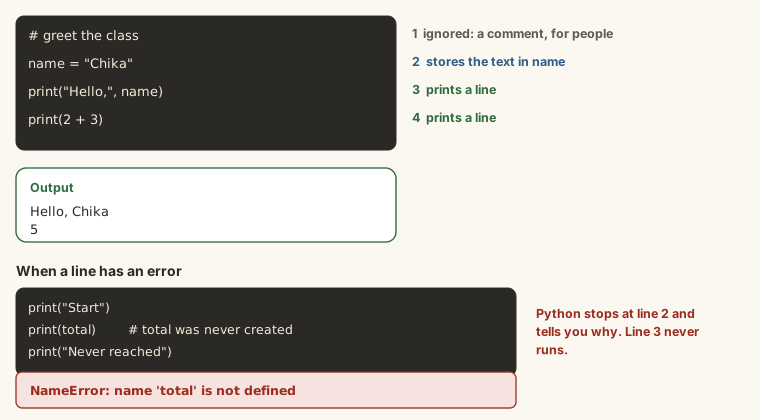
Python runs your code one line at a time, from top to bottom:
Edit the code and press Run (Ctrl + Enter). Examples on this page share their variables, like cells in a notebook.
Output
First
Second
ThirdEach instruction usually goes on its own line. Capitals matter: print works, Print and PRINT don't. And in Python, the spaces at the start of a line mean something (you'll see why in the lesson on conditions), so for now, start every line at the left edge.
Comments
Anything after a # on a line is a comment. Python ignores it; it's a note for people reading your code, including you next month:
Edit the code and press Run (Ctrl + Enter). Examples on this page share their variables, like cells in a notebook.
Output
30800Comments explain why the code does something. You'll also use # to switch a line off while you test, without deleting it.
When it goes wrong
Errors are normal, even for experts. Python's error messages tell you what went wrong if you read the last line first. The three you'll meet most:
print("Hello)Output
SyntaxError: unterminated string literal (detected at line 1)A SyntaxError means Python can't understand the line: here, the closing quotation mark is missing. Look at the line it names, and the one just before it.
print(nmae)Output
NameError: name 'nmae' is not definedA NameError means you used a name Python doesn't know: usually a typo, or a variable whose cell you haven't run yet. (After Colab disconnects or restarts, run your earlier cells again.)
Print("Hello")Output
NameError: name 'Print' is not definedCapitals matter: Python knows print, not Print.
Summary
| You want to... | Write |
|---|---|
| show text | print("Hello") |
| show several values | print("Total:", 2500) |
| calculate | print(2 + 3) |
| add a note | # comment |
| run a cell in Colab | Shift + Enter |
| start again after a disconnect | Runtime → Run all |
Try it
Open your Colab notebook and work through these. Run your code, then type the result here.
Practice
One bus trip costs ₦700. You make 2 trips a day for 22 days in a month. Write the calculation in Python: how much do you spend on transport in the month?
Practice
What does Python give for "5" + "5"? Type exactly what it shows, quotation marks included.
Practice
What type is 4.21? Type the short name Python uses. (Run type(4.21) to find out; the next lesson explains types.)
Task
6 minWrite a short program with at least three print lines: your name, your course, and a calculation (for example your monthly transport cost), with a comment above it explaining what it works out. Run it in Colab, then paste your code here.
Your work is checked for
- At least three print lines
- Text in quotes
- A calculation with an operator
- A comment starting with #
Earn your badge
Take the module check
Questions on this module. Pass and you earn the Python First Steps badge, free.
Create a free account to earn the badge