Module 3 · Power BI Fundamentals
Importing data
Load CSV files into Power BI, choose between Load and Transform Data, and check that what arrived is complete and correctly typed.
About 25 minutes
The problem
Kolanut's data is in three CSV files. Before you can chart anything, they have to come into Power BI whole, with numbers as numbers and dates as dates. A file that loads with the wrong types, or a truncated preview mistaken for the full data, causes problems that surface much later as "wrong" numbers.
The concept
Get data (Home → Get data) connects to hundreds of sources: Excel workbooks, CSV and text files, folders, SQL databases, SharePoint, web pages and online services.
For a CSV, Power BI shows a preview of the first rows with its guess at the delimiter and types, then two buttons:
| Button | Does |
|---|---|
| Load | Loads the data as it is into the model |
| Transform Data | Opens Power Query to clean and shape it first (next lesson) |
Import mode. Loading copies the data into the .pbix file. That makes reports fast. To see new data you Refresh (Home → Refresh), which re-reads the source files.
Storage modes
Import isn't the only way to connect. When you connect to a database, Power BI may ask which mode to use:
| Mode | Where the data lives | Speed | Freshness | Use when |
|---|---|---|---|---|
| Import | Copied into the .pbix | Fastest | As of the last refresh | Almost always, and for every file source |
| DirectQuery | Stays in the database; each visual sends a query | Slower; depends on the database | Live | The data is huge or must be up to the minute |
| Live connection | An existing published model | Fast | As that model | Your company already has a shared model |
This course uses Import throughout.
Common sources
| Source | Get data option | Notes |
|---|---|---|
| CSV or text file | Text/CSV | Check the delimiter and the File Origin (encoding) for ₦ signs |
| Excel workbook | Excel workbook | The Navigator lists each sheet and each Table; choose Tables where you can |
| Many files of the same layout | Folder | Combines every file in a folder: drop next month's file in and refresh |
| SQL Server, PostgreSQL, MySQL | Database | You can paste a SQL query instead of loading whole tables |
| SharePoint or OneDrive | SharePoint folder | Lets the Service refresh without a gateway (lesson 13) |
| A web page table | Web | Handy for public data such as exchange rates |
Data types in Power BI
Every column has one type, shown by an icon in the Data pane and in Power Query:
| Type | Power Query icon | For | Kolanut column |
|---|---|---|---|
| Whole number | 123 | Counts, IDs | quantity, customer_id |
| Decimal number / Fixed decimal | 1.2 / $ | Amounts | revenue |
| Date | calendar | Dates without times | order_date |
| Text | ABC | Names, categories, codes | region |
| True/False | ✓✗ | Yes/no flags |
Fixed decimal is stored to four decimal places, which avoids tiny rounding errors in money. Get types right before loading: a date stored as text can't be used by the date table, and a number stored as text can't be summed.
Check what arrived, every time:
- Row counts: in Table view the row count for the selected table appears at the bottom-left of the window. Compare it with the source.
- Types: each column's type shows in Table view under Column tools → Data type. Numbers should be Whole number or Decimal number, dates should be Date.
- Obvious oddities: blanks where you expect values, dates in the wrong century, IDs shown as decimals.
Example
Kolanut's files, once loaded:
| Table | Rows | Key columns |
|---|---|---|
orders | 4,266 | order_id, order_date (Date), customer_id, product_id, quantity, unit_price, discount_pct |
customers | 90 | customer_id, customer_name, channel, region, city, sales_rep, joined_date, credit_limit |
products | 16 | product_id, product_name, category, list_price |
Walkthrough
Open
kolanut-sales.pbixfrom the last lesson.Home → Get data. The full list of sources opens:
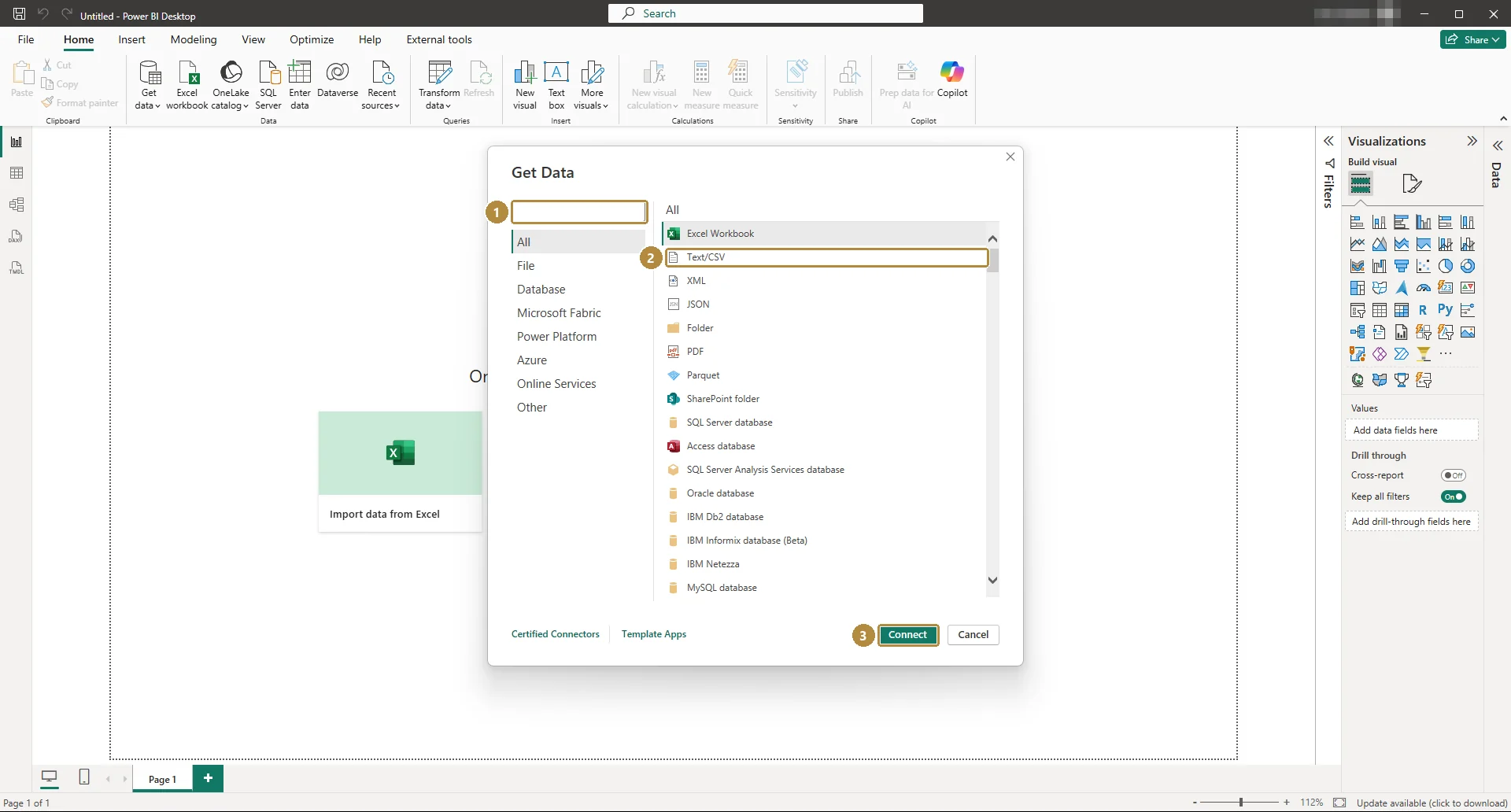
Get Data. Type in the search box (1) to find a connector quickly.TapClick the image to see it full size. Choose Text/CSV (2), then Connect (3), and pick
orders.csv.Power BI shows a preview:
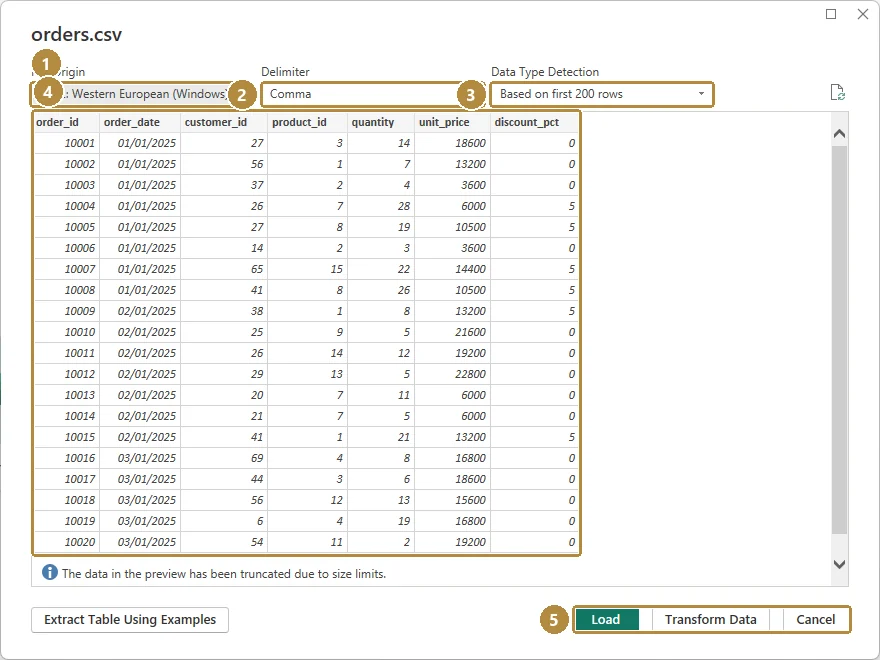
The CSV preview: encoding (1), delimiter (2), type detection (3), a sample of rows (4), and Load or Transform Data (5).TapClick the image to see it full size. Check the delimiter is Comma and the columns look right. Click Load.
Repeat for
customers.csvandproducts.csv.Switch to Table view. Select each table in the Data pane and read the row count at the bottom of the window:
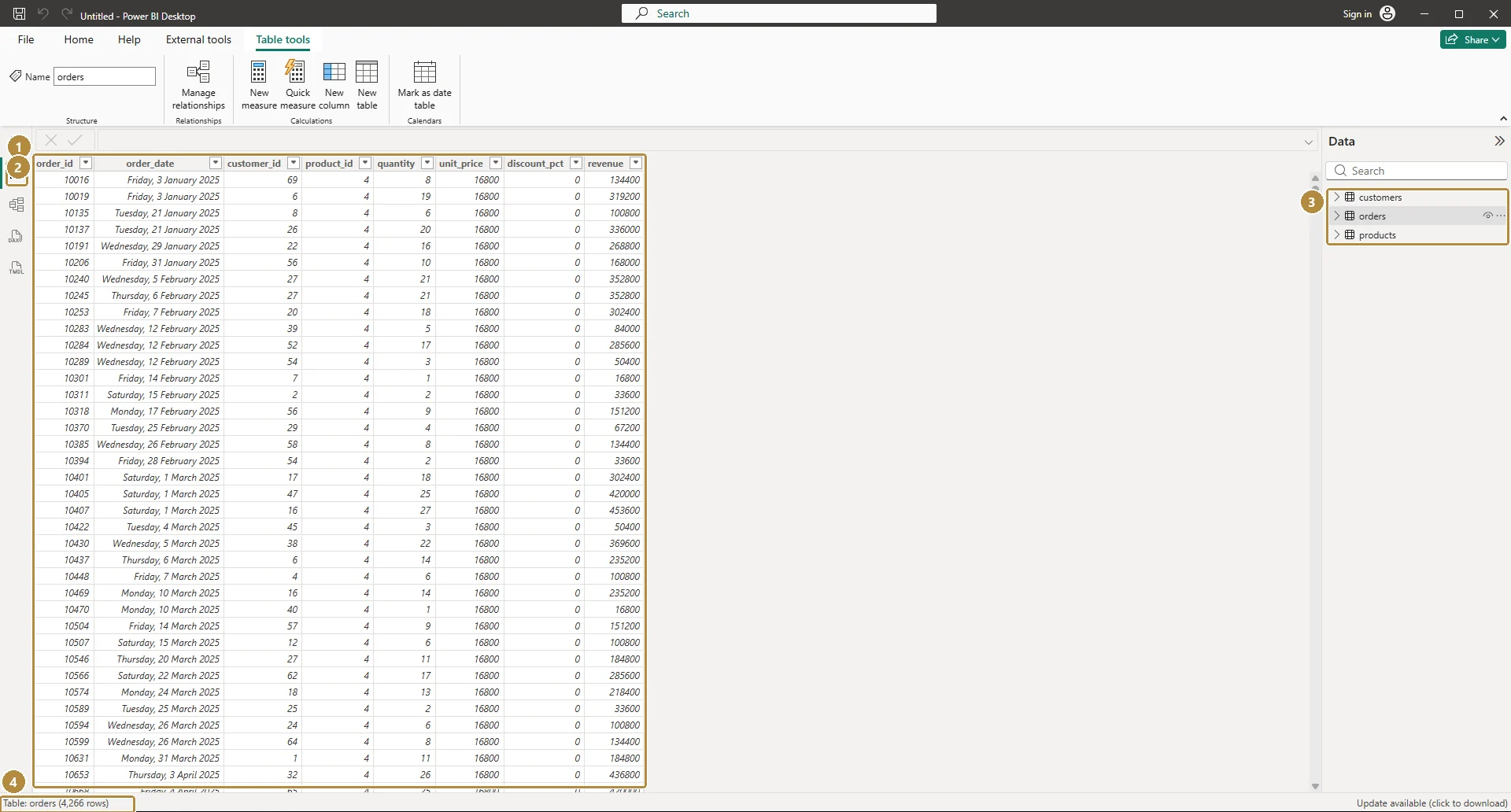
Table view (1): the rows of the selected table (2), the tables in the model (3), and the row count (4): 4,266 for orders.TapClick the image to see it full size. Click the
order_datecolumn and check Column tools → Data type says Date.Save.
Practice
Practice
After loading, how many rows does the orders table have in Power BI?
Practice
How many different customers placed an order in June 2026? Build a Card visual with customer_id from orders, set to Count (Distinct), and filter order_date to June 2026.
More practice
Optional drills. They don't count towards the certificate, but they're the fastest way to make this lesson stick. Several use a different dataset from the lesson on purpose: if you can do the same thing on unfamiliar data, you've really learned it.
Drill · optional
Load the HR dataset's attendance.csv into Power BI. How many rows does the attendance table have?
Drill · optional
Load the legal dataset's hearings.csv. How many different matters have at least one hearing?
Check your understanding
Answer every question to check.