Module 9 · Power BI Fundamentals
Measures with CALCULATE and time intelligence
Change the filters with CALCULATE: fixed segments, shares of the total with REMOVEFILTERS and ALLSELECTED, and time intelligence for year to date and year on year.
About 20 minutes
The problem
The managing director wants three numbers on every page: revenue this year to date, growth versus the same period last year, and each category's share of revenue. None of these is a plain sum. Each needs a measure that changes the filters before calculating.
The concept
In the last lesson, every measure accepted the filter context it was given: a Lagos cell got Lagos revenue. Many business questions need something different: Lagos revenue next to every region, each category against the total, this year against last year. For those, the measure has to change the filters before it calculates. That's what CALCULATE does, and it's the most important function in DAX.
CALCULATE
DAX
CALCULATE ( <expression>, <filter1>, <filter2>, … )| Argument | Meaning |
|---|---|
expression | Usually a measure: what to calculate |
filter1, filter2, … | Changes to the filter context, applied before the expression runs |
CALCULATE takes the cell's filter context, applies your changes, then evaluates the expression in the new context.
Adding or replacing a filter
DAX
Revenue Wholesale = CALCULATE ( [Revenue], customers[channel] = "Wholesale" )Across all dates, this gives ₦580,264,905. Put it in a table by region and each row shows that region's wholesale revenue: the row's region filter stays, and CALCULATE adds the channel filter.
Put it in a table by channel, and every row shows ₦580,264,905, even the Kiosk row. A filter argument on a column replaces any existing filter on that same column. That's often exactly what you want (a fixed benchmark beside each row), but it surprises people the first time.
Several filters are combined with AND:
DAX
Revenue Lagos Beverages =
CALCULATE ( [Revenue], customers[region] = "Lagos", products[category] = "Beverages" )That's ₦116,162,310, across all dates.
Removing filters: REMOVEFILTERS and ALL
To compare each row with a total, remove a filter instead of adding one:
DAX
Revenue All Categories = CALCULATE ( [Revenue], REMOVEFILTERS ( products[category] ) )

% of Revenue = DIVIDE ( [Revenue], [Revenue All Categories] )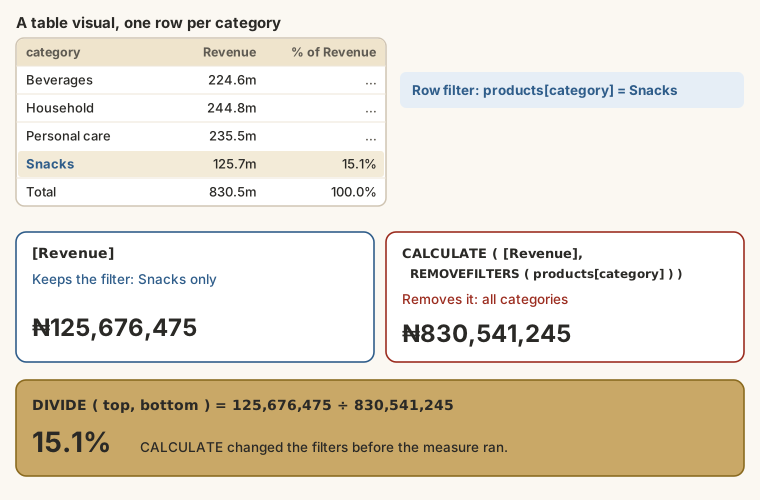
In each row, Revenue is that category's revenue, and Revenue All Categories is the grand total, so the ratio is the category's share. Format % of Revenue as a percentage.
| Function | Removes |
|---|---|
REMOVEFILTERS ( products[category] ) | Filters on one column |
REMOVEFILTERS ( products ) | Filters on every column of a table |
REMOVEFILTERS () | Every filter in the model |
ALL ( … ) | The same as REMOVEFILTERS when used inside CALCULATE; also returns a table, so you'll see it in older formulas |
ALLSELECTED ( … ) | Filters from inside the visual, but keeps the user's slicer choices |
Time intelligence
DAX has functions that shift and stretch the date filter. They need the marked date table from lesson 7.
| Function | Returns | Used for |
|---|---|---|
TOTALYTD ( <expr>, 'Date'[Date] ) | The expression from 1 January to the last date in context | Year to date |
DATESYTD ( 'Date'[Date] ) | The dates from 1 January to the last date in context | Inside CALCULATE: the same as TOTALYTD |
SAMEPERIODLASTYEAR ( 'Date'[Date] ) | The dates in context, moved back one year | Last year's figure |
DATEADD ( 'Date'[Date], -1, MONTH ) | The dates moved by any number of days, months, quarters or years | Previous month, previous quarter |
DATESINPERIOD ( 'Date'[Date], <end>, -3, MONTH ) | A window of dates ending on a date | Rolling three months |
The three measures you'll use most:
DAX
Revenue YTD = TOTALYTD ( [Revenue], 'Date'[Date] )

Revenue LY = CALCULATE ( [Revenue], SAMEPERIODLASTYEAR ( 'Date'[Date] ) )

YoY % = DIVIDE ( [Revenue] - [Revenue LY], [Revenue LY] )TOTALYTDadds everything from 1 January up to the latest date in the current filter. At September 2025 it shows ₦379,011,165: January to September.SAMEPERIODLASTYEARshifts the dates in the filter back one year. In the cell for March 2026, it gives March 2025.YoY %compares them. It's blank when there's no previous year, thanks toDIVIDE.
Common measure patterns
| Question | Pattern |
|---|---|
| One segment, whatever the visual shows | CALCULATE ( [Revenue], customers[channel] = "Wholesale" ) |
| Share of the total | DIVIDE ( [Revenue], CALCULATE ( [Revenue], REMOVEFILTERS ( … ) ) ) |
| Year to date | TOTALYTD ( [Revenue], 'Date'[Date] ) |
| Same period last year | CALCULATE ( [Revenue], SAMEPERIODLASTYEAR ( 'Date'[Date] ) ) |
| Growth | DIVIDE ( [Revenue] - [Revenue LY], [Revenue LY] ) |
| Previous month | CALCULATE ( [Revenue], DATEADD ( 'Date'[Date], -1, MONTH ) ) |
When a measure gives a surprising number
- Ask what's filtered. Put the measure in a table with the fields from the visual, one at a time, and watch it change.
- Check the total row. A different total than you expected usually means a filter is being removed or replaced.
- Test with a Card. A Card with no other fields shows the measure in the widest context: compare it with a number you know (₦830,541,245 for all revenue).
- Break it into variables and return each one in turn to see which part is wrong.
Example
A matrix with Date[Year] and Date[Month] in Rows:
| Month | Revenue | Revenue LY | YoY % |
|---|---|---|---|
| 2026 Jan | 48,963,925 | 37,088,460 | 32.0% |
| 2026 Feb | 43,042,730 | 36,138,690 | 19.1% |
| 2026 Mar | 51,202,475 | 46,282,170 | 10.6% |
Check the first row by hand: (48,963,925 − 37,088,460) ÷ 37,088,460 = 0.320, so 32.0%.
At month level, Revenue YTD keeps adding: it shows January alone in January, January and February in February, and so on.
Walkthrough
- In
_Measures, addRevenue All Categoriesand% of Revenue. Build a table:products[category],[Revenue],[% of Revenue]. The percentages should add up to 100%. - Add a slicer on
products[category]and pick two categories. The shares no longer add to 100%: each is a share of all four categories. ChangeREMOVEFILTERStoALLSELECTEDand they add to 100% again. Decide which one your report needs. - Add
Revenue YTD,Revenue LYandYoY %. Format YoY % as a percentage with one decimal place. - Build a matrix with
Date[Year]→Date[Month]in Rows and the three measures in Values. - Check one number by hand: February 2026's YoY % should equal (43.04 − 36.14) ÷ 36.14.
- Add a Card for
Revenue YTDand a slicer onDate[Month]: selecting March 2026 shows year-to-date March. - Add
Revenue Wholesaleto a table by channel and see the "replace" behaviour for yourself.
Summary
| Need | Use |
|---|---|
| Change filters, then calculate | CALCULATE ( expression, filters… ) |
| A fixed segment | A filter argument: customers[channel] = "Wholesale" |
| A total to compare with | REMOVEFILTERS ( … ), or ALLSELECTED ( … ) to respect slicers |
| Year to date | TOTALYTD |
| Last year | SAMEPERIODLASTYEAR inside CALCULATE |
| Any shift in time | DATEADD |
| A surprising number | Ask what's filtered; test in a table and a Card |
Practice
Practice
What share of total revenue (all dates) comes from Beverages? One decimal place.
Practice
What is Revenue YTD at the end of March 2026? (A rounded figure is fine.)
Challenge
Challenge · optional
What is YoY % for Q1 2026 against Q1 2025, to one decimal place?
More practice
Optional drills. They don't count towards the certificate, but they're the fastest way to make this lesson stick. Several use a different dataset from the lesson on purpose: if you can do the same thing on unfamiliar data, you've really learned it.
Drill · optional
Write a measure for the share of revenue from the Lagos region using CALCULATE and DIVIDE. What is it across all dates? One decimal place.
Drill · optional
In the HR data, write an Absence Rate measure: Absent records ÷ all attendance records. What is it? One decimal place.
Check your understanding
Answer every question to check.