Module 8 · Data Analytics Foundations
Business intelligence
Analytics versus BI, the pipeline from source systems to dashboards, a single source of truth, dashboard design, and self-service with governance.
About 15 minutes
The problem
Every Monday, Kolanut's sales manager asks for the same numbers: last week's revenue, revenue by region, overdue customers. Every Monday an analyst spends two hours rebuilding the same spreadsheet. The numbers are useful; the process is wasteful, and each rebuild risks a new mistake.
Business intelligence (BI) fixes this: build the analysis once, connect it to the data, and let it refresh.
The concept
Analytics and BI
The words overlap, but a useful distinction:
| Analytics | Business intelligence | |
|---|---|---|
| Question | Often new: why did North West fall? | The same ones, repeatedly: how is each region doing this week? |
| Output | A one-off analysis, a recommendation | Dashboards and reports that refresh themselves |
| Built for | One decision | Many people, every week |
| Typical tools | Spreadsheets, SQL, Python | Power BI, Tableau, Looker Studio |
Good analysis often becomes BI. Once you know North West matters, you put it on the dashboard so nobody has to ask again.
The BI pipeline
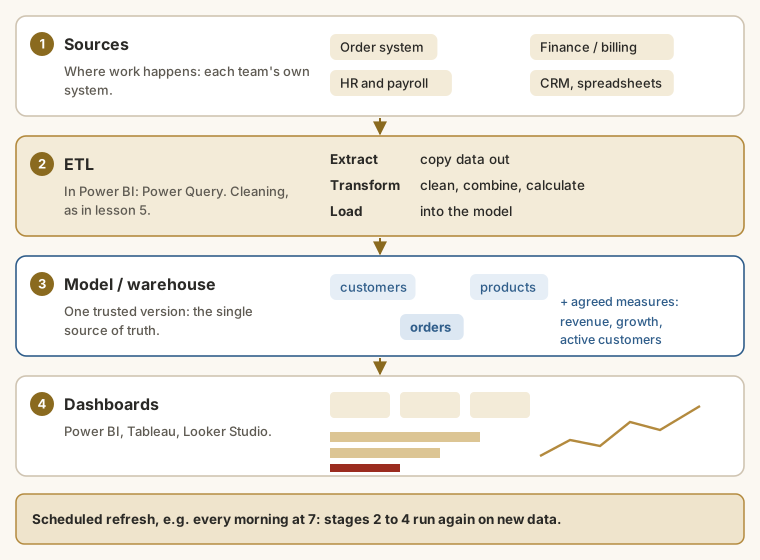
- Sources: the systems where work happens: the order system, billing, HR, CRM, and the odd spreadsheet.
- ETL (extract, transform, load): copying data out, cleaning it and shaping it. In Power BI this is Power Query. Every cleaning step from lesson 5 becomes an automated step that runs on each refresh.
- Model / warehouse: clean tables with relationships (lesson 4) and agreed calculations: a single source of truth. A large company keeps this in a data warehouse, a database built for analysis; a small one may keep it inside the BI file itself.
- Dashboards and reports: the views people look at, refreshed on a schedule.
A single source of truth
Without BI, every team builds its own spreadsheet, and their numbers disagree. Sales says revenue was ₦48m (before discounts), finance says ₦46m (after discounts and returns), and the meeting is spent arguing about whose number is right.
A single source of truth means one place where each KPI is calculated, one way, from one set of cleaned data. Everyone's dashboard reads from it, so everyone sees the same number. The definitions from lesson 2 (name, formula, inclusions, source) are written into the model once.
Dashboards and reports
| Dashboard | Report | |
|---|---|---|
| Purpose | Monitor: "are we OK?" | Explore and explain: "why?" |
| Size | One screen | Several pages |
| Content | A few KPIs, a trend, an exception list | Detail, breakdowns, tables |
| Used | Daily or weekly, in seconds | When a question comes up |
Most BI tools produce both, and a good dashboard links through to the report for detail.
Designing a dashboard
- Start from the decisions. Who opens this, and what will they do differently because of it?
- Top-left is read first. Put the headline KPIs there.
- Every number needs a comparison: against last year, last month or target. "₦290.7m" means little; "₦290.7m, up 19% on last year" means something.
- Use the chart rules from lesson 7. Lines for trends, sorted bars for comparisons, one highlight colour.
- End with an action list: the customers to call, the invoices to chase.
- Leave things out. Four KPIs and three visuals beat twenty tiles nobody reads.
Self-service and governance
Modern BI tools let business users build their own reports from the shared model: self-service BI. It's powerful, but it needs governance:
- Certified data: the official model is marked as trusted, so people build on it rather than on private copies.
- Access: each person sees the data they're allowed to; a regional manager might see only their region. In Power BI this is called row-level security.
- Ownership: each dashboard and each KPI has an owner who answers questions about it.
Common BI tools
| Tool | Notes |
|---|---|
| Microsoft Power BI | Widely used in Nigerian companies, because many already pay for Microsoft 365. Covered in its own course here. |
| Tableau | Strong on visual exploration; popular in larger companies. |
| Google Looker Studio | Free, browser-based, works well with Google Sheets. |
| Qlik | Common in some industries, such as manufacturing and banking. |
The ideas in this lesson apply to all of them; the menus differ.
Example
A sensible first dashboard for Kolanut's sales manager:
| Area | Visual | Why |
|---|---|---|
| Top row | 4 KPI cards: revenue this month, vs same month last year, active customers, average order line | Answers "are we OK?" in two seconds |
| Middle | Line chart of monthly revenue, this year vs last | Shows the trend and season |
| Middle | Bar chart of revenue by region, sorted, with growth % | Shows where to look |
| Bottom | Table of customers whose orders dropped most vs last quarter | Tells reps who to call |
| Side | Filters (slicers) for region, channel, product category | Lets each manager see their own area |
Four KPIs, three visuals, one action list. The discipline is leaving things out.
Note the leading indicator in the bottom table: a customer ordering less often is an early warning, before revenue falls. That's exactly what happened in the North West, and a list like this would have flagged those shops while there was still time to act.
Walkthrough
When a law firm like Ashgrove Chambers builds BI for its partners, it follows the same steps:
- Agree the KPIs with the partners: open matters, hearings adjourned, invoices overdue, collection rate.
- Define each one precisely. Collection rate = paid invoices ÷ all invoices issued × 100, counted by number of invoices. That choice matters: counted by value instead, Ashgrove's rate is 81.5%, because paid invoices are larger on average than unpaid ones. Both are reasonable; what's not reasonable is two partners using different ones.
- Connect the sources: the matter management system and the billing system.
- Check the numbers against a manual calculation before anyone relies on the dashboard.
- Schedule the refresh, for example every morning at 7.
- Name an owner for each KPI, who answers when someone asks "why did this change?"
Step 4 is the one people skip. A dashboard that is wrong once loses trust for months.
Summary
| Term | Meaning |
|---|---|
| BI | Building analysis once, so it refreshes and many people can use it |
| ETL | Extract, transform, load: the automated cleaning stage |
| Data warehouse / model | Clean, related tables with agreed measures |
| Single source of truth | One place, one definition for each KPI |
| Dashboard / report | Monitor at a glance / explore in detail |
| Governance | Certified data, access rules and owners |
Practice
Practice
Check a KPI before it goes on the dashboard. Using invoices.csv, what is Ashgrove Chambers' collection rate by number of invoices (invoices with status Paid ÷ all invoices × 100), to one decimal place?
Practice
How many of Ashgrove Chambers' invoices are Overdue?
More practice
Optional drills. They don't count towards the certificate, but they're the fastest way to make this lesson stick. Several use a different dataset from the lesson on purpose: if you can do the same thing on unfamiliar data, you've really learned it.
Drill · optional
An HR dashboard KPI: attendance rate = Present records ÷ all records in attendance.csv. What is it? One decimal place.
Check your understanding
Answer every question to check.