Module 5 · Data Analytics Foundations
Data cleaning
The six sides of data quality, profiling before you fix, mapping tables, missing values and outliers, and a safe, logged cleaning plan.
About 20 minutes
The problem
Kolanut is moving to a new system, and IT has exported the customer list from the old one. Open it and something is off straight away: some names are in capitals, some have spaces before them, Lagos is written four different ways, and a few customers appear twice.
If you counted customers in this file, you'd get the wrong number. If you totalled sales by region, "Lagos" and "LAGOS" would appear as two different regions. Data cleaning is fixing problems like these before you analyse.
The concept
Data cleaning means finding and fixing the problems in a dataset that would make your analysis wrong. It's not glamorous, and it's often most of the work. A beautiful chart built on dirty data is a confident wrong answer.
What "good data" means
Data quality has several sides. It helps to name them, because each is checked differently:
| Dimension | Question | Kolanut example of a problem |
|---|---|---|
| Accuracy | Are the values true? | A credit limit typed as ₦20,500,000 instead of ₦2,050,000 |
| Completeness | Is anything missing? | 3 customers with a blank credit limit |
| Consistency | Is the same thing written the same way? | Lagos, LAGOS, lagos, Lagos |
| Validity | Does each value fit the rules? | A date that isn't a date; a negative quantity |
| Uniqueness | Is each thing recorded once? | 12 customers listed twice |
| Timeliness | Is it up to date? | A customer list exported six months ago |
The common problems
| Problem | Example | What it breaks |
|---|---|---|
| Duplicates | The same customer listed twice | Counts and totals come out too high |
| Inconsistent labels | Lagos, LAGOS, lagos, Lagos | Groups split into several |
| Extra spaces | " Ada Superstore" | Matching and lookups fail silently |
| Mixed formats | 2023-07-11, 11/07/2023, 11-Jul-2023 | Dates sort and group wrongly |
| Numbers stored as text | "₦1,200,000" | Sums return 0 or an error |
| Missing values | A blank credit limit | Averages and totals change meaning |
| Outliers | A quantity of 10,000 when most are under 40 | Averages are dragged up; could be a typo |
Step 1: profile before you fix
Profiling means measuring the problems before changing anything. For Kolanut's raw customer export of 102 rows:
| Check | Finding |
|---|---|
| Rows | 102 |
| Different customer names, after trimming and ignoring capitals | 90, so 12 rows are duplicates |
| Names with spaces at the start or end | 42 |
| Different spellings in the Region column | 23, for 6 real regions |
| Date formats in Date Joined | 3: 2023-07-11 (49 rows), 22/10/2023 (28), 15-May-2024 (25) |
Credit limits containing ₦ | 15 |
| Blank credit limits | 3 |
Profiling tells you how big each problem is, which ones matter most, and gives you numbers to check against afterwards. When you've finished, run the same checks again: duplicates 0, region spellings 6, blanks still 3 (unless you found the real values).
Standardising categories
The Region column is a classic consistency problem. Twenty-three spellings, six regions:
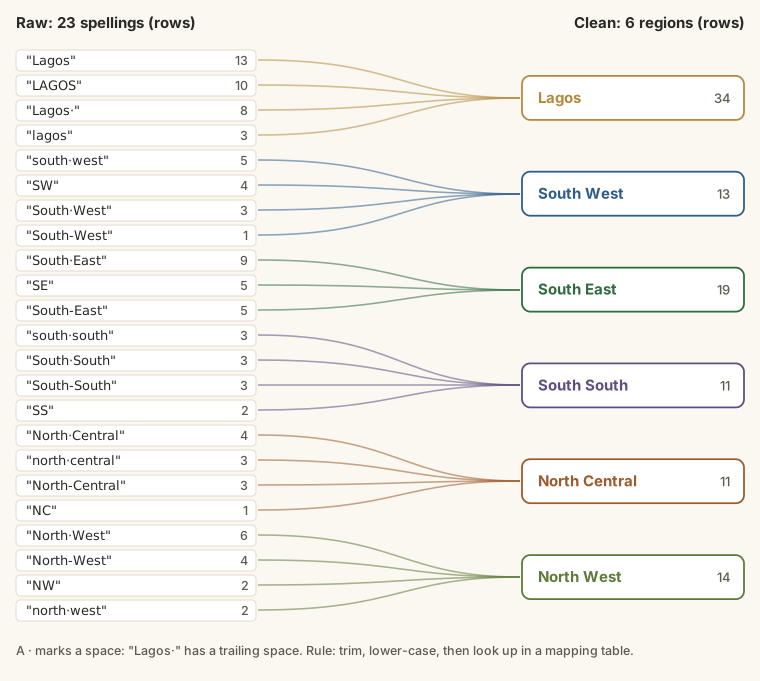
The reliable way to fix this is a mapping table: a two-column list of every raw spelling and the clean value it should become. Clean the raw value a little first (remove spaces, make it lower case), then look it up. Any value not in the table is flagged, so nothing slips through, and adding a new spelling is one new row.
Missing values
A blank is not the same as zero. A blank credit limit means "we don't know"; a zero would mean "this customer gets no credit". Treating one as the other changes your totals and averages.
| Option | When to use it | Risk |
|---|---|---|
| Leave it blank and say so | Usually the best default | Some calculations skip blanks; say how many |
| Mark it "Unknown" | Categories, such as a missing region | None, if it's visible in reports |
| Find the real value | When someone can look it up | Takes time, but it's the right answer |
| Fill with an estimate (average, median) | Rarely, and only for modelling | Invents data; always disclose it |
| Remove the row | When the row is useless without it | You may remove a pattern along with it |
Whatever you choose, write it down and report how many values it affected.
Outliers
An outlier is a value far from the rest. It can be:
- an error: a quantity of 3,000 typed instead of 30;
- real and important: a genuinely huge order from a new wholesaler.
Don't delete outliers automatically. Check the largest and smallest values in each number column first. Kolanut's quantities run from 1 to 30 packs, so a 3,000 would stand out at once. Then decide case by case, and if you exclude one, report the result with and without it.
Rules for cleaning safely
- Never edit the original. Keep the raw file untouched; work on a copy.
- Profile first. Count the problems before fixing them.
- Fix in a sensible order. Trim and standardise text before removing duplicates, or near-duplicates will survive.
- Keep a cleaning log. Write down each change: what, why, how many rows. Anyone can then repeat or question your work.
- Don't guess silently. If a value is missing, decide on a rule and state it.
- Fix the cause when you can. If the old system allowed free-typed regions, the new one should use a drop-down list.
A cleaning log can be as simple as this:
| Step | Change | Rows affected |
|---|---|---|
| 1 | Trimmed spaces from Customer Name | 42 |
| 2 | Mapped 23 region spellings to 6 regions | 102 |
| 3 | Read all dates as day first | 102 |
| 4 | Removed ₦, commas and .00 from Credit Limit | 99 |
| 5 | Removed duplicate customers (kept the copy with a credit limit) | 12 |
| 6 | Left 2 customers' credit limits blank; flagged to finance | 2 |
Example
Four rows from the raw export:
| Customer Name | Region | Date Joined | Credit Limit |
|---|---|---|---|
kayode distributors | LAGOS | 22/10/2023 | ₦2,050,000 |
ADA SUPERSTORE | Lagos | 2023-07-11 | 1,200,000 |
Hajia Amina Superstore | north central | 21/04/2023 | 850000 |
peace mart | South-West | 01/09/2022 | 1500000 |
After cleaning:
| Customer Name | Region | Date Joined | Credit Limit |
|---|---|---|---|
| Kayode Distributors | Lagos | 2023-10-22 | 2050000 |
| Ada Superstore | Lagos | 2023-07-11 | 1200000 |
| Hajia Amina Superstore | North Central | 2023-04-21 | 850000 |
| Peace Mart | South West | 2022-09-01 | 1500000 |
Look at 01/09/2022. Is that 1 September or 9 January? Nigeria writes day first, so it's 1 September 2022, but a spreadsheet set to US format would read it as 9 January. Mixed date formats are one of the most dangerous cleaning problems, because the wrong answer still looks like a date. Writing the clean dates as 2022-09-01 (year-month-day) removes the doubt for everyone who reads them later.
Walkthrough
A cleaning plan for this file, in the order you'd do it:
- Save a copy of the raw file and work only on the copy.
- Profile it: count rows, distinct names, region spellings, blanks. Write the numbers down.
- Trim spaces and fix capitals in names (spreadsheets have
TRIMandPROPERfunctions for this; the Excel course shows them). - Standardise regions to six agreed spellings: Lagos, South West, South East, South South, North Central, North West.
SW,South-Westandsouth westall becomeSouth West. - Remove duplicates after steps 3 and 4. Before trimming,
ADA SUPERSTOREandAda Superstorelook different, so duplicate removal would miss them. - Convert dates to one format, reading each as day/month/year.
- Turn money into numbers: remove
₦, commas and.00. - Profile again and compare with step 2: 90 customers, 6 regions.
- Log what you changed and how many rows it affected.
Summary
| Term | Meaning |
|---|---|
| Data quality | Accuracy, completeness, consistency, validity, uniqueness, timeliness |
| Profiling | Measuring the problems before fixing them |
| Mapping table | Raw value → clean value, for standardising categories |
| Missing value | Unknown, not zero: decide a rule and state it |
| Outlier | A value far from the rest: check it, don't just delete it |
| Cleaning log | What you changed, why, and how many rows |
Practice
Practice
How many data rows does the raw export customer_list_raw.csv contain (not counting the header)?
Practice
After trimming spaces, ignoring differences in capital letters, and removing duplicate customer names, how many different customers are in the list?
More practice
Optional drills. They don't count towards the certificate, but they're the fastest way to make this lesson stick. Several use a different dataset from the lesson on purpose: if you can do the same thing on unfamiliar data, you've really learned it.
Drill · optional
In customer_list_raw.csv, how many rows have a Customer Name with extra spaces at the start or end?
Check your understanding
Answer every question to check.