Module 3 · Data Analytics Foundations
Types of data
Structured and unstructured data, numbers and categories, what you can calculate with each type, identifiers, dates, and the grain of a table.
About 15 minutes
The problem
You open Kolanut's orders.csv for the first time. Some columns hold numbers you can add up (quantity). Some hold numbers you must never add up (customer_id). Some hold dates. Before you calculate anything, you need to know what kind of data each column is, and what a single row stands for.
The concept
Before you calculate anything, you need to know two things about a table: what kind of data each column holds, and what one row stands for. Get either wrong and the numbers you produce will look fine and be wrong.
Structured, semi-structured and unstructured
| Kind | What it looks like | Examples | How it's analysed |
|---|---|---|---|
| Structured | Rows and columns, each column with a fixed meaning | Orders, invoices, attendance records, CSV files | Spreadsheets, SQL, BI tools |
| Semi-structured | Labelled fields, but not a fixed grid | JSON from a website or app, system logs | Flattened into tables first, often with Python |
| Unstructured | No fixed layout at all | Emails, WhatsApp messages, scanned contracts, photos, call recordings | Text analysis, AI models, or reading by people |
Most business analysis works on structured data, and so does this course. But much of a company's knowledge sits in unstructured data: the reason a customer left is in an email, not a column.
Quantitative and qualitative
Quantitative data is numbers that measure an amount. Qualitative (or categorical) data puts things into groups.
| Type | What it is | Examples |
|---|---|---|
| Quantitative, discrete | Counts: whole numbers | Packs ordered, number of staff, number of visits |
| Quantitative, continuous | Measurements: can take any value in a range | Weight in kg, revenue in naira, hours worked |
| Qualitative, nominal | Categories with no order | Region, product category, payment method |
| Qualitative, ordinal | Categories with a natural order | Job level (Junior < Mid < Senior), rating (Poor, Fair, Good) |
What you can do with each type
The type decides which calculations make sense. This table is worth remembering:
| Type | Count it | Put it in order | Add or subtract | Average it | Kolanut example |
|---|---|---|---|---|---|
| Nominal category | ✓ | ✗ | ✗ | ✗ | Region: "how many Lagos customers?" |
| Ordinal category | ✓ | ✓ | ✗ | ✗ | Job level: "how many are Mid or above?" |
| Discrete count | ✓ | ✓ | ✓ | ✓ | Quantity: "total packs" |
| Continuous amount | ✓ | ✓ | ✓ | ✓ | Revenue: "average line value" |
| Date | ✓ | ✓ | Subtract only | (rarely) | Days between hire and exit |
| Identifier | ✓ | ✗ | ✗ | ✗ | Count distinct customers |
So you can say "34 Lagos customers" but never "the average region"; "Senior is above Mid" but not "Senior minus Junior equals Mid".
Identifiers: numbers that aren't numbers
customer_id 42 is not "twice" customer 21. An identifier is a label that happens to use digits. Adding or averaging IDs gives a meaningless number, though a spreadsheet will happily calculate it.
What you can do with an identifier:
- Count them: how many order lines?
- Count distinct values: how many different customers ordered?
- Use them to link tables: find customer 27 in
customers.csv(next lesson).
Phone numbers, account numbers, postcodes and staff numbers are identifiers too. Store them as text, so a leading zero survives: 08089165939 as a number becomes 8089165939.
Dates and times
Dates deserve their own type, because they let you:
- group by day, month, quarter or year;
- measure time between events, such as days from order to delivery or hire to exit;
- compare periods, such as January to June this year against last year.
A spreadsheet stores a date as a number of days, which is why subtraction works. But a date stored as text can't be grouped or subtracted, and a date read in the wrong format (month-first instead of day-first) is silently wrong. You'll fix both in lesson 5.
Grain: what one row represents
The grain of a table is the answer to "one row = one what?".
| File | One row is | Rows |
|---|---|---|
orders.csv | one product on one order (an order line) | 4,266 |
customers.csv | one customer | 90 |
products.csv | one product | 16 |
Getting the grain wrong causes real errors. Each order line has its own order_id, and a shop that buys three products on the same day appears as three rows. So "how many orders?" depends on what you mean:
| Question | Answer from Kolanut's data |
|---|---|
| How many order lines? (count rows) | 4,266 |
| How many shop visits? (distinct customer and date pairs) | 3,982 |
| How many visits bought more than one product? | 263 |
Neither 4,266 nor 3,982 is "wrong"; they answer different questions. The mistake is reporting one while the reader thinks it's the other. Say which you counted.
Example
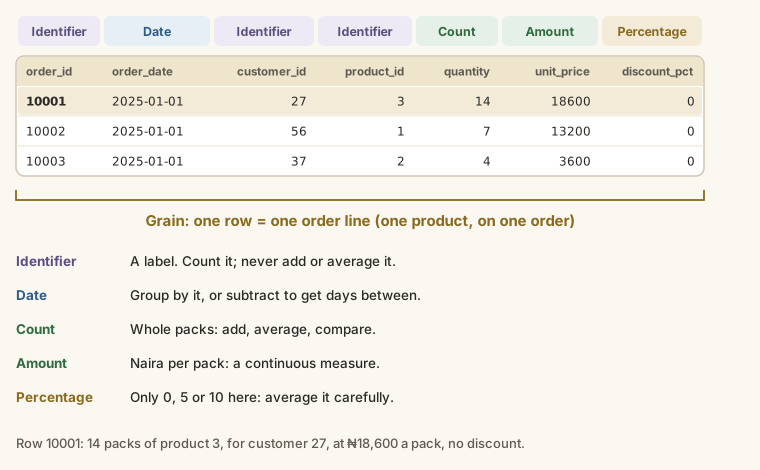
The first rows of orders.csv:
| order_id | order_date | customer_id | product_id | quantity | unit_price | discount_pct |
|---|---|---|---|---|---|---|
| 10001 | 2025-01-01 | 27 | 3 | 14 | 18600 | 0 |
| 10002 | 2025-01-01 | 56 | 1 | 7 | 13200 | 0 |
| 10003 | 2025-01-01 | 37 | 2 | 4 | 3600 | 0 |
order_id,customer_id,product_id: identifiers (labels, not quantities).order_date: a date.quantity: quantitative, discrete.unit_price: quantitative, continuous: the price actually charged for one unit (one pack).discount_pct: quantitative, the percentage taken off this line: 0, 5 or 10.
Reading the first row: order line 10001 was 14 packs of product 3 at ₦18,600 a pack, with no discount.
And customers.csv:
| Column | Type |
|---|---|
customer_id | Identifier (the key) |
customer_name, city | Text labels |
channel (Kiosk, Supermarket, Wholesale), region | Nominal categories |
sales_rep | Nominal category |
joined_date | Date |
credit_limit | Continuous amount (naira) |
Walkthrough
Open orders.csv in Google Sheets (File → Import → Upload) or Excel (File → Open).
- Look at the header row. Each column name tells you what the column holds.
- Press Ctrl + ↓ (Cmd + ↓ on a Mac) in column A to jump to the last row. The row number tells you how many rows there are. Remember that row 1 is the header: 4,267 − 1 = 4,266 rows.
- For each column, decide: identifier, number, category or date? Write it down, as in the tables above.
- Check numbers are numbers: they sit on the right of the cell. Text sits on the left.
- Ask the grain question and write the sentence: "Each row is one order line."
- Do the same for
customers.csvandproducts.csv.
Summary
| Term | Meaning |
|---|---|
| Structured / unstructured | Fits in rows and columns / doesn't |
| Discrete / continuous | Counts / measurements |
| Nominal / ordinal | Categories without / with an order |
| Identifier | A label made of digits: count it, never add it |
| Grain | What one row stands for |
Practice
Practice
How many order lines (data rows, not counting the header) are in orders.csv?
Practice
How many different products does Kolanut sell? (Look in products.csv.)
More practice
Optional drills. They don't count towards the certificate, but they're the fastest way to make this lesson stick. Several use a different dataset from the lesson on purpose: if you can do the same thing on unfamiliar data, you've really learned it.
Drill · optional
How many columns does the HR employees.csv have?
Drill · optional
How many leave requests (data rows) are in the HR leave.csv?
Check your understanding
Answer every question to check.