Module 11 · SQL for Data Analysis
CASE statements
Turn data into categories with CASE: bands, custom sort orders, counting and summing with SUM(CASE ...), percentages and date arithmetic, step by step.
About 30 minutes
The problem
Operations wants to know how reliable Harbourline really is:
"For each transport mode, how many deliveries arrived on time, and how many were late?"
The database stores dates, not a column that says "late". You need to create that label from the data: a delivery is late when it took longer than the route's target.
The concept
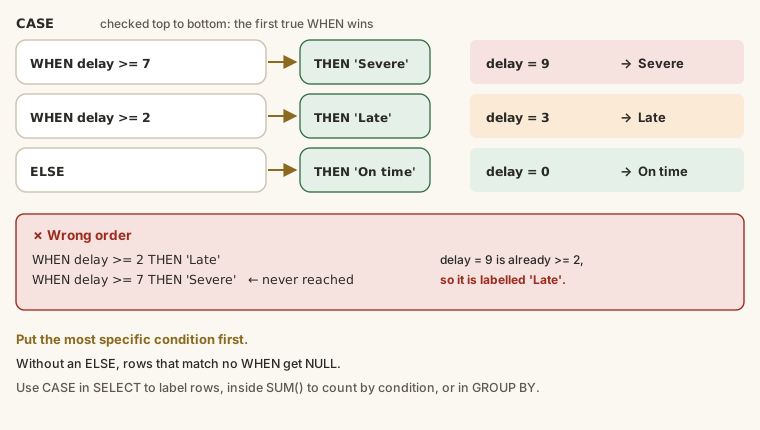
CASE lets a query make decisions. It checks conditions in order and returns a different value depending on which is true, much like IF in Excel. Use it to turn raw data into the categories people actually talk about: "large", "late", "high value", "this year".
The syntax
SQL
CASE
  WHEN condition_1 THEN result_1
  WHEN condition_2 THEN result_2
  ELSE result_otherwise
END- The conditions are checked from top to bottom, and the first true one wins. The rest are ignored.
ELSEis what you get if nothing matched. Without anELSE, the result isNULL.- Every
CASEfinishes withEND. Forgetting it is the commonestCASEerror. - A
CASEis an expression: it produces one value per row, so it can go anywhere a value can, inSELECT,WHERE,GROUP BY,ORDER BYor inside an aggregate.
Labelling rows in SELECT
Size bands for shipments:
SELECT
  shipment_id,
  containers,
  CASE
    WHEN containers >= 6 THEN 'Large'
    WHEN containers >= 3 THEN 'Medium'
    ELSE 'Small'
  END AS size_band
FROM shipments
LIMIT 20;
Follow a 4-container shipment through: containers >= 6 is false, so the database tries the next line; containers >= 3 is true, so the answer is 'Medium' and checking stops.
Why the order of WHEN lines matters
Swap the two conditions and see what goes wrong:
SELECT
  containers,
  CASE
    WHEN containers >= 3 THEN 'Medium'
    WHEN containers >= 6 THEN 'Large'
    ELSE 'Small'
  END AS size_band
FROM shipments
WHERE containers >= 6
LIMIT 5;
Every large shipment is now called 'Medium', because 8 is also >= 3, and that line comes first. When bands overlap, put the most specific condition first.
The simple form
When every condition compares one column to a fixed value, there's a shorter form:
SELECT DISTINCT
  mode,
  CASE mode
    WHEN 'Air'  THEN 'Fast, expensive'
    WHEN 'Road' THEN 'Regional'
    WHEN 'Sea'  THEN 'Slow, cheap per tonne'
  END AS description
FROM routes;
CASE mode WHEN 'Air' ... means CASE WHEN mode = 'Air' .... The simple form can only test for equality; for anything else (>=, LIKE, IS NULL, several columns), use the full form.
Counting with CASE: SUM(CASE ...)
This pattern is one of the most useful in SQL. A CASE that returns 1 or 0 turns a condition into a number, and SUM adds up the 1s, which counts the rows that meet the condition:
SELECT
  COUNT(*)                                          AS shipments,
  SUM(CASE WHEN status = 'Delivered' THEN 1 ELSE 0 END) AS delivered,
  SUM(CASE WHEN status = 'Cancelled' THEN 1 ELSE 0 END) AS cancelled
FROM shipments;
Combined with GROUP BY, you get several counts per group in one query, side by side, like a pivot table:
SELECT
  strftime('%Y', booking_date)                          AS year,
  SUM(CASE WHEN containers >= 6 THEN 1 ELSE 0 END)      AS large,
  SUM(CASE WHEN containers BETWEEN 3 AND 5 THEN 1 ELSE 0 END) AS medium,
  SUM(CASE WHEN containers <= 2 THEN 1 ELSE 0 END)      AS small
FROM shipments
GROUP BY year;
Percentages
Divide a conditional count by the total. Multiply by 100.0 (with the .0) to avoid whole-number division:
SELECT
  ROUND(100.0 * SUM(CASE WHEN status = 'Cancelled' THEN 1 ELSE 0 END) / COUNT(*), 1) AS cancelled_pct
FROM shipments;
Summing amounts with CASE
CASE can return an amount instead of 1, so SUM adds up only the matching values. Revenue by year, as columns:
SELECT
  SUM(CASE WHEN booking_date < '2026-01-01' THEN freight_charge ELSE 0 END)  AS revenue_2025,
  SUM(CASE WHEN booking_date >= '2026-01-01' THEN freight_charge ELSE 0 END) AS revenue_2026
FROM shipments
WHERE status <> 'Cancelled';
Grouping by a CASE
Group by the label itself to count each band:
SELECT
  CASE
    WHEN containers >= 6 THEN 'Large'
    WHEN containers >= 3 THEN 'Medium'
    ELSE 'Small'
  END AS size_band,
  COUNT(*) AS shipments
FROM shipments
GROUP BY size_band;
1,892 small, 511 medium and 280 large shipments. (SQLite lets you group by the alias; in some databases you repeat the CASE in GROUP BY.)
A custom sort order
Alphabetical isn't always useful. Statuses make more sense in the order a shipment moves through them. CASE turns each status into a number to sort by:
SELECT status, COUNT(*) AS shipments
FROM shipments
GROUP BY status
ORDER BY CASE status
  WHEN 'Booked'     THEN 1
  WHEN 'In transit' THEN 2
  WHEN 'Delivered'  THEN 3
  WHEN 'Cancelled'  THEN 4
END;
Handling missing values
CASE is a clear way to replace NULL with something readable:
SELECT
  company_name,
  CASE
    WHEN account_manager_id IS NULL THEN 'Unassigned'
    ELSE 'Assigned'
  END AS manager_status
FROM customers
ORDER BY manager_status DESC
LIMIT 10;
For the plain "use this value if it's missing" case there's a shortcut, COALESCE(column, fallback), which returns the first value that isn't NULL. You'll use it in the CTEs lesson.
Keep the results one type
Every THEN and the ELSE should return the same kind of value: all text, or all numbers. Mixing them (THEN 'Late' ELSE 0) works in SQLite but fails in most databases, and confuses anyone using the result.
Date arithmetic for "late"
Kemi's question needs the number of days between two dates. julianday() turns a date into a day number, so subtracting two gives the days between:
SELECT
  shipment_id,
  ship_date,
  delivery_date,
  julianday(delivery_date) - julianday(ship_date) AS days_in_transit
FROM shipments
WHERE status = 'Delivered'
LIMIT 5;Example
Kemi's question: for each mode, how many deliveries arrived on time and how many were late, and what share was on time?
SELECT
  r.mode,
  COUNT(*) AS delivered,
  SUM(CASE WHEN julianday(s.delivery_date) - julianday(s.ship_date) <= r.target_transit_days THEN 1 ELSE 0 END) AS on_time,
  SUM(CASE WHEN julianday(s.delivery_date) - julianday(s.ship_date) >  r.target_transit_days THEN 1 ELSE 0 END) AS late,
  ROUND(100.0 * SUM(CASE WHEN julianday(s.delivery_date) - julianday(s.ship_date) <= r.target_transit_days THEN 1 ELSE 0 END) / COUNT(*), 1) AS on_time_pct
FROM shipments AS s
JOIN routes AS r ON r.route_id = s.route_id
WHERE s.status = 'Delivered'
GROUP BY r.mode;Walkthrough
- The join brings each delivered shipment together with its route's
target_transit_days. - For every shipment,
julianday(delivery_date) - julianday(ship_date)gives the days it actually took. - The first
CASEreturns 1 if that's within the target, otherwise 0.SUMcounts the 1s: the on-time deliveries. - The second does the same for late ones. Together they add up to
delivered. - The last column divides on-time by the total and rounds: about three-quarters on time for every mode.
Common mistakes
| Mistake | What happens | Fix |
|---|---|---|
Forgetting END | A syntax error | Every CASE ends with END |
Broad conditions first (>= 3 before >= 6) | Everything lands in the first band | Most specific first |
No ELSE | Unmatched rows become NULL | Add an ELSE |
COUNT(CASE WHEN ... THEN 1 ELSE 0 END) | Counts every row, because 0 isn't NULL | Use SUM, or drop the ELSE 0 |
100 * count / total | Whole-number division: 0 or 100 | 100.0 * count / total |
| Mixing text and numbers in the results | Errors in most databases | Return one type |
Summary
| You want... | Write |
|---|---|
| a label from a condition | CASE WHEN cond THEN 'A' ELSE 'B' END AS label |
| a label from fixed values | CASE col WHEN 'x' THEN 'X' ... END |
| to count rows that match | SUM(CASE WHEN cond THEN 1 ELSE 0 END) |
| a percentage | ROUND(100.0 * SUM(CASE ...) / COUNT(*), 1) |
| a total of matching amounts | SUM(CASE WHEN cond THEN amount ELSE 0 END) |
| a custom sort order | ORDER BY CASE col WHEN 'a' THEN 1 ... END |
Practice
Practice
Show shipment_id, freight_charge and a column named price_band: 'High' when freight_charge is 10,000,000 or more, 'Standard' otherwise. Only include shipments booked on '2026-06-01'.
Ctrl + Enter to run. Tab indents; press Esc then Tab to leave the editor.
Challenge
Challenge · optional
For each size band (Large: 6+ containers, Medium: 3–5, Small: 1–2), count the shipments. Show size_band and shipments.
Ctrl + Enter to run. Tab indents; press Esc then Tab to leave the editor.
More practice
Optional drills on the same skills. They don't count towards the certificate, but each one is a small, realistic request from someone at Harbourline. Do as many as you need until the pattern feels automatic.
Drill · optional
For every route, show origin, destination and a column distance_band: 'Long haul' when target_transit_days is 20 or more, 'Regional' when it's 5 to 19, 'Local' otherwise.
Ctrl + Enter to run. Tab indents; press Esc then Tab to leave the editor.
Drill · optional
Count customers by region: 'Nigeria' for Nigerian customers and 'Rest of West Africa' for everyone else. Show region and customers.
Ctrl + Enter to run. Tab indents; press Esc then Tab to leave the editor.
Drill · optional
In one row, count shipments that were Delivered as delivered and shipments that were Cancelled as cancelled. Use SUM with CASE.
Ctrl + Enter to run. Tab indents; press Esc then Tab to leave the editor.
Check your understanding
Answer every question to check.