Module 12 · SQL for Data Analysis
Subqueries
Use the result of one query inside another: single values, lists with IN, the NOT IN trap, EXISTS, correlated subqueries and tables in FROM, step by step.
About 30 minutes
The problem
Finance wants to review unusually expensive bookings:
"Show me every shipment that cost more than our average shipment."
To answer it, you need the average first, and then the shipments above it. You could run two queries and copy the number across by hand. But next month the average changes, and your copied number is wrong.
The concept
A subquery is a query inside another query, written in brackets. The inner query works something out, and the outer query uses the answer. It lets one query do what would otherwise take two, with the number always up to date.
Three kinds of answer, three places to use them
| The subquery returns... | Called | Use it... | Example |
|---|---|---|---|
| one value | a scalar subquery | anywhere a single value fits: WHERE, SELECT | > (SELECT AVG(x) FROM t) |
| one column of values | a list | with IN or NOT IN | IN (SELECT id FROM t) |
| a whole table | a derived table | in FROM, with an alias | FROM (SELECT ...) AS t |
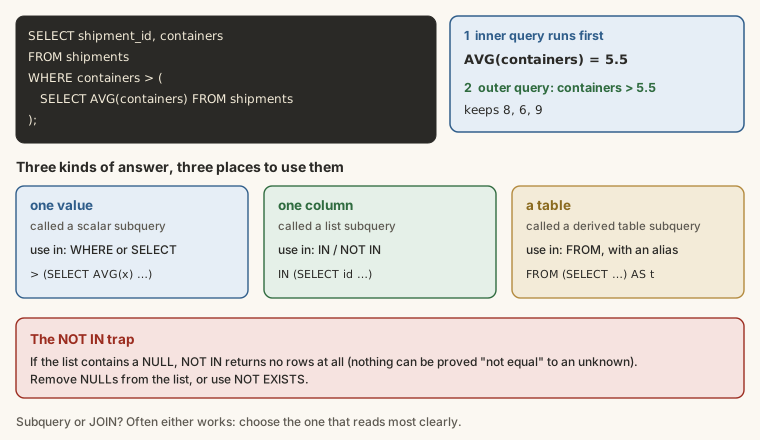
A single value in WHERE
The average shipment charge is one number:
SELECT ROUND(AVG(freight_charge)) AS average_charge
FROM shipments;
Put that query in brackets inside WHERE, and the outer query keeps the shipments above it:
SELECT shipment_id, booking_date, freight_charge
FROM shipments
WHERE freight_charge > (SELECT AVG(freight_charge) FROM shipments)
ORDER BY freight_charge DESC;
The inner query runs first and returns about ₦7.16 million; the outer query keeps the 1,034 shipments above it. Next month the average changes, and the query still gives the right answer, with nothing copied by hand.
A scalar subquery must return exactly one value. If it could return several rows, the database stops with an error (or, in SQLite, silently uses the first one).
A single value in SELECT
A scalar subquery in SELECT puts the same value on every row, which is handy for comparisons:
SELECT
  shipment_id,
  freight_charge,
  (SELECT ROUND(AVG(freight_charge)) FROM shipments)                  AS average_charge,
  freight_charge - (SELECT ROUND(AVG(freight_charge)) FROM shipments) AS above_average
FROM shipments
ORDER BY above_average DESC
LIMIT 10;
A list with IN
A subquery that returns one column works with IN. Shipments for pharmaceutical customers, without a join:
SELECT shipment_id, booking_date, containers
FROM shipments
WHERE customer_id IN (
  SELECT customer_id
  FROM customers
  WHERE industry = 'Pharmaceuticals'
);
The inner query lists the IDs of pharmaceutical customers; the outer query keeps shipments whose customer_id is in that list. 294 of them.
NOT IN, and the NULL trap
NOT IN keeps rows whose value is not in the list. Customers who have never shipped:
SELECT company_name
FROM customers
WHERE customer_id NOT IN (SELECT customer_id FROM shipments);
Fifteen, the same as the LEFT JOIN method in the JOINs lesson. But NOT IN has a dangerous trap. Which employees don't manage anyone? Their ID never appears as anyone's manager_id:
SELECT full_name
FROM employees
WHERE employee_id NOT IN (SELECT manager_id FROM employees);
No rows at all, although most employees manage nobody. The reason: the two people at the top have no manager, so the list contains a NULL. NOT IN checks "not equal to any value in the list", and nothing can be proved "not equal" to an unknown, so every row fails. Remove the NULLs and you get the real answer:
SELECT full_name
FROM employees
WHERE employee_id NOT IN (
  SELECT manager_id FROM employees WHERE manager_id IS NOT NULL
);
22 employees. Whenever you use NOT IN with a subquery, either filter out NULLs or use NOT EXISTS, which doesn't have the problem.
EXISTS and NOT EXISTS
EXISTS (subquery) is true if the subquery returns any row at all. It's usually written with a condition that links back to the outer row:
SELECT c.company_name
FROM customers AS c
WHERE NOT EXISTS (
  SELECT 1
  FROM shipments AS s
  WHERE s.customer_id = c.customer_id
);
For each customer, the inner query looks for any shipment with that customer's ID. NOT EXISTS keeps the customers for whom it finds none. SELECT 1 is a convention: EXISTS only cares whether a row exists, not what's in it.
Customers who shipped something in August 2026:
SELECT c.company_name
FROM customers AS c
WHERE EXISTS (
  SELECT 1
  FROM shipments AS s
  WHERE s.customer_id = c.customer_id
    AND s.booking_date >= '2026-08-01'
);
Correlated subqueries
The EXISTS examples are correlated: the inner query refers to the outer row (c.customer_id), so it's worked out again for each row. A correlated subquery can also return a value. Shipments that cost more than the average on their own route:
SELECT s.shipment_id, s.route_id, s.freight_charge
FROM shipments AS s
WHERE s.freight_charge > (
  SELECT AVG(s2.freight_charge)
  FROM shipments AS s2
  WHERE s2.route_id = s.route_id
)
ORDER BY s.route_id, s.freight_charge DESC;
The inner query uses a second alias, s2, for the same table, and s2.route_id = s.route_id ties it to the current outer row. That's fairer than comparing against the company-wide average: a sea shipment from Shanghai is always dearer than a lorry to Ibadan.
Correlated subqueries are powerful but can be slow on big tables, because the inner query runs once per outer row. Window functions (lesson 14) do the same job faster.
A table in FROM
A subquery in FROM returns a whole result that the outer query treats as a table. It must have an alias. This answers a question that needs two levels of summary, the average number of shipments per customer:
SELECT ROUND(AVG(shipment_count), 1) AS avg_shipments_per_customer
FROM (
  SELECT customer_id, COUNT(*) AS shipment_count
  FROM shipments
  GROUP BY customer_id
) AS per_customer;- The inner query gives one row per customer, with their count.
- The outer query averages those counts: 25.6 shipments per customer who has shipped.
You can't write AVG(COUNT(*)) directly; nesting aggregates needs a subquery like this.
Subquery or JOIN?
Many questions can be answered either way. IN (subquery) and a join give the same shipments for pharmaceutical customers. Choose the one that reads most clearly:
- If you only filter by the other table,
INorEXISTSoften reads better. - If you need to show columns from the other table, you need a join.
- For "which have none?",
NOT EXISTSandLEFT JOIN ... IS NULLare both safe;NOT INneeds care.
Example
Finance's request: every shipment that cost more than the average shipment.
SELECT shipment_id, booking_date, freight_charge
FROM shipments
WHERE freight_charge > (SELECT AVG(freight_charge) FROM shipments)
ORDER BY freight_charge DESC;Walkthrough
- The database runs the subquery first:
SELECT AVG(freight_charge) FROM shipmentsreturns one number. - The outer query compares each shipment's charge with it and keeps the higher ones.
ORDER BYputs the most expensive first.
Because the average is worked out every time the query runs, the report is always correct. No number is copied, and nothing goes stale.
Common mistakes
| Mistake | What happens | Fix |
|---|---|---|
| A scalar subquery that returns several rows | An error, or an arbitrary value in SQLite | Make sure it returns one value |
NOT IN with a NULL in the list | No rows at all, and no error | Filter out NULLs, or use NOT EXISTS |
A subquery in FROM with no alias | An error in most databases | Add AS name |
Writing AVG(COUNT(*)) | An error: aggregates can't be nested | Count in a subquery, average outside |
| A correlated subquery on a huge table | Slow | Use a join, a CTE or a window function |
Summary
| You want... | Write |
|---|---|
| rows above an overall figure | WHERE x > (SELECT AVG(x) FROM t) |
| the overall figure on every row | SELECT ..., (SELECT AVG(x) FROM t) AS avg |
| rows whose key is in another list | WHERE id IN (SELECT id FROM t2 WHERE ...) |
| rows with no match elsewhere | WHERE NOT EXISTS (SELECT 1 FROM t2 WHERE t2.id = t.id) |
| a comparison within each group | a correlated subquery on the same table |
| a summary of a summary | SELECT AVG(n) FROM (SELECT ... COUNT(*) AS n ...) AS t |
Practice
Practice
Show shipment_id and weight_kg for every shipment heavier than the average shipment.
Ctrl + Enter to run. Tab indents; press Esc then Tab to leave the editor.
Challenge
Challenge · optional
List the company_name of customers who booked at least one Air shipment. Each company once. (Air is a mode in routes.)
Ctrl + Enter to run. Tab indents; press Esc then Tab to leave the editor.
More practice
Optional drills on the same skills. They don't count towards the certificate, but each one is a small, realistic request from someone at Harbourline. Do as many as you need until the pattern feels automatic.
Drill · optional
Show the company_name of every customer who has booked at least one shipment with 8 containers. Use IN with a subquery.
Ctrl + Enter to run. Tab indents; press Esc then Tab to leave the editor.
Drill · optional
Show payment_id and amount for every payment larger than the average payment.
Ctrl + Enter to run. Tab indents; press Esc then Tab to leave the editor.
Drill · optional
Which routes carried no shipments booked in August 2026 (from '2026-08-01')? Show route_id, origin and destination. Use NOT IN.
Ctrl + Enter to run. Tab indents; press Esc then Tab to leave the editor.
Check your understanding
Answer every question to check.