Module 13 · SQL for Data Analysis
CTEs
Break complex questions into named steps with WITH: several and reused steps, checking as you build, COALESCE and recursive CTEs for calendars, step by step.
About 25 minutes
The problem
The finance director asks for something that sounds simple:
"How much does each customer still owe us?"
What a customer owes is what we charged for delivered shipments, minus what they've paid. Charges live in shipments; payments live in payments, and one shipment can have several payments. Getting this right takes several steps, and doing it in one tangled query is how analysts end up with wrong numbers.
The concept
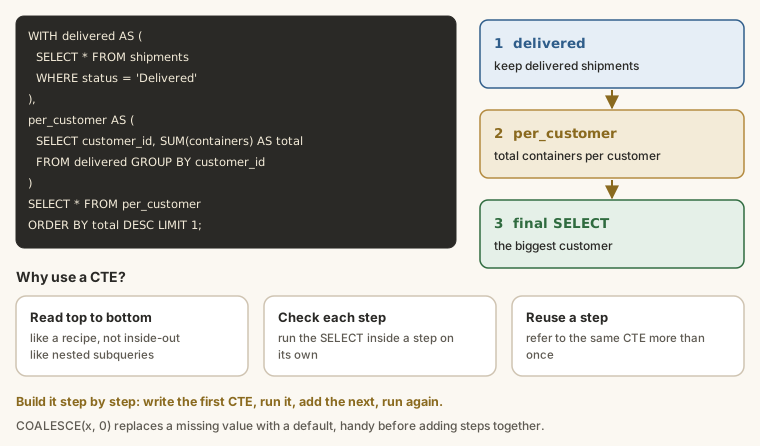
A CTE (common table expression) is a named, temporary result that you define at the top of a query with WITH, then use as if it were a table. It does the same job as a subquery in FROM, but you read it top to bottom, one step at a time, like a recipe. For anything with more than one step, that makes queries far easier to write, read and check.
The syntax
SQL
WITH step_name AS (
  SELECT ...
)
SELECT ...
FROM step_name;WITHstarts the query.step_nameis the name you give the result.- The query inside the brackets defines it.
- The main query after the brackets uses it like a table.
A CTE only exists while the query runs. Nothing is saved in the database.
A subquery, rewritten as a CTE
The average number of shipments per customer, from the subqueries lesson:
SELECT ROUND(AVG(shipment_count), 1) AS avg_shipments_per_customer
FROM (
  SELECT customer_id, COUNT(*) AS shipment_count
  FROM shipments
  GROUP BY customer_id
) AS per_customer;
The same thing as a CTE:
WITH per_customer AS (
  SELECT customer_id, COUNT(*) AS shipment_count
  FROM shipments
  GROUP BY customer_id
)
SELECT ROUND(AVG(shipment_count), 1) AS avg_shipments_per_customer
FROM per_customer;
Same answer. But now the first step is written first, has a name, and the main query reads like a sentence: "the average shipment count from per_customer".
Several steps
Separate CTEs with commas, and write WITH only once. A later CTE can use an earlier one:
SQL
WITH step_one AS (
  SELECT ...
),
step_two AS (
  SELECT ... FROM step_one ...
)
SELECT ... FROM step_two;Customers who shipped more than average, by name:
WITH per_customer AS (
  SELECT customer_id, COUNT(*) AS shipment_count
  FROM shipments
  GROUP BY customer_id
),
average AS (
  SELECT AVG(shipment_count) AS avg_count
  FROM per_customer
)
SELECT c.company_name, pc.shipment_count
FROM per_customer AS pc
JOIN customers AS c ON c.customer_id = pc.customer_id
WHERE pc.shipment_count > (SELECT avg_count FROM average)
ORDER BY pc.shipment_count DESC;per_customer: one row per customer with their count.average: one row, the average of those counts. It uses the step above.- The main query joins the counts to customer names and keeps those above average.
Reusing a step
A CTE can be used more than once in the same query. Each customer's shipments as a share of the busiest customer's:
WITH per_customer AS (
  SELECT customer_id, COUNT(*) AS shipments
  FROM shipments
  GROUP BY customer_id
)
SELECT
  customer_id,
  shipments,
  ROUND(100.0 * shipments / (SELECT MAX(shipments) FROM per_customer), 1) AS pct_of_busiest
FROM per_customer
ORDER BY shipments DESC
LIMIT 10;
per_customer is used twice: as the main table, and inside the subquery that finds the maximum. With subqueries in FROM, you'd have to write the counting query out twice.
Building and checking step by step
The real strength of CTEs is that you can check each step on its own. Build a CTE, look at it, then add the next:
WITH charged AS (
  SELECT customer_id, SUM(freight_charge) AS total_charged
  FROM shipments
  WHERE status = 'Delivered'
  GROUP BY customer_id
)
SELECT * FROM charged
LIMIT 5;
When that looks right, add the next step and change the final SELECT. When a number looks wrong at the end, you can point the final SELECT at any step and see where it went wrong.
COALESCE: replacing missing values
When you LEFT JOIN two summaries, rows with no match get NULL, and any arithmetic with NULL gives NULL: 1000 - NULL is NULL, not 1000. COALESCE(value, fallback) returns the first argument that isn't NULL:
SELECT
  COALESCE(NULL, 0)       AS a,
  COALESCE(250, 0)        AS b,
  1000 - NULL             AS without_coalesce,
  1000 - COALESCE(NULL, 0) AS with_coalesce;
You'll need it in the example below.
Recursive CTEs: generating rows
A CTE can refer to itself, which lets it generate rows. The commonest use is a calendar: a row for every month, even months with no data. Customer 75's bookings, month by month, have gaps:
SELECT strftime('%Y-%m', booking_date) AS month, COUNT(*) AS shipments
FROM shipments
WHERE customer_id = 75
GROUP BY month;
A report should show zero for the missing months, not skip them. A recursive CTE builds the list of months:
WITH RECURSIVE months AS (
  SELECT '2025-01-01' AS month_start
  UNION ALL
  SELECT date(month_start, '+1 month')
  FROM months
  WHERE month_start < '2026-08-01'
)
SELECT strftime('%Y-%m', month_start) AS month
FROM months;- The first
SELECTis the starting row: January 2025. UNION ALLadds the rows from the secondSELECT, which takes the previous row and adds a month.- It repeats until the
WHEREcondition stops it, giving 20 months.
Join the counts to the calendar with a LEFT JOIN, and every month appears:
WITH RECURSIVE months AS (
  SELECT '2025-01-01' AS month_start
  UNION ALL
  SELECT date(month_start, '+1 month')
  FROM months
  WHERE month_start < '2026-08-01'
),
bookings AS (
  SELECT strftime('%Y-%m', booking_date) AS month, COUNT(*) AS shipments
  FROM shipments
  WHERE customer_id = 75
  GROUP BY month
)
SELECT
  strftime('%Y-%m', m.month_start) AS month,
  COALESCE(b.shipments, 0)         AS shipments
FROM months AS m
LEFT JOIN bookings AS b ON b.month = strftime('%Y-%m', m.month_start)
ORDER BY month;CTE or subquery?
| Use a CTE when... | A subquery is fine when... |
|---|---|
| there's more than one step | it's one short step |
| a step is used more than once | it's used once |
| you'll want to check steps separately | it's obvious at a glance |
| the query will be read by others | it's a quick one-off |
CTEs are standard SQL and work in SQLite, PostgreSQL, SQL Server, MySQL 8 and Oracle. (In SQL Server, the statement before a WITH must end with a semicolon.)
Example
The finance director's question: how much does each customer still owe?
WITH charged AS (
  SELECT customer_id, SUM(freight_charge) AS total_charged
  FROM shipments
  WHERE status = 'Delivered'
  GROUP BY customer_id
),
paid AS (
  SELECT s.customer_id, SUM(p.amount) AS total_paid
  FROM payments AS p
  JOIN shipments AS s ON s.shipment_id = p.shipment_id
  GROUP BY s.customer_id
)
SELECT
  c.company_name,
  ch.total_charged,
  COALESCE(pd.total_paid, 0)                    AS total_paid,
  ch.total_charged - COALESCE(pd.total_paid, 0) AS balance_owed
FROM charged AS ch
JOIN customers AS c ON c.customer_id = ch.customer_id
LEFT JOIN paid AS pd ON pd.customer_id = ch.customer_id
ORDER BY balance_owed DESC
LIMIT 10;Walkthrough
chargedadds up the charges for delivered shipments: one row per customer.paidadds up payments: one row per customer. Payments don't store the customer, so it joins toshipmentsto find them.- The main query joins both summaries to
customersand subtracts. LEFT JOIN paidkeeps customers who haven't paid anything, andCOALESCE(pd.total_paid, 0)turns theirNULLinto 0 so the subtraction works.
Why two separate summaries? If you joined shipments to payments first and then summed, every shipment with two payments would have its charge counted twice (the double-counting trap from the JOINs lesson). Summarise each table on its own, then join the totals. CTEs make that pattern easy to write and easy to see.
Common mistakes
| Mistake | What happens | Fix |
|---|---|---|
WITH written before every CTE | A syntax error | WITH once, commas between CTEs |
| A comma after the last CTE | A syntax error | No comma before the main SELECT |
| Using a CTE before it's defined | "No such table" | Define steps in order |
Arithmetic with NULL after a LEFT JOIN | NULL results | COALESCE(value, 0) |
| A recursive CTE with no stop condition | Runs until the database stops it | Add a WHERE that ends it |
| Expecting a CTE to be saved | It's gone after the query | Use a view or a table to keep it |
Summary
| You want... | Write |
|---|---|
| a named step | WITH step AS (SELECT ...) SELECT ... FROM step |
| several steps | WITH a AS (...), b AS (SELECT ... FROM a) SELECT ... |
| to check a step | point the final SELECT at it: SELECT * FROM a |
| a fallback for missing values | COALESCE(value, 0) |
| a row for every month | WITH RECURSIVE months AS (...) |
| totals from two tables without double counting | summarise each in its own CTE, then join |
Practice
Practice
Using a CTE named monthly with one row per month of 2025 (month as 'YYYY-MM' and shipments as the count), return only the months with more than 130 shipments.
Ctrl + Enter to run. Tab indents; press Esc then Tab to leave the editor.
Challenge
Challenge · optional
Which shipments are delivered but have received no payment at all? Show shipment_id, customer company_name and freight_charge, largest charge first. Use a CTE for the set of shipments that have payments.
Ctrl + Enter to run. Tab indents; press Esc then Tab to leave the editor.
More practice
Optional drills on the same skills. They don't count towards the certificate, but each one is a small, realistic request from someone at Harbourline. Do as many as you need until the pattern feels automatic.
Drill · optional
Using a CTE named totals with each customer_id and their total freight_charge, show the company_name and total for the 5 biggest customers.
Ctrl + Enter to run. Tab indents; press Esc then Tab to leave the editor.
Drill · optional
Using a CTE, find the average number of shipments per customer. Count each customer's shipments in the CTE, then average the counts, rounded to 1 decimal place.
Ctrl + Enter to run. Tab indents; press Esc then Tab to leave the editor.
Drill · optional
For each customer with shipments, show company_name, total charged (freight_charge) and total paid (payments.amount), using one CTE for charges and one for payments. Show customers whose total paid is less than total charged.
Ctrl + Enter to run. Tab indents; press Esc then Tab to leave the editor.
Check your understanding
Answer every question to check.