Module 5 · SQL for Data Analysis
ORDER BY
Sort results by one or more columns, ascending or descending, with tie-breakers, calculations and missing values, step by step.
About 25 minutes
The problem
Finance is reviewing the most valuable bookings from the first week of January 2026. They want the biggest charges at the top, so they can check those first.
Operations wants the routes listed from the longest journey to the shortest, to plan staffing for long-haul shipments.
A database doesn't promise to return rows in any particular order. If order matters, you have to ask for it.
The concept
ORDER BY sorts the rows of a result. Without it, a database is free to return rows in any order: often the order they were stored, but not always, and it can change from one run to the next. If the order matters, you must ask for it.
The syntax
SQL
SELECT column1, column2, ...
FROM table_name
WHERE condition
ORDER BY column1 [ASC | DESC], column2 [ASC | DESC], ...;ORDER BY comes after WHERE. The clauses you've learned so far always appear in this order:
| Clause | Job | Required? |
|---|---|---|
SELECT | which columns | yes |
FROM | which table | yes (almost always) |
WHERE | which rows | no |
ORDER BY | what order | no |
Ascending and descending
| Keyword | Order | Numbers | Text | Dates |
|---|---|---|---|---|
ASC | ascending (the default) | smallest first | A to Z | earliest first |
DESC | descending | largest first | Z to A | latest first |
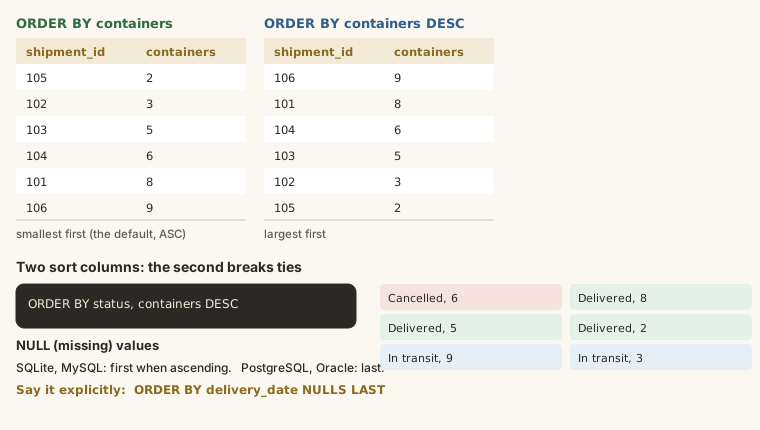
ASC is the default, so ORDER BY company_name and ORDER BY company_name ASC mean the same thing. Customers in alphabetical order:
SELECT company_name, city
FROM customers
ORDER BY company_name;
The staff who've been here longest come first when you sort hire dates ascending:
SELECT full_name, role, hire_date
FROM employees
ORDER BY hire_date;
And DESC puts the most recent first:
SELECT full_name, role, hire_date
FROM employees
ORDER BY hire_date DESC;
Sorting by several columns
List more than one column, separated by commas. The first column decides the order. The second only matters when two rows have the same value in the first, like a tie-breaker; the third breaks ties in the second, and so on.
Routes by transport mode, and within each mode, the longest journeys first:
SELECT mode, origin, destination, target_transit_days
FROM routes
ORDER BY mode, target_transit_days DESC;
Read the result from the top: the five Air routes come first (A to Z), longest first; then the seven Road routes, longest first; then the eighteen Sea routes. Each column has its own direction: here mode is ascending and target_transit_days is descending. Writing DESC once at the end doesn't apply to the earlier columns.
Sorting by a column you don't show
You can sort by any column in the table, even if it isn't in SELECT:
SELECT company_name, city
FROM customers
ORDER BY signup_date DESC;
The newest customers come first, though the signup date isn't displayed. It's allowed, but it can confuse the reader, who can't see why the rows are in that order. Usually it's better to show the column you sort by.
Sorting by a calculation or an alias
You can sort by a calculated value. If you've given it an alias in SELECT, you can use the alias, because ORDER BY runs after SELECT:
SELECT
  shipment_id,
  containers,
  freight_charge / containers AS charge_per_container
FROM shipments
ORDER BY charge_per_container DESC;
Compare that with WHERE, which runs before SELECT and so can't rely on an alias.
| Step | Clause | Can it use a SELECT alias? |
|---|---|---|
| 1 | FROM picks the table | no |
| 2 | WHERE filters rows | no |
| 3 | SELECT picks and calculates columns | (creates them) |
| 4 | ORDER BY sorts | yes |
Where missing values go
Rows where the sort column is NULL have to go somewhere. SQLite and MySQL put them first in ascending order (and last in descending); PostgreSQL and Oracle do the opposite. Shipments that haven't been delivered have no delivery_date, so they appear at the top:
SELECT shipment_id, status, delivery_date
FROM shipments
ORDER BY delivery_date;
Add NULLS FIRST or NULLS LAST to choose (SQLite, PostgreSQL and Oracle support it):
SELECT shipment_id, status, delivery_date
FROM shipments
ORDER BY delivery_date NULLS LAST;
Sorting text
Text sorts character by character, like a dictionary. Two surprises to watch for:
- Numbers stored as text sort as text:
'10'comes before'9', because'1'comes before'9'. Store numbers as numbers. - Capitals: in SQLite, capital letters sort before small letters (
'Zenith'before'apex'). Other databases have their own rules. If case varies in your data, sort byLOWER(column).
Sorting by position (and why not to)
ORDER BY 2 sorts by the second column in SELECT. It works, but if someone later adds a column at the front, the query silently sorts by the wrong thing. Write the column name.
Example
Finance's request: the first week of January 2026, biggest charges first.
SELECT shipment_id, booking_date, freight_charge
FROM shipments
WHERE booking_date BETWEEN '2026-01-01' AND '2026-01-07'
ORDER BY freight_charge DESC;
Operations' request: routes from the longest journey to the shortest, with origin as a tie-breaker so routes of the same length appear in a predictable order.
SELECT origin, destination, mode, target_transit_days
FROM routes
ORDER BY target_transit_days DESC, origin;Walkthrough
In the first query:
FROM shipmentstakes every shipment.WHERE booking_date BETWEEN '2026-01-01' AND '2026-01-07'keeps the first week of January.SELECTpicks three columns.ORDER BY freight_charge DESCsorts what's left, largest charge first.
In the second, several routes share the same number of days. Without the tie-breaker origin, those routes could come back in a different order each time you run the query. Adding a second sort column makes the result deterministic: the same every time. That matters for reports people compare week to week.
Common mistakes
| Mistake | What happens | Fix |
|---|---|---|
ORDER BY before WHERE | A syntax error | ... WHERE ... ORDER BY ... |
ORDER BY mode, target_transit_days DESC expecting both descending | mode is still ascending | Write DESC after each column that needs it |
No ORDER BY, assuming the stored order | Rows can come back in any order | Always sort when order matters |
| Sorting numbers stored as text | '10' before '9' | Store numbers as numbers |
ORDER BY 2 | Breaks silently when columns change | Use the column name |
Summary
| You want... | Write |
|---|---|
| smallest, earliest or A first | ORDER BY col (or ASC) |
| largest, latest or Z first | ORDER BY col DESC |
| a tie-breaker | ORDER BY col1, col2 |
| different directions | ORDER BY col1 ASC, col2 DESC |
| a calculated order | ORDER BY alias DESC |
| missing values last | ORDER BY col NULLS LAST |
Practice
Practice
List every route's origin, destination and target_transit_days, from the longest journey to the shortest. Where two routes take the same number of days, put the lower route_id first.
Ctrl + Enter to run. Tab indents; press Esc then Tab to leave the editor.
Challenge
Challenge · optional
Show company_name and signup_date for customers in Lagos, newest customers first. If two signed up on the same day, sort them by company_name A to Z.
Ctrl + Enter to run. Tab indents; press Esc then Tab to leave the editor.
More practice
Optional drills on the same skills. They don't count towards the certificate, but each one is a small, realistic request from someone at Harbourline. Do as many as you need until the pattern feels automatic.
Drill · optional
List every employee's full_name and hire_date, from the longest-serving to the newest.
Ctrl + Enter to run. Tab indents; press Esc then Tab to leave the editor.
Drill · optional
Show shipment_id, booking_date and freight_charge for shipments booked on '2026-07-15', most expensive first.
Ctrl + Enter to run. Tab indents; press Esc then Tab to leave the editor.
Drill · optional
Show company_name, industry and city for every customer, sorted by industry A to Z, then by company_name A to Z within each industry.
Ctrl + Enter to run. Tab indents; press Esc then Tab to leave the editor.
Check your understanding
Answer every question to check.