Module 14 · SQL for Data Analysis
Window functions
Rank, total and compare rows without collapsing them: OVER, PARTITION BY, ROW_NUMBER, RANK and DENSE_RANK, running totals, moving averages, LAG and LEAD, step by step.
About 30 minutes
The problem
Two requests land on your desk the same morning:
- The sales director wants customers ranked by containers shipped in 2026, with their rank shown next to their name.
- Finance wants each month's revenue alongside a running total for the year so far.
GROUP BY can total things, but it collapses rows. Here you need a calculation across rows and to keep every row.
The concept
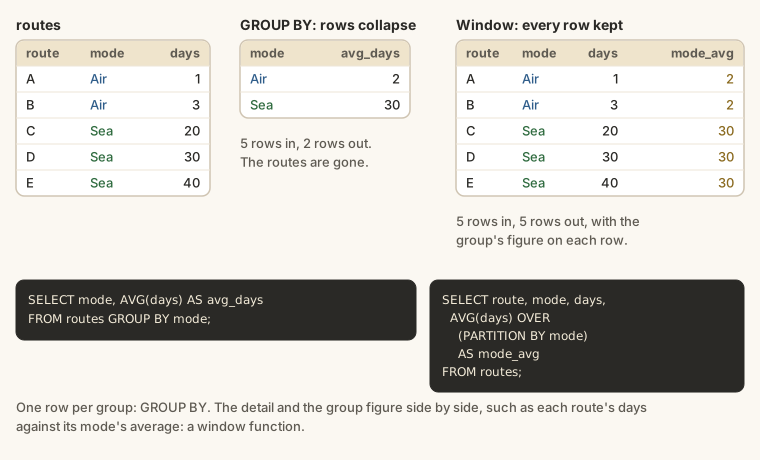
A window function calculates something for each row using a group of related rows, its window, but without collapsing them. GROUP BY turns many rows into one per group; a window function keeps every row and adds the group's figure alongside. That's what you need for rankings, running totals, shares of a total and month-on-month changes.
The syntax
You recognise a window function by OVER (...):
SQL
function(...) OVER (
  PARTITION BY group_column
  ORDER BY sort_column
)PARTITION BYsplits the rows into groups, and the function restarts in each group. Leave it out and all the rows are one group.ORDER BYinsideOVERsets the order the function works through the rows. Rankings and running totals need it.- Both are optional:
OVER ()means "all the rows, in no particular order".
OVER (): a figure for the whole result on every row
Each payment method's total, with the grand total alongside and its share:
SELECT
  method,
  SUM(amount)                                          AS total,
  SUM(SUM(amount)) OVER ()                             AS grand_total,
  ROUND(100.0 * SUM(amount) / SUM(SUM(amount)) OVER (), 1) AS share_pct
FROM payments
GROUP BY method
ORDER BY total DESC;
SUM(SUM(amount)) OVER () looks odd, but read it inside out: SUM(amount) is each group's total (from GROUP BY), and SUM(...) OVER () adds those totals across all the rows of the result. Window functions run after GROUP BY, so they can work on grouped results.
PARTITION BY: a figure per group on every row
Each route's planned journey, compared with the average for its mode:
SELECT
  origin,
  destination,
  mode,
  target_transit_days,
  ROUND(AVG(target_transit_days) OVER (PARTITION BY mode), 1) AS mode_average
FROM routes
ORDER BY mode, target_transit_days;
All 30 routes stay in the result. The average restarts for each mode, so every Air route shows the Air average and every Sea route the Sea average.
Ranking: ROW_NUMBER, RANK and DENSE_RANK
All three number the rows in the ORDER BY order. They differ only in how they treat ties:
WITH per_customer AS (
  SELECT c.company_name, COUNT(*) AS shipments
  FROM shipments AS s
  JOIN customers AS c ON c.customer_id = s.customer_id
  GROUP BY c.customer_id, c.company_name
)
SELECT
  company_name,
  shipments,
  ROW_NUMBER() OVER (ORDER BY shipments DESC) AS row_number,
  RANK()       OVER (ORDER BY shipments DESC) AS rank,
  DENSE_RANK() OVER (ORDER BY shipments DESC) AS dense_rank
FROM per_customer
ORDER BY shipments DESC
LIMIT 12;
Look at the two customers with 83 shipments:
| Function | The tied pair get | The next customer gets |
|---|---|---|
ROW_NUMBER() | 5 and 6 (an arbitrary order) | 7 |
RANK() | 5 and 5 | 7 (skips 6) |
DENSE_RANK() | 5 and 5 | 6 (no gap) |
Use ROW_NUMBER when you need exactly one row per position (such as "the latest shipment per customer"), RANK for league tables ("joint fifth"), and DENSE_RANK when you want "the top three values" including ties.
Ranking within groups
Add PARTITION BY and the ranking restarts in each group. The longest routes within each mode:
SELECT
  mode,
  origin,
  destination,
  target_transit_days,
  RANK() OVER (PARTITION BY mode ORDER BY target_transit_days DESC) AS rank_in_mode
FROM routes
ORDER BY mode, rank_in_mode;
Filtering on a window function: wrap it
You can't use a window function in WHERE: WHERE runs before window functions are worked out. Put the query in a CTE or subquery and filter outside. Each customer's most recent shipment:
WITH numbered AS (
  SELECT
    customer_id,
    shipment_id,
    booking_date,
    ROW_NUMBER() OVER (
      PARTITION BY customer_id
      ORDER BY booking_date DESC, shipment_id DESC
    ) AS rn
  FROM shipments
)
SELECT customer_id, shipment_id, booking_date
FROM numbered
WHERE rn = 1
ORDER BY booking_date;
rn = 1 is each customer's latest booking. The customers at the top haven't booked for longest: exactly the list a sales team uses to spot customers drifting away. This "top 1 per group" pattern is one of the most common in real SQL.
Running totals
SUM(...) OVER (ORDER BY ...) adds up every row from the first up to the current one:
WITH monthly AS (
  SELECT strftime('%Y-%m', payment_date) AS month, SUM(amount) AS received
  FROM payments
  WHERE payment_date >= '2026-01-01'
  GROUP BY month
)
SELECT
  month,
  received,
  SUM(received) OVER (ORDER BY month) AS received_year_to_date
FROM monthly
ORDER BY month;
Add PARTITION BY to restart the running total, for example per year: SUM(received) OVER (PARTITION BY year ORDER BY month).
Moving averages: choosing the frame
By default, a running window covers "the first row up to this one". You can choose a different frame: the rows around the current one. A three-month moving average smooths out bumpy monthly figures:
WITH monthly AS (
  SELECT strftime('%Y-%m', payment_date) AS month, SUM(amount) AS received
  FROM payments
  GROUP BY month
)
SELECT
  month,
  received,
  ROUND(AVG(received) OVER (
    ORDER BY month
    ROWS BETWEEN 2 PRECEDING AND CURRENT ROW
  )) AS three_month_average
FROM monthly
ORDER BY month;
ROWS BETWEEN 2 PRECEDING AND CURRENT ROW means "this row and the two before it". The first two months average over fewer rows, because there's nothing earlier.
The previous and next row: LAG and LEAD
LAG(column) returns the value from the previous row; LEAD(column) from the next one. That's month-on-month change:
WITH monthly AS (
  SELECT strftime('%Y-%m', payment_date) AS month, SUM(amount) AS received
  FROM payments
  WHERE payment_date >= '2026-01-01'
  GROUP BY month
)
SELECT
  month,
  received,
  LAG(received) OVER (ORDER BY month)            AS previous_month,
  received - LAG(received) OVER (ORDER BY month) AS change
FROM monthly
ORDER BY month;
The first month has no previous one, so LAG returns NULL. LAG(received, 12) would look back twelve rows: the same month last year.
Splitting into equal groups: NTILE
NTILE(4) splits the rows into four groups of (nearly) equal size, numbered 1 to 4. Customers in quartiles by shipments:
WITH per_customer AS (
  SELECT customer_id, COUNT(*) AS shipments
  FROM shipments
  GROUP BY customer_id
)
SELECT
  customer_id,
  shipments,
  NTILE(4) OVER (ORDER BY shipments DESC) AS quartile
FROM per_customer
ORDER BY shipments DESC;
Quartile 1 is the busiest quarter of customers.
Where window functions run
| Step | Clause |
|---|---|
| 1 | FROM, joins |
| 2 | WHERE |
| 3 | GROUP BY |
| 4 | HAVING |
| 5 | window functions, then SELECT |
| 6 | ORDER BY |
| 7 | LIMIT |
That's why a window function can use grouped results (step 3) but can't be filtered in WHERE (step 2).
Example
The sales director wants this year's league table of customers by containers, with joint positions shown fairly:
WITH totals AS (
  SELECT c.company_name, SUM(s.containers) AS containers
  FROM shipments AS s
  JOIN customers AS c ON c.customer_id = s.customer_id
  WHERE s.booking_date >= '2026-01-01'
  GROUP BY c.customer_id, c.company_name
)
SELECT
  company_name,
  containers,
  RANK() OVER (ORDER BY containers DESC) AS position
FROM totals
ORDER BY position
LIMIT 15;Walkthrough
- The CTE totals this year's containers per customer: a
JOINandGROUP BYfrom earlier lessons. RANK() OVER (ORDER BY containers DESC)looks at all the customer rows, orders them by containers and gives each its position. Ties share a position.- Every customer row is still there. The position is just a new column.
ORDER BY position LIMIT 15shows the top fifteen.
Common mistakes
| Mistake | What happens | Fix |
|---|---|---|
WHERE rn = 1 in the same query as ROW_NUMBER() | An error | Wrap it in a CTE and filter outside |
No ORDER BY inside OVER for a ranking | An error, or meaningless numbers | OVER (ORDER BY ...) |
ROW_NUMBER when ties should share a position | Tied rows get different numbers | RANK or DENSE_RANK |
Expecting PARTITION BY to reduce the rows | All rows are still there | Use GROUP BY to collapse |
Forgetting the first row has no LAG | NULL change in the first row | Expect it, or use COALESCE |
Summary
| You want... | Write |
|---|---|
| a grand total on every row | SUM(x) OVER () |
| a group's figure on every row | AVG(x) OVER (PARTITION BY g) |
| a ranking with ties | RANK() OVER (ORDER BY x DESC) |
| the latest row per group | ROW_NUMBER() OVER (PARTITION BY g ORDER BY date DESC), then rn = 1 |
| a running total | SUM(x) OVER (ORDER BY date) |
| a moving average | AVG(x) OVER (ORDER BY date ROWS BETWEEN 2 PRECEDING AND CURRENT ROW) |
| change from the previous row | x - LAG(x) OVER (ORDER BY date) |
| quartiles | NTILE(4) OVER (ORDER BY x DESC) |
Practice
Practice
Rank the routes by how many shipments they carried. Show route_id, shipments and route_rank using RANK(), busiest first.
Ctrl + Enter to run. Tab indents; press Esc then Tab to leave the editor.
Challenge
Challenge · optional
For each month of 2025, show month ('YYYY-MM'), the number of shipments booked, and the previous month's number using LAG. Order by month.
Ctrl + Enter to run. Tab indents; press Esc then Tab to leave the editor.
More practice
Optional drills on the same skills. They don't count towards the certificate, but each one is a small, realistic request from someone at Harbourline. Do as many as you need until the pattern feels automatic.
Drill · optional
Rank customers by total freight_charge with DENSE_RANK. Show customer_id, total_charge and charge_rank, top 10 only.
Ctrl + Enter to run. Tab indents; press Esc then Tab to leave the editor.
Drill · optional
For each mode, find the single most expensive shipment. Show mode, shipment_id and freight_charge. Use ROW_NUMBER partitioned by mode in a CTE.
Ctrl + Enter to run. Tab indents; press Esc then Tab to leave the editor.
Drill · optional
Show a running total of payments received in 2026 by month: month ('YYYY-MM'), received, and running_total. Order by month.
Ctrl + Enter to run. Tab indents; press Esc then Tab to leave the editor.
Check your understanding
Answer every question to check.