Module 3 · SQL for Data Analysis
SELECT
Choose the columns you need, rename them, calculate new ones, join text together and remove duplicates. Every part of SELECT, step by step.
About 35 minutes
The problem
The sales team is preparing calls to customers. They don't need every column in the customers table. They need the company name, the city and the industry, and nothing else cluttering the screen.
Later that day, finance asks for each shipment's weight in tonnes, but the database stores it in kilograms. And marketing wants a single "Company, City" label for each customer for a mailing.
All three are jobs for SELECT, the statement you'll write more than any other.
The concept
SELECT asks the database for data. It never changes anything: you can run it as often as you like, and the tables stay exactly as they were.
The syntax
SQL
SELECT column1, column2, ...
FROM table_name;SELECTis followed by the columns you want, separated by commas.FROMnames the table they come from.- The semicolon
;marks the end of the statement. Many tools let you leave it out for a single query, but it's a good habit, and required when you run several statements together.
SQL keywords aren't case-sensitive: select, SELECT and Select all work. Most people write keywords in capitals and names in lower case, so it's easy to see which is which.
Selecting specific columns
List the columns you want, in the order you want them:
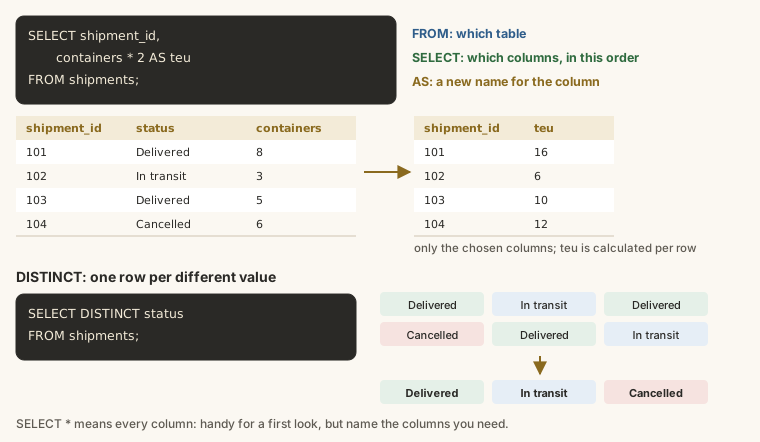
SELECT company_name, city, industry
FROM customers;
The result has exactly those three columns, in that order. The order you list them in is the order you get them back, not the order they're stored in the table. Swap them and the result swaps too:
SELECT industry, company_name
FROM customers;
Selecting every column: SELECT *
The star * means "every column":
SELECT *
FROM routes;
SELECT * is handy for a first look at a table you don't know yet. In real queries, name the columns instead:
- The result only has what you need, so it's easier to read.
- It's faster on big tables, because less data is sent.
- If someone adds a column to the table later, your report doesn't suddenly change shape.
Renaming columns with AS
A column alias gives a column a different name in the result. Write AS and the new name after the column:
SELECT
  full_name AS name,
  role AS job_title
FROM employees;
The table isn't changed. Only the headings in your result are.
Some rules for aliases:
- Use letters, numbers and underscores, and start with a letter:
job_title,total_2026. - If you want spaces or capitals kept exactly, put the alias in double quotes:
AS "Job title". ASis optional (full_name namealso works), but write it. Without it, a missing comma is very hard to spot, as you'll see under common mistakes.
SELECT
  company_name AS "Customer name",
  signup_date AS "Joined on"
FROM customers;
Calculating new columns
You can do arithmetic on columns, and the result appears as a new column. The table itself is unchanged.
| Operator | Meaning | Example |
|---|---|---|
+ | add | containers + 1 |
- | subtract | amount - 50000 |
* | multiply | containers * 2 |
/ | divide | weight_kg / 1000.0 |
% | remainder after division | shipment_id % 2 |
Finance's request, weight in tonnes:
SELECT
  shipment_id,
  weight_kg,
  weight_kg / 1000.0 AS weight_tonnes
FROM shipments;
Always give a calculated column an alias. Without one, the heading is the whole expression (weight_kg / 1000.0), which is hard to read and hard to refer to later.
Whole-number division
Look closely at 1000.0 above. In SQLite and SQL Server, dividing one whole number by another throws the decimals away:
SELECT
  7 / 2 AS whole_division,
  7 / 2.0 AS decimal_division,
  7 % 2 AS remainder;
7 / 2 gives 3, not 3.5. If either number has a decimal point, you get the decimal answer. So when you divide columns that hold whole numbers, write the constant with .0, or multiply by 1.0 first. (PostgreSQL behaves the same way; MySQL always gives decimals.)
Notice that this query has no FROM: SQLite lets you SELECT plain values, which is a quick way to test a calculation.
Brackets and the order of calculation
As in maths, * and / are worked out before + and -. Use brackets to make the order explicit:
SELECT
  10 + 5 * 2 AS without_brackets,
  (10 + 5) * 2 AS with_brackets;
The freight charge is stored in naira. Here's the charge per container, and the same in thousands of naira:
SELECT
  shipment_id,
  containers,
  freight_charge,
  freight_charge / containers AS charge_per_container,
  (freight_charge / containers) / 1000.0 AS charge_per_container_thousands
FROM shipments;
Joining text together
Use || to join pieces of text into one, which is called concatenation. Text you type yourself goes in single quotes:
SELECT
  company_name || ', ' || city AS mailing_label
FROM customers;
That's marketing's "Company, City" label. Other databases use different syntax for the same thing: SQL Server writes company_name + ', ' + city, and MySQL uses CONCAT(company_name, ', ', city). CONCAT also works in SQL Server and PostgreSQL.
Fixed values in every row
You can include a value that's the same on every row. It's useful for labelling rows when you combine results later:
SELECT
  company_name,
  'Customer' AS record_type,
  2026 AS report_year
FROM customers;
Removing duplicates with DISTINCT
DISTINCT straight after SELECT removes duplicate rows from the result, so each value appears once:
SELECT DISTINCT mode
FROM routes;
Harbourline runs 30 routes but only three transport modes, so you get three rows.
With more than one column, DISTINCT removes rows where every listed column is the same, so you get each combination once:
SELECT DISTINCT city, country
FROM customers;
Each city appears once with its country. If two customers are in Lagos, Nigeria, that combination still appears only once.
Comments
Anything after -- on a line is a comment: the database ignores it. Use comments to explain why, or to switch a line off while you experiment:
-- Call list for the sales team
SELECT
  company_name,
  city
  -- , industry   (not needed this week)
FROM customers;
For a comment over several lines, put it between /* and */.
Formatting for people
The database doesn't care about line breaks or spacing. People do. Once a query has more than two or three columns:
- put each column on its own line, indented;
- put
FROMon its own line; - line up the commas the same way every time.
The queries in this course follow that style, and it's what you'll see in most teams.
Example
Back to the three requests. The sales call list:
SELECT
  company_name,
  city,
  industry
FROM customers;
Finance's weights in tonnes, with the original weight for checking:
SELECT
  shipment_id,
  weight_kg,
  weight_kg / 1000.0 AS weight_tonnes
FROM shipments;
And marketing's mailing labels, one per city and company, with a clear heading:
SELECT DISTINCT
  company_name || ', ' || city AS "Mailing label"
FROM customers;Walkthrough
Read each query clause by clause, the way the database does:
FROM customerspicks the table.SELECT company_name, city, industrypicks the columns, in that order, from every row.- In the second query,
weight_kg / 1000.0is worked out for each row separately, andAS weight_tonnesnames the result. Because of the.0, a weight of 1,500 kg becomes 1.5 tonnes rather than 1. - In the third,
||joins three pieces of text for each row: the company name, the text', 'and the city.DISTINCTthen keeps each finished label once.
Common mistakes
| Mistake | What happens | Fix |
|---|---|---|
A comma after the last column: SELECT city, industry, FROM customers | A syntax error near FROM | Remove the last comma |
A missing comma: SELECT company_name city FROM customers | No error. You get one column, company_name, renamed to city | Add the comma. This is why writing AS for aliases helps |
Dividing whole numbers: containers / 3 | Decimals silently thrown away | Divide by 3.0 |
Double quotes for text: "Lagos" | Treated as a column name; an error or a wrong result | Use single quotes: 'Lagos' |
A misspelt column: SELECT compnay_name | An error: no such column | Check the spelling against the table |
Summary
| You want to... | Write |
|---|---|
| Choose columns | SELECT col1, col2 FROM table |
| See every column | SELECT * FROM table |
| Rename a column in the result | col AS new_name |
| Calculate a column | col1 * col2 AS result |
| Keep decimals when dividing | col / 1000.0 |
| Join text | col1 || ' ' || col2 |
| Remove duplicate rows | SELECT DISTINCT col FROM table |
| Add a note | -- comment |
Practice
Practice
The sales team wants a call list: show company_name, city and industry for every customer.
Ctrl + Enter to run. Tab indents; press Esc then Tab to leave the editor.
Challenge
Challenge · optional
Finance wants each shipment's charge in millions of naira. Show shipment_id and freight_charge divided by 1,000,000 as charge_millions.
Ctrl + Enter to run. Tab indents; press Esc then Tab to leave the editor.
Challenge · optional
Which industries do Harbourline's customers work in? List each industry once.
Ctrl + Enter to run. Tab indents; press Esc then Tab to leave the editor.
More practice
Optional drills on the same skills. They don't count towards the certificate, but each one is a small, realistic request from someone at Harbourline. Do as many as you need until the pattern feels automatic.
Drill · optional
Operations wants a list of lanes: show origin, destination and mode for every route.
Ctrl + Enter to run. Tab indents; press Esc then Tab to leave the editor.
Drill · optional
Show shipment_id, weight_kg, and the weight in tonnes as weight_tonnes (weight_kg divided by 1000.0).
Ctrl + Enter to run. Tab indents; press Esc then Tab to leave the editor.
Drill · optional
Which payment methods has Harbourline received money by? List each method once.
Ctrl + Enter to run. Tab indents; press Esc then Tab to leave the editor.
Drill · optional
HR wants a staff list with friendlier headings: show each employee's full_name as name and role as job_title.
Ctrl + Enter to run. Tab indents; press Esc then Tab to leave the editor.
Drill · optional
Make a route label for each route: origin, then ' to ', then destination, in one column called lane.
Ctrl + Enter to run. Tab indents; press Esc then Tab to leave the editor.
Drill · optional
Show each shipment's shipment_id, containers and the charge per container (freight_charge divided by containers) as charge_per_container.
Ctrl + Enter to run. Tab indents; press Esc then Tab to leave the editor.
Drill · optional
List each combination of team and role in the employees table once.
Ctrl + Enter to run. Tab indents; press Esc then Tab to leave the editor.
Check your understanding
Answer every question to check.