Module 4 · SQL for Data Analysis
WHERE
Keep only the rows you need. Comparisons on numbers, text and dates, AND, OR and NOT, IN, BETWEEN, LIKE patterns and NULL, step by step.
About 50 minutes
The problem
Harbourline has thousands of shipments, and nobody wants to scroll through all of them. Kemi's questions are always about a slice of the data:
- "Show me the big bookings: six containers or more."
- "Which shipments were cancelled?"
- "Which customers don't have an account manager yet?"
- "Which of our customers are food companies?"
Each of these keeps some rows and drops the rest. That's what WHERE is for.
The concept
WHERE filters rows. It checks a condition against every row, keeps the rows where the condition is true, and leaves the rest out of the result.
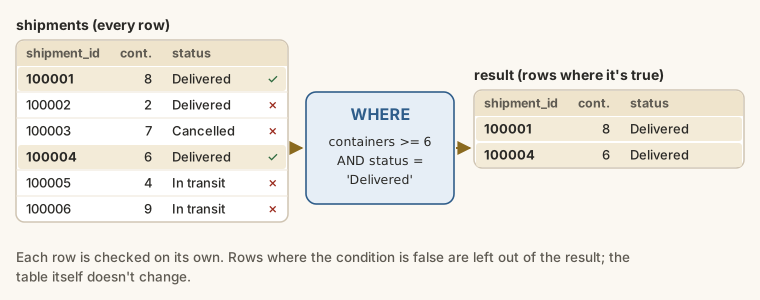
The syntax
SQL
SELECT column1, column2, ...
FROM table_name
WHERE condition;WHERE always comes after FROM. The database reads the table first, filters the rows with WHERE, and only then picks the columns in SELECT. That's why you can filter on a column you don't show:
SELECT company_name
FROM customers
WHERE city = 'Abuja';
city isn't in the result, but it was used to choose the rows.
Comparison operators
| Operator | Meaning | Example |
|---|---|---|
= | equal to | status = 'Delivered' |
<> or != | not equal to | mode <> 'Air' |
> | greater than | containers > 6 |
>= | greater than or equal to | containers >= 6 |
< | less than | weight_kg < 10000 |
<= | less than or equal to | target_transit_days <= 3 |
On numbers, they work as you'd expect:
SELECT shipment_id, containers, freight_charge
FROM shipments
WHERE containers >= 6;SELECT origin, destination, target_transit_days
FROM routes
WHERE target_transit_days <= 3;Note the difference between > and >=: containers > 6 leaves out shipments of exactly six; containers >= 6 keeps them.
Comparing text
Text values go in single quotes. Numbers don't:
SELECT shipment_id, booking_date, status
FROM shipments
WHERE status = 'Cancelled';
Two things to know about text:
- Spelling must match exactly, including spaces.
'In transit'matches;'In Transit'and'Intransit'don't. - Capitals matter with
=in SQLite, PostgreSQL and Oracle:city = 'lagos'finds nothing, because the data says'Lagos'. (SQL Server and MySQL usually ignore case.) If you're not sure how a value is stored, look first withSELECT DISTINCT.
SELECT DISTINCT status
FROM shipments;
<> keeps every row that isn't the value:
SELECT company_name, city, country
FROM customers
WHERE country <> 'Nigeria';
Comparing dates
In this database, dates are stored as text in the format YYYY-MM-DD, such as '2026-03-15'. That format puts the year first, so dates sort and compare correctly as text: '2025-12-31' < '2026-01-01' is true. Write dates in the same format, in single quotes:
SELECT shipment_id, booking_date
FROM shipments
WHERE booking_date >= '2026-08-01';Combining conditions: AND, OR, NOT
| Keyword | A row is kept when... |
|---|---|
AND | both conditions are true |
OR | at least one condition is true |
NOT | the condition is false |
Big bookings that were actually delivered:
SELECT shipment_id, booking_date, containers, status
FROM shipments
WHERE containers >= 6
  AND status = 'Delivered';
Shipments that aren't finished yet, either booked or on their way:
SELECT shipment_id, status
FROM shipments
WHERE status = 'Booked'
   OR status = 'In transit';
NOT reverses a condition. NOT status = 'Delivered' means the same as status <> 'Delivered'. It's most useful with IN, BETWEEN and LIKE, which you'll see below.
Mixing AND and OR: use brackets
When a condition has both AND and OR, SQL works out every AND first, just as maths does × before +. That can give a very different answer from the one you meant.
Kemi wants pharmaceutical customers in Lagos or Abuja. Without brackets:
SELECT company_name, city, industry
FROM customers
WHERE city = 'Lagos' OR city = 'Abuja' AND industry = 'Pharmaceuticals';
That returns 46 rows: every Lagos customer, whatever the industry, plus the pharmaceutical customers in Abuja. SQL read it as city = 'Lagos' OR (city = 'Abuja' AND industry = 'Pharmaceuticals'). With brackets:
SELECT company_name, city, industry
FROM customers
WHERE (city = 'Lagos' OR city = 'Abuja')
  AND industry = 'Pharmaceuticals';
Four rows, which is what Kemi asked for.
A list of values: IN
IN checks whether a value is in a list. It's a tidier way to write several ORs on the same column:
SELECT company_name, city
FROM customers
WHERE city IN ('Lagos', 'Abuja', 'Kano');
That's the same as city = 'Lagos' OR city = 'Abuja' OR city = 'Kano'. NOT IN keeps everything that isn't in the list:
SELECT shipment_id, status
FROM shipments
WHERE status NOT IN ('Delivered', 'Cancelled');
A range: BETWEEN
BETWEEN low AND high keeps values in a range, including both ends:
SELECT shipment_id, containers
FROM shipments
WHERE containers BETWEEN 3 AND 5;
You get 3, 4 and 5 containers. It's shorthand for containers >= 3 AND containers <= 5. It works on dates too, which is the commonest use:
SELECT shipment_id, booking_date, status
FROM shipments
WHERE booking_date BETWEEN '2026-01-01' AND '2026-01-31';
That's every shipment booked in January 2026: 137 of them.
Text patterns: LIKE
LIKE matches text against a pattern. Two characters have special meanings:
| Wildcard | Matches | Example | Matches |
|---|---|---|---|
% | any number of characters, including none | 'Lagoon%' | names starting with Lagoon |
_ | exactly one character | '_a%' | names whose second letter is a |
| Pattern | Means |
|---|---|
'Apex%' | starts with Apex |
'%Ltd' | ends with Ltd |
'%Foods%' | contains Foods anywhere |
'____' | exactly four characters |
Marketing wants every food company:
SELECT company_name, city
FROM customers
WHERE company_name LIKE '%Foods%';
Twelve customers have "Foods" in their names. And customers registered as public companies, whose names end in "Plc":
SELECT company_name
FROM customers
WHERE company_name LIKE '%Plc';
In SQLite and MySQL, LIKE ignores the difference between capitals and small letters (for the letters A to Z), so LIKE 'lagos' matches 'Lagos'. In PostgreSQL it doesn't; use ILIKE there. NOT LIKE keeps the rows that don't match.
Missing values: IS NULL
NULL means no value: the information is missing or unknown. It isn't zero, and it isn't empty text. A shipment that hasn't arrived has no delivery_date, so that column is NULL.
You can't find NULL with =. In SQL, NULL = NULL isn't true, because two unknowns can't be known to be equal. So this finds nothing:
SELECT company_name
FROM customers
WHERE account_manager_id = NULL;
Use IS NULL instead:
SELECT company_name, city
FROM customers
WHERE account_manager_id IS NULL;
Eight customers don't have an account manager yet. IS NOT NULL finds the rows that do have a value:
SELECT shipment_id, ship_date, delivery_date
FROM shipments
WHERE delivery_date IS NOT NULL;
Filtering on a calculation
A condition can use a calculation, not just a column. Shipments where the charge per container is over ₦5 million:
SELECT
  shipment_id,
  containers,
  freight_charge,
  freight_charge / containers AS charge_per_container
FROM shipments
WHERE freight_charge / containers > 5000000;
Notice that the calculation is written out again in WHERE. You can't write WHERE charge_per_container > 5000000, because WHERE runs before SELECT, so the alias doesn't exist yet when the rows are filtered. (SQLite happens to allow it, but most databases don't, so don't rely on it.)
Example
Kemi's four questions, answered. Big bookings:
SELECT shipment_id, booking_date, containers
FROM shipments
WHERE containers >= 6;
Cancelled shipments:
SELECT shipment_id, booking_date, freight_charge
FROM shipments
WHERE status = 'Cancelled';
Customers without an account manager:
SELECT company_name, city
FROM customers
WHERE account_manager_id IS NULL;
Food companies in Lagos or Port Harcourt:
SELECT company_name, city
FROM customers
WHERE company_name LIKE '%Foods%'
AND city IN ('Lagos', 'Port Harcourt');Walkthrough
Read the last query the way the database runs it:
FROM customerstakes all 120 customers.WHERE company_name LIKE '%Foods%'checks each name for "Foods" anywhere.AND city IN ('Lagos', 'Port Harcourt')also requires the city to be one of the two. Because it'sAND, a row needs both to be true.SELECT company_name, cityshows two columns of the rows that passed.
Common mistakes
| Mistake | What happens | Fix |
|---|---|---|
WHERE status = Delivered | An error: SQL thinks Delivered is a column | Text goes in single quotes: 'Delivered' |
WHERE city = "Lagos" | Double quotes mean a name, not text: an error or a wrong result | Use single quotes |
WHERE account_manager_id = NULL | No rows, and no error | IS NULL |
WHERE a = 1 OR b = 2 AND c = 3 | AND runs first, so the result isn't what you meant | Add brackets |
WHERE city = 'lagos' | No rows in SQLite: capitals don't match | Match the stored value, or use LIKE |
WHERE booking_date = '02/01/2026' | No rows: the format doesn't match | Use '2026-01-02' |
WHERE before FROM | A syntax error | SELECT ... FROM ... WHERE ... |
Summary
| You want rows where... | Write |
|---|---|
| a value equals something | WHERE status = 'Delivered' |
| a value isn't something | WHERE mode <> 'Air' |
| a number is at least something | WHERE containers >= 6 |
| both conditions are true | WHERE a AND b |
| either condition is true | WHERE a OR b (with brackets if mixed with AND) |
| a value is one of a list | WHERE city IN ('Lagos', 'Abuja') |
| a value is in a range | WHERE containers BETWEEN 3 AND 5 |
| text matches a pattern | WHERE company_name LIKE '%Foods%' |
| a value is missing | WHERE delivery_date IS NULL |
| a value is present | WHERE delivery_date IS NOT NULL |
Practice
Practice
Show the shipment_id, booking_date and freight_charge of every cancelled shipment.
Ctrl + Enter to run. Tab indents; press Esc then Tab to leave the editor.
Practice
Which customers don't have an account manager yet? Show their company_name and city.
Ctrl + Enter to run. Tab indents; press Esc then Tab to leave the editor.
Challenge
Challenge · optional
Show shipment_id, booking_date and status for shipments booked in January 2026 that were not delivered.
Ctrl + Enter to run. Tab indents; press Esc then Tab to leave the editor.
Challenge · optional
List the company_name of every customer in the food or agriculture business (industry 'Food & Beverage' or 'Agriculture') based in Lagos or Port Harcourt.
Ctrl + Enter to run. Tab indents; press Esc then Tab to leave the editor.
More practice
Optional drills on the same skills. They don't count towards the certificate, but each one is a small, realistic request from someone at Harbourline. Do as many as you need until the pattern feels automatic.
Drill · optional
Show company_name and industry for every customer based in Abuja.
Ctrl + Enter to run. Tab indents; press Esc then Tab to leave the editor.
Drill · optional
Show shipment_id, containers and freight_charge for shipments of 6 or more containers booked in 2026 (from '2026-01-01').
Ctrl + Enter to run. Tab indents; press Esc then Tab to leave the editor.
Drill · optional
List company_name, city and country for every customer outside Nigeria.
Ctrl + Enter to run. Tab indents; press Esc then Tab to leave the editor.
Drill · optional
Which shipments haven't arrived yet? Show shipment_id and status for shipments that are 'Booked' or 'In transit'. Use IN.
Ctrl + Enter to run. Tab indents; press Esc then Tab to leave the editor.
Drill · optional
Find every customer whose company_name contains the word 'Foods'. Show company_name and city.
Ctrl + Enter to run. Tab indents; press Esc then Tab to leave the editor.
Drill · optional
Show origin, destination and mode for every route that isn't by sea and takes 5 days or fewer (target_transit_days).
Ctrl + Enter to run. Tab indents; press Esc then Tab to leave the editor.
Drill · optional
Show shipment_id and weight_kg for shipments weighing between 20,000 and 30,000 kg, including both.
Ctrl + Enter to run. Tab indents; press Esc then Tab to leave the editor.
Drill · optional
Which shipments have been sent but not delivered? Show shipment_id and ship_date where ship_date has a value and delivery_date doesn't.
Ctrl + Enter to run. Tab indents; press Esc then Tab to leave the editor.
Check your understanding
Answer every question to check.