Module 8 · SQL for Data Analysis
GROUP BY
Calculate totals per customer, route, month or status: how grouping works, the golden rule, several columns, calculated groups and NULL, step by step.
About 30 minutes
The problem
Harbourline has thousands of shipment records. Your manager wants to know:
"Which customers have shipped the most containers this year?"
You know how to add up containers for the whole company with SUM. Now you need that total for each customer, then the biggest ones at the top.
The concept
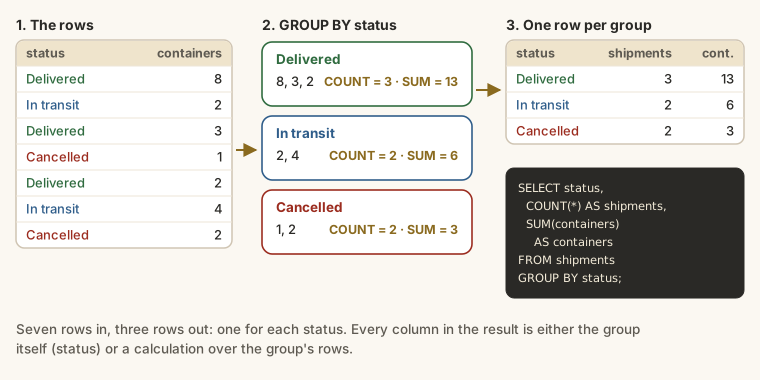
An aggregate on its own gives one answer for the whole table. GROUP BY gives one answer per group: shipments per customer, revenue per month, customers per city.
It works in three steps:
- Split the rows into groups that share the same value in the
GROUP BYcolumn. - Summarise each group separately with the aggregate functions.
- Return one row per group.
The syntax
SQL
SELECT group_column, AGGREGATE(column) AS name
FROM table_name
WHERE condition
GROUP BY group_column
ORDER BY ...;GROUP BY comes after WHERE and before ORDER BY:
SQL
SELECT ... FROM ... WHERE ... GROUP BY ... ORDER BY ... LIMIT ...Your first GROUP BY
How many shipments are in each status?
SELECT status, COUNT(*) AS shipments
FROM shipments
GROUP BY status;
Four statuses, four rows. Add more aggregates and each one is worked out per group:
SELECT
  status,
  COUNT(*)        AS shipments,
  SUM(containers) AS containers
FROM shipments
GROUP BY status;
The golden rule
Every column in SELECT must be either:
- listed in
GROUP BY, or - inside an aggregate function.
Why? Each result row represents a whole group. status is the same for every row in its group, so it can be shown. containers differs from row to row, so on its own it has no single value for the group; SUM(containers) does.
This breaks the rule:
SQL
SELECT status, shipment_id, COUNT(*)
FROM shipments
GROUP BY status;There are 2,411 delivered shipments. Which shipment_id should appear on the "Delivered" row? Most databases reject the query. SQLite runs it and shows one arbitrary ID, which looks like an answer but means nothing.
Grouping by a column you summarise elsewhere
Customers per city, largest first:
SELECT city, COUNT(*) AS customers
FROM customers
GROUP BY city
ORDER BY customers DESC;
Average, shortest and longest planned journey for each transport mode:
SELECT
  mode,
  COUNT(*)                          AS routes,
  ROUND(AVG(target_transit_days), 1) AS average_days,
  MIN(target_transit_days)          AS shortest,
  MAX(target_transit_days)          AS longest
FROM routes
GROUP BY mode;
Air routes average under two days; sea routes 23.
Filter rows first, then group
WHERE removes rows before they're grouped, so they never reach any group. This year's busiest customers by containers, excluding cancellations:
SELECT
  customer_id,
  COUNT(*)        AS shipments,
  SUM(containers) AS containers
FROM shipments
WHERE booking_date >= '2026-01-01'
  AND status <> 'Cancelled'
GROUP BY customer_id
ORDER BY containers DESC
LIMIT 10;
The result shows customer IDs rather than names, because names live in the customers table. You'll bring them together in the JOINs lesson.
Grouping by several columns
List more than one column and you get one group for each combination:
SELECT city, industry, COUNT(*) AS customers
FROM customers
GROUP BY city, industry
ORDER BY city, customers DESC;
Each row is one city and industry pair. A pair with no customers simply doesn't appear: GROUP BY only creates groups for values that exist.
Grouping by a calculation
You can group by a calculated value. strftime('%Y-%m', booking_date) turns a date into its year and month, such as '2026-03', which gives monthly figures:
SELECT
  strftime('%Y-%m', booking_date) AS month,
  COUNT(*)                        AS shipments,
  SUM(containers)                 AS containers
FROM shipments
GROUP BY month
ORDER BY month;
Change the format to '%Y' for yearly totals:
SELECT
  strftime('%Y', booking_date) AS year,
  COUNT(*)                     AS shipments
FROM shipments
GROUP BY year;Groups and NULL
Rows where the grouping column is NULL form one group of their own. Customers per account manager, including the ones with none:
SELECT account_manager_id, COUNT(*) AS customers
FROM customers
GROUP BY account_manager_id
ORDER BY account_manager_id;
The first row, with an empty manager, is the eight customers nobody looks after yet.
Sorting grouped results
ORDER BY runs after grouping, so it can sort by the group column or by an aggregate's alias:
SELECT method, COUNT(*) AS payments, SUM(amount) AS total
FROM payments
GROUP BY method
ORDER BY total DESC;
Bank transfers bring in by far the most money.
Example
Kemi wants to know who ships the most this year: the top ten customers by containers.
SELECT
  customer_id,
  COUNT(*)        AS shipments,
  SUM(containers) AS containers
FROM shipments
WHERE booking_date >= '2026-01-01'
GROUP BY customer_id
ORDER BY containers DESC
LIMIT 10;Walkthrough
The database works through it in this order:
FROM shipments: every shipment.WHERE booking_date >= '2026-01-01': only this year's.GROUP BY customer_id: one group per customer.SELECT: for each group, the customer ID,COUNT(*)of its shipments andSUM(containers).ORDER BY containers DESC: biggest shippers first.containershere is the alias you created.LIMIT 10: the top ten.
Common mistakes
| Mistake | What happens | Fix |
|---|---|---|
A column in SELECT that's neither grouped nor aggregated | An error, or an arbitrary value in SQLite | Add it to GROUP BY or wrap it in an aggregate |
GROUP BY before WHERE | A syntax error | WHERE then GROUP BY |
| Expecting a row for a group with no data | It isn't there | GROUP BY only shows values that exist |
Grouping by booking_date for monthly totals | One group per day | Group by strftime('%Y-%m', booking_date) |
Filtering a total with WHERE SUM(...) > ... | An error | Use HAVING (next lesson) |
Summary
| You want... | Write |
|---|---|
| a count per group | SELECT g, COUNT(*) FROM t GROUP BY g |
| several figures per group | SELECT g, COUNT(*), SUM(x), AVG(y) ... GROUP BY g |
| one group per combination | GROUP BY g1, g2 |
| monthly totals | GROUP BY strftime('%Y-%m', date_col) |
| some rows only | WHERE before GROUP BY |
| biggest groups first | ORDER BY total DESC |
Practice
Practice
How many shipments are there in each status? Show status and a count named shipments.
Ctrl + Enter to run. Tab indents; press Esc then Tab to leave the editor.
Practice
What is the total freight_charge for each route_id? Show route_id and total_charge, highest total first.
Ctrl + Enter to run. Tab indents; press Esc then Tab to leave the editor.
Challenge
Challenge · optional
Finance wants money received per month in 2026. Show the month (as 'YYYY-MM') and the total payment amount, in date order. Use the payments table.
Ctrl + Enter to run. Tab indents; press Esc then Tab to leave the editor.
More practice
Optional drills on the same skills. They don't count towards the certificate, but each one is a small, realistic request from someone at Harbourline. Do as many as you need until the pattern feels automatic.
Drill · optional
How many customers are there in each city? Show city and customers, most customers first.
Ctrl + Enter to run. Tab indents; press Esc then Tab to leave the editor.
Drill · optional
How much money came in by each payment method? Show method and total_amount, largest first.
Ctrl + Enter to run. Tab indents; press Esc then Tab to leave the editor.
Drill · optional
How many shipments were booked in each month of 2025? Show month as 'YYYY-MM' and shipments, in date order.
Ctrl + Enter to run. Tab indents; press Esc then Tab to leave the editor.
Drill · optional
For each status, show status, the number of shipments and the total containers. Name them shipments and containers.
Ctrl + Enter to run. Tab indents; press Esc then Tab to leave the editor.
Check your understanding
Answer every question to check.