Module 9 · SQL for Data Analysis
HAVING
Filter groups after they're calculated: WHERE versus HAVING, the order clauses run in, minimum group sizes and several conditions, step by step.
About 20 minutes
The problem
Harbourline is planning a loyalty discount for its most active customers. The rule the sales director proposes is simple:
"Anyone who booked more than 30 shipments in 2025."
You can count shipments per customer with GROUP BY. But you can't write WHERE COUNT(*) > 30, because WHERE runs before the counting happens.
The concept
HAVING filters groups. It's the WHERE of grouped results: after GROUP BY has built the groups and the aggregates have been worked out, HAVING keeps the groups whose totals meet a condition.
WHERE or HAVING?
WHERE | HAVING | |
|---|---|---|
| Filters | individual rows | whole groups |
| Runs | before GROUP BY | after GROUP BY |
Can use COUNT, SUM, AVG... | no | yes |
| Example | WHERE status <> 'Cancelled' | HAVING COUNT(*) > 30 |
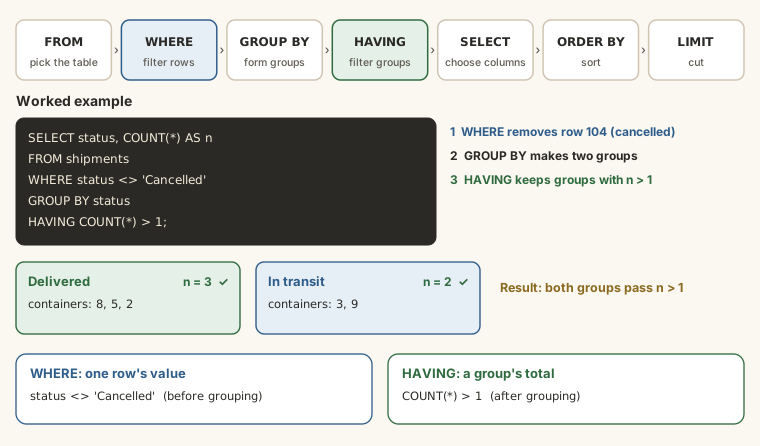
A simple test: if the condition is about one row (this shipment's status, this booking's date), it goes in WHERE. If it's about a total for a group (this customer's number of shipments, this route's average charge), it goes in HAVING.
The syntax
SQL
SELECT group_column, AGGREGATE(column) AS name
FROM table_name
WHERE row_condition
GROUP BY group_column
HAVING group_condition
ORDER BY ...;The complete order of the clauses you've learned:
SQL
SELECT ... FROM ... WHERE ... GROUP BY ... HAVING ... ORDER BY ... LIMIT ...And the order the database runs them in, which explains what each clause can see:
| Step | Clause | Does |
|---|---|---|
| 1 | FROM | picks the table |
| 2 | WHERE | removes rows |
| 3 | GROUP BY | builds groups |
| 4 | HAVING | removes groups |
| 5 | SELECT | works out the columns |
| 6 | ORDER BY | sorts |
| 7 | LIMIT | cuts |
Your first HAVING
Which cities have ten or more customers?
SELECT city, COUNT(*) AS customers
FROM customers
GROUP BY city
HAVING COUNT(*) >= 10;
Without HAVING, you'd get all eight cities. With it, only the five big ones.
Why WHERE can't do it
Try to put the count in WHERE:
SQL
SELECT city, COUNT(*) AS customers
FROM customers
WHERE COUNT(*) >= 10
GROUP BY city;It fails. WHERE runs at step 2, before any groups exist, so there's nothing to count yet. Conditions on aggregates always go in HAVING.
HAVING with other aggregates
Any aggregate works in HAVING. Industries with at least 15 customers:
SELECT industry, COUNT(*) AS customers
FROM customers
GROUP BY industry
HAVING COUNT(*) >= 15;
Payment methods that brought in more than ₦2 billion:
SELECT method, COUNT(*) AS payments, SUM(amount) AS total
FROM payments
GROUP BY method
HAVING SUM(amount) > 2000000000
ORDER BY total DESC;
Using WHERE and HAVING together
Most real questions need both. Which customers made more than 30 bookings in 2025?
SELECT
  customer_id,
  COUNT(*) AS shipments_2025
FROM shipments
WHERE booking_date BETWEEN '2025-01-01' AND '2025-12-31'
GROUP BY customer_id
HAVING COUNT(*) > 30
ORDER BY shipments_2025 DESC;WHEREkeeps only 2025 rows: a row filter.GROUP BYmakes one group per customer.HAVING COUNT(*) > 30keeps customers with more than 30 of those rows: a group filter.
24 customers qualify.
Minimum group size
An average over three shipments isn't worth much. HAVING COUNT(*) >= n keeps only groups big enough for their averages to mean something. The routes with the highest average charge, among routes with at least 50 shipments:
SELECT
  route_id,
  COUNT(*)                   AS shipments,
  ROUND(AVG(freight_charge)) AS avg_charge
FROM shipments
WHERE status <> 'Cancelled'
GROUP BY route_id
HAVING COUNT(*) >= 50
ORDER BY avg_charge DESC;
Several conditions in HAVING
AND and OR work in HAVING just as in WHERE. Customers with more than 20 shipments and an average of at least two containers per shipment:
SELECT
  customer_id,
  COUNT(*)                  AS shipments,
  ROUND(AVG(containers), 2) AS avg_containers
FROM shipments
GROUP BY customer_id
HAVING COUNT(*) > 20
   AND AVG(containers) >= 2
ORDER BY shipments DESC;
Can HAVING use an alias?
Databases differ. SQLite and MySQL accept HAVING shipments_2025 > 30; PostgreSQL and SQL Server don't, because HAVING runs before SELECT. Repeat the aggregate (HAVING COUNT(*) > 30) and your query works everywhere.
Example
Finance wants to know which customers booked a lot in 2025, to offer them a volume discount: customers with more than 30 bookings, busiest first.
SELECT
  customer_id,
  COUNT(*)        AS shipments_2025,
  SUM(containers) AS containers_2025
FROM shipments
WHERE booking_date BETWEEN '2025-01-01' AND '2025-12-31'
  AND status <> 'Cancelled'
GROUP BY customer_id
HAVING COUNT(*) > 30
ORDER BY shipments_2025 DESC;Walkthrough
FROM shipments: every shipment.WHERE ...: 2025 bookings that weren't cancelled. Row by row.GROUP BY customer_id: one group per customer.HAVING COUNT(*) > 30: keep customers with more than 30 of those bookings. Group by group.SELECT: the customer, their count and their containers.ORDER BY shipments_2025 DESC: busiest first.
Common mistakes
| Mistake | What happens | Fix |
|---|---|---|
WHERE COUNT(*) > 30 | An error | Move it to HAVING |
HAVING before GROUP BY | A syntax error | GROUP BY then HAVING |
A row condition in HAVING, such as HAVING status <> 'Cancelled' | Works only if status is grouped, and filters too late | Put row conditions in WHERE |
Relying on an alias in HAVING | Fails in PostgreSQL and SQL Server | Repeat the aggregate |
Confusing COUNT(*) > 30 with >= 30 | Off by one group | Read the question's wording carefully |
Summary
| You want... | Write |
|---|---|
| groups with more than n rows | HAVING COUNT(*) > n |
| groups whose total passes a level | HAVING SUM(x) > level |
| groups big enough to trust | HAVING COUNT(*) >= n |
| a row filter and a group filter | WHERE ... GROUP BY ... HAVING ... |
| several group conditions | HAVING a AND b |
Practice
Practice
Which customers booked more than 40 shipments in total, across all dates? Show customer_id and the number of shipments.
Ctrl + Enter to run. Tab indents; press Esc then Tab to leave the editor.
Challenge
Challenge · optional
Find the industries where Harbourline has at least 12 customers. Show industry and the number of customers, most customers first, then industry A to Z.
Ctrl + Enter to run. Tab indents; press Esc then Tab to leave the editor.
More practice
Optional drills on the same skills. They don't count towards the certificate, but each one is a small, realistic request from someone at Harbourline. Do as many as you need until the pattern feels automatic.
Drill · optional
Which cities have more than 10 customers? Show city and the number of customers.
Ctrl + Enter to run. Tab indents; press Esc then Tab to leave the editor.
Drill · optional
Which routes carried more than 100 shipments in 2025? Show route_id and shipments, busiest first.
Ctrl + Enter to run. Tab indents; press Esc then Tab to leave the editor.
Drill · optional
Which customers have been charged more than 600,000,000 naira in freight in total? Show customer_id and total_charge, highest first.
Ctrl + Enter to run. Tab indents; press Esc then Tab to leave the editor.
Check your understanding
Answer every question to check.