Module 10 · SQL for Data Analysis
JOINs
Combine tables with INNER and LEFT JOIN: aliases, rows that multiply, finding what's missing, the LEFT JOIN trap, double counting, self joins and more, step by step.
About 40 minutes
The problem
Your list of top customers shows customer_id 17, 42, 88… The sales director doesn't know customers by number. She needs company names, and those are in a different table.
She also asks something trickier:
"Which customers signed up but have never shipped anything with us?"
Both questions need data from two tables at once.
The concept
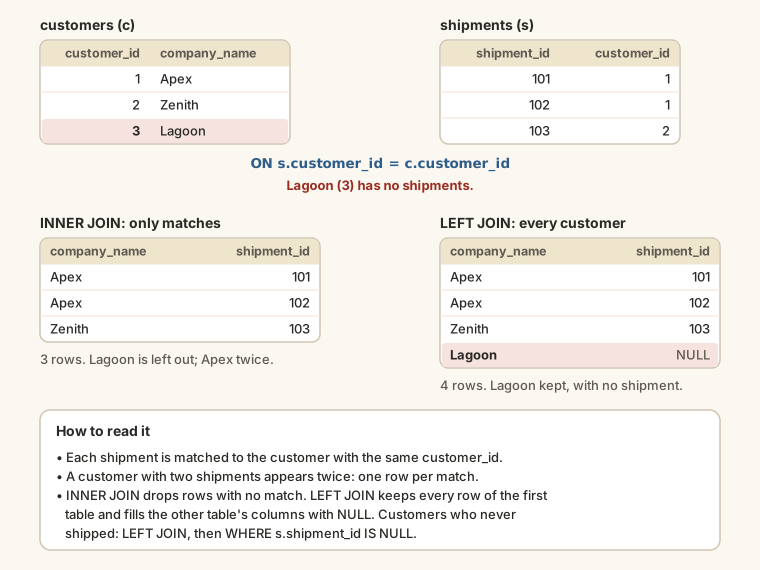
A relational database splits data across tables so that each fact is stored once. A customer's name is in customers; each shipment only stores the customer's ID. That's tidy, but most questions need both, and a JOIN puts them back together. It matches rows from two tables using a condition, almost always "this table's foreign key equals that table's primary key".
The syntax
SQL
SELECT a.column, b.column, ...
FROM table_a AS a
INNER JOIN table_b AS b
ON b.key = a.key;FROM table_ais the left table, where you start.INNER JOIN table_bbrings in the right table.ONis the matching rule: which row ofbgoes with which row ofa.
Table aliases and qualified columns
Both shipments and customers have a column called customer_id. If you write just customer_id, the database doesn't know which one you mean and stops with an "ambiguous column" error. So:
- give each table a short alias after
AS:shipments AS s,customers AS c; - qualify every column with its table's alias:
s.customer_id,c.company_name.
Qualify every column in a join, even ones only one table has. It tells the reader where each column comes from.
INNER JOIN: only rows that match
Each shipment, with its customer's name:
SELECT
  s.shipment_id,
  s.booking_date,
  c.company_name,
  c.city
FROM shipments AS s
INNER JOIN customers AS c
  ON c.customer_id = s.customer_id;
For every shipment, the database finds the customer whose customer_id matches and puts their columns alongside. JOIN on its own means INNER JOIN, so you'll often see just JOIN.
Rows multiply: one-to-many
A customer has many shipments, so joining shipments to customers gives one row per shipment, and each customer's name appears as many times as they have shipments. That's correct, but it's worth checking row counts:
SELECT
  (SELECT COUNT(*) FROM shipments) AS shipments,
  (SELECT COUNT(*)
     FROM shipments AS s
     JOIN customers AS c ON c.customer_id = s.customer_id) AS joined_rows;
Both are 2,683: every shipment matched exactly one customer. A good habit: when you write a join, predict the number of rows, then check.
Joining, then grouping
Now the sales director's list makes sense: top customers by name.
SELECT
  c.company_name,
  COUNT(*)          AS shipments,
  SUM(s.containers) AS containers
FROM shipments AS s
JOIN customers AS c
  ON c.customer_id = s.customer_id
WHERE s.booking_date >= '2026-01-01'
GROUP BY c.customer_id, c.company_name
ORDER BY containers DESC
LIMIT 10;
Group by the ID and the name. The ID guarantees two companies with the same name are never merged into one; the name is there so you can show it.
LEFT JOIN: keep every row of the first table
LEFT JOIN keeps every row from the left table. Where a row has no match, the right table's columns are filled with NULL.
SELECT
  c.company_name,
  s.shipment_id,
  s.booking_date
FROM customers AS c
LEFT JOIN shipments AS s
  ON s.customer_id = c.customer_id
ORDER BY s.shipment_id
LIMIT 20;
The first rows have an empty shipment_id: customers with no shipments at all. An INNER JOIN would have dropped them.
Finding what's missing
That NULL is the key to a very common question: "which X have no Y?" LEFT JOIN, then keep only the rows where the right side is NULL:
SELECT c.company_name, c.signup_date
FROM customers AS c
LEFT JOIN shipments AS s
  ON s.customer_id = c.customer_id
WHERE s.shipment_id IS NULL
ORDER BY c.signup_date;
Fifteen customers signed up and never shipped. The same pattern finds delivered shipments that haven't been paid:
SELECT s.shipment_id, s.delivery_date, s.freight_charge
FROM shipments AS s
LEFT JOIN payments AS p
  ON p.shipment_id = s.shipment_id
WHERE s.status = 'Delivered'
  AND p.payment_id IS NULL
ORDER BY s.delivery_date;
161 shipments: money finance should be chasing.
The LEFT JOIN trap: conditions in WHERE
Suppose you want every customer, with their shipments from August 2026 if they have any. Putting the date in WHERE quietly breaks the LEFT JOIN:
SELECT COUNT(*) AS rows_returned
FROM customers AS c
LEFT JOIN shipments AS s
  ON s.customer_id = c.customer_id
WHERE s.booking_date >= '2026-08-01';
WHERE runs after the join. For customers with no August shipments, s.booking_date is NULL, the condition is false, and they're thrown away: you're back to an inner join. Move the condition into ON, so it limits which shipments are matched rather than which rows are kept:
SELECT COUNT(*) AS rows_returned
FROM customers AS c
LEFT JOIN shipments AS s
  ON s.customer_id = c.customer_id
 AND s.booking_date >= '2026-08-01';
131 rows against 199: the second keeps every customer, with August shipments where they exist.
| Put the condition in... | Effect on a LEFT JOIN |
|---|---|
ON | limits which right-hand rows match; every left row is kept |
WHERE | removes rows after the join, including unmatched ones |
Joining three or more tables
Add one JOIN per table, each with its own ON:
SELECT
  s.shipment_id,
  c.company_name,
  r.origin,
  r.destination,
  r.mode
FROM shipments AS s
JOIN customers AS c ON c.customer_id = s.customer_id
JOIN routes    AS r ON r.route_id    = s.route_id
WHERE s.booking_date = '2026-08-03';
Each join adds columns from one more table. Five shipments were booked that day, each now with its customer and its route.
The double-counting trap
Some shipments were paid in two instalments, so they have two rows in payments. Join shipments to payments and those shipments appear twice:
SELECT
  COUNT(DISTINCT s.shipment_id) AS shipments,
  COUNT(*)                      AS rows_after_join
FROM shipments AS s
LEFT JOIN payments AS p
  ON p.shipment_id = s.shipment_id
WHERE s.status = 'Delivered';
2,411 shipments became 2,570 rows. Now any SUM(s.freight_charge) over that join counts 159 charges twice, and the total is wrong. This is the most common way analysts produce numbers that are too big.
The fix is to summarise first, then join: add up payments per shipment, so there's one row per shipment before joining. You'll learn the neat way to do that with subqueries and CTEs in lessons 12 and 13.
Joining a table to itself
Each employee has a manager_id, which is another employee's ID. To show each employee next to their manager's name, join employees to itself, with two different aliases:
SELECT
  e.full_name AS employee,
  e.role,
  m.full_name AS manager
FROM employees AS e
LEFT JOIN employees AS m
  ON m.employee_id = e.manager_id
ORDER BY manager, employee;
It's a self join. The aliases make it work: e is the employee's copy of the table, m the manager's. LEFT JOIN keeps the two people at the top, who have no manager.
RIGHT, FULL and CROSS joins
| Join | Keeps |
|---|---|
INNER JOIN | rows that match in both tables |
LEFT JOIN | every row of the left table |
RIGHT JOIN | every row of the right table |
FULL OUTER JOIN | every row of both tables |
CROSS JOIN | every row paired with every row (no ON) |
You'll rarely need RIGHT JOIN: swap the tables and use LEFT JOIN, which reads more naturally. FULL OUTER JOIN is for comparing two lists to see what's in one, the other or both. (Older SQLite versions and MySQL don't support it.)
CROSS JOIN pairs every row with every row:
SELECT COUNT(*) AS combinations
FROM customers
CROSS JOIN routes;
120 customers × 30 routes = 3,600 rows. Occasionally useful for building every combination; usually a sign of a missing ON clause.
USING: a shortcut
When both tables name the key column identically, USING (column) is a shortcut for ON a.column = b.column:
SELECT s.shipment_id, c.company_name
FROM shipments AS s
JOIN customers AS c USING (customer_id)
LIMIT 5;Example
The sales director's two questions. Top customers this year, by name:
SELECT
  c.company_name,
  COUNT(*)          AS shipments,
  SUM(s.containers) AS containers
FROM shipments AS s
INNER JOIN customers AS c
  ON c.customer_id = s.customer_id
WHERE s.booking_date >= '2026-01-01'
GROUP BY c.customer_id, c.company_name
ORDER BY containers DESC
LIMIT 10;
Customers who signed up but never shipped:
SELECT c.company_name, c.signup_date
FROM customers AS c
LEFT JOIN shipments AS s
  ON s.customer_id = c.customer_id
WHERE s.shipment_id IS NULL
ORDER BY c.signup_date;Walkthrough
In the first query:
FROM shipments AS sstarts with shipments.INNER JOIN customers AS c ON c.customer_id = s.customer_idattaches each shipment's customer.WHEREkeeps this year's shipments.GROUP BY c.customer_id, c.company_namemakes one group per customer, so the name can be shown.COUNT(*)andSUM(s.containers)summarise each group;ORDER BYandLIMITgive the top ten.
In the second, LEFT JOIN keeps every customer, and WHERE s.shipment_id IS NULL keeps only those with no match: the ones the sales team should call.
Common mistakes
| Mistake | What happens | Fix |
|---|---|---|
An unqualified shared column: SELECT customer_id | "Ambiguous column" error | Qualify it: s.customer_id |
A missing or wrong ON | Thousands of meaningless rows | Match foreign key to primary key |
LEFT JOIN with a right-table condition in WHERE | Unmatched rows disappear | Move the condition into ON |
| Summing after a one-to-many join | Totals counted twice | Summarise first, then join |
INNER JOIN for "which have none?" | The rows you want are dropped | LEFT JOIN ... WHERE right.key IS NULL |
| Grouping by name only | Two companies with one name merged | Group by the ID and the name |
Summary
| You want... | Write |
|---|---|
| rows that match in both tables | FROM a JOIN b ON b.key = a.key |
| every row of a, matched where possible | FROM a LEFT JOIN b ON b.key = a.key |
| rows of a with no match in b | LEFT JOIN b ... WHERE b.key IS NULL |
| a condition that keeps unmatched rows | put it in ON, not WHERE |
| three tables | FROM a JOIN b ON ... JOIN c ON ... |
| a table joined to itself | two aliases: employees AS e, employees AS m |
Practice
Practice
Show each shipment booked on '2026-08-03' with its shipment_id, the customer's company_name and the freight_charge.
Ctrl + Enter to run. Tab indents; press Esc then Tab to leave the editor.
Practice
Which customers have never shipped with Harbourline? Show their company_name and city.
Ctrl + Enter to run. Tab indents; press Esc then Tab to leave the editor.
Challenge
Challenge · optional
Show each account manager's full_name and how many customers they look after, most customers first. (Account managers are in employees; customers.account_manager_id points to them.)
Ctrl + Enter to run. Tab indents; press Esc then Tab to leave the editor.
More practice
Optional drills on the same skills. They don't count towards the certificate, but each one is a small, realistic request from someone at Harbourline. Do as many as you need until the pattern feels automatic.
Drill · optional
Show shipment_id, origin, destination and mode for every shipment booked on '2026-08-03'.
Ctrl + Enter to run. Tab indents; press Esc then Tab to leave the editor.
Drill · optional
How many shipments did each mode carry? Show mode and shipments, busiest first.
Ctrl + Enter to run. Tab indents; press Esc then Tab to leave the editor.
Drill · optional
Show each employee's full_name with their manager's full_name as manager. Leave out people with no manager.
Ctrl + Enter to run. Tab indents; press Esc then Tab to leave the editor.
Drill · optional
Which shipments have no payment recorded? Show shipment_id and status. (Use LEFT JOIN and IS NULL.)
Ctrl + Enter to run. Tab indents; press Esc then Tab to leave the editor.
Check your understanding
Answer every question to check.