Module 1 · SQL for Data Analysis
Introduction to databases
What a database is and why businesses use one, tables, rows, columns and data types, primary and foreign keys, what SQL is, and your first queries.
About 20 minutes
The problem
You've just joined Harbourline Freight, a logistics company in Lagos that moves containers for its customers by sea, air and road. On your first morning, Kemi, the head of operations, asks a simple question:
"Can you pull up our list of routes? I want to see where we ship to."
The answer isn't in a spreadsheet on someone's desktop. It lives in the company's database, and the way you ask a database a question is with SQL.
The concept
What a database is
A database is an organised store of data that many people and systems can use at the same time. Harbourline's booking app writes new shipments into it, finance records payments in it, and you'll read from it to answer questions, all at once, without anyone emailing files around.
Why not just use spreadsheets? For a small list, a spreadsheet is fine. A business database does things a spreadsheet can't:
| Spreadsheet | Database | |
|---|---|---|
| Size | slows down past a few hundred thousand rows | handles millions of rows easily |
| Many users | one person edits at a time, or copies multiply | thousands of people and apps at once |
| Rules | anyone can type anything anywhere | rules stop bad data: a shipment must belong to a real customer |
| Connected data | linked by copying and pasting, or lookups that break | tables linked by keys |
| Questions | formulas and filters by hand | ask in SQL, get the answer in seconds |
The software that runs a database is a database management system (DBMS). You'll meet the common ones at work: SQL Server (Microsoft), PostgreSQL, MySQL, Oracle and SQLite. They all speak SQL, with small differences. This course runs SQLite inside your browser, so there's nothing to install.
Tables, rows and columns
The kind of database in this course is a relational database, which stores data in tables. A table looks like a spreadsheet:
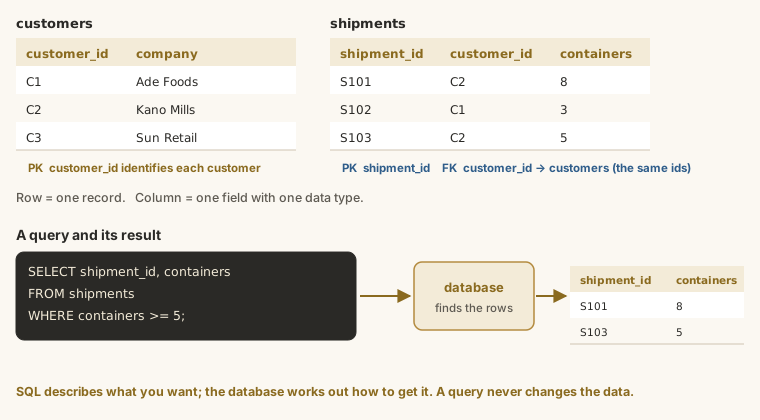
- Each column holds one kind of information, such as a company name or a booking date. Every column has a name and a data type.
- Each row is one record: one customer, one shipment, one payment.
- The order of rows has no meaning: a table is a set of records, not a list. If you want an order, you ask for it (you'll learn how in the ORDER BY lesson).
Data types
Every column holds one type of data. The main types you'll see:
| Type | Holds | Harbourline example |
|---|---|---|
| Integer | whole numbers | containers, customer_id |
| Decimal (real) | numbers with decimals | prices in other systems |
| Text | words and codes | company_name, status |
| Date | calendar dates | booking_date (stored as text, '2026-03-15', in SQLite) |
The type matters when you compare and calculate: numbers add up, text doesn't; dates must be written in the right format.
Primary keys
Every table has a primary key: a column whose value is unique for every row and never empty. It's the row's identity, like a customer number on an invoice. In customers it's customer_id; in shipments, shipment_id.
Names aren't good keys: two companies can share a name, and names change. IDs don't.
Foreign keys: how tables connect
A foreign key is a column that holds another table's primary key, which links the two. Every shipment belongs to a customer, so shipments has a customer_id column that points to a row in customers.
Look at one shipment. It doesn't store the customer's name, only their ID:
SELECT shipment_id, customer_id, route_id, booking_date, containers
FROM shipments
WHERE shipment_id = 100001;
Customer 75. Now look up customer 75 in customers:
SELECT customer_id, company_name, city, industry
FROM customers
WHERE customer_id = 75;
That's the relational idea: each fact is stored once, in the table it belongs to, and keys connect them. If the customer changes their name, it's updated in one place, and every shipment still points to the right company. In the JOINs lesson you'll learn to combine both lookups in one query.
Harbourline's five tables
| Table | One row is... | Primary key | Links to |
|---|---|---|---|
customers | a company that ships with Harbourline | customer_id | employees (its account manager) |
shipments | one booking to move goods | shipment_id | customers, routes |
routes | a lane Harbourline operates | route_id | |
payments | money received for a shipment | payment_id | shipments |
employees | a member of staff | employee_id | employees (their manager) |
You'll see the full diagram of how they connect in the next lesson.
What SQL is
SQL (Structured Query Language) is the language for working with relational databases. You'll hear it said "S-Q-L" or "sequel"; both are fine. A piece of SQL is a statement, and statements fall into a few families:
| Statement | Does | In this course? |
|---|---|---|
SELECT | reads data and returns a result | yes, all the time |
INSERT, UPDATE, DELETE | add, change or remove rows | mentioned, not practised |
CREATE, ALTER, DROP | create or change tables | in the Data Modelling course |
As an analyst, you'll spend nearly all your time writing SELECT. It's safe: it only reads, so you can't break anything by experimenting.
Your first query
SQL
SELECT * FROM routes;SELECTsays you want to read data.*means "every column".FROM routessays which table to read.;marks the end of the statement.
SQL keywords aren't case-sensitive: select * from routes works too. The convention, used in this course, is capitals for keywords and lower case for names.
Running queries in this course
Every grey box with a Run button is a live editor connected to the Harbourline database:
- Read the query, then press Run (or Ctrl + Enter).
- The result appears underneath as a table, with the number of rows.
- You can edit any example and run it again. Try changing a table name or a column. To get the original back, reload the page.
When something goes wrong
Mistakes are normal, and the database tells you what it didn't understand. Here's a query with a deliberate typo:
SQL
SELECT * FROM route;Run it (type it into any editor in this course) and you'll see this error in red under the editor:
Output
no such table: routeThe table is called routes. Most errors you'll meet early on are like this: a misspelt name, a missing comma, or a missing quote. Read the message, look just before the word it mentions, and fix it.
Exploring a table you don't know
When you meet a new table, three quick queries tell you most of what you need. How many rows?
SELECT COUNT(*) FROM customers;What does a row look like?
SELECT * FROM customers LIMIT 5;And which values does a column hold?
SELECT DISTINCT industry FROM customers;You'll learn each of these properly in the coming lessons. For now, just notice how quickly you can get to know a table.
Example
Here's the query that answers Kemi's question: every route Harbourline operates.
SELECT * FROM routes;Walkthrough
SELECT *asks for every column.FROM routesreads theroutestable.- The result shows all 30 routes, from sea lanes like Shanghai to Lagos (Apapa) to road routes like Lagos to Kano. Each has an ID, an origin, a destination, a mode of transport and a target number of days.
Look at the route_id column: it's the primary key. Every shipment stores one of these IDs to say which route it travelled.
Summary
| Term | Means |
|---|---|
| database | an organised, shared store of data |
| DBMS | the software that runs it: SQL Server, PostgreSQL, MySQL, SQLite... |
| table | data about one kind of thing, in rows and columns |
| row | one record |
| column | one kind of information, with a data type |
| primary key | the column that uniquely identifies each row |
| foreign key | a column holding another table's primary key, linking the two |
| SQL | the language you use to ask a relational database questions |
SELECT * FROM table; | read every row and column of a table |
Practice
Practice
Kemi wants to know who works at Harbourline. Show every column of the employees table.
Ctrl + Enter to run. Tab indents; press Esc then Tab to leave the editor.
Challenge
Challenge · optional
Now show every column of the customers table. Look through the result: which columns connect a customer to another table?
Ctrl + Enter to run. Tab indents; press Esc then Tab to leave the editor.
More practice
Optional drills on the same skills. They don't count towards the certificate, but each one is a small, realistic request from someone at Harbourline. Do as many as you need until the pattern feels automatic.
Drill · optional
Show every column of the routes table. Look at the mode column: which three ways does Harbourline move freight?
Ctrl + Enter to run. Tab indents; press Esc then Tab to leave the editor.
Drill · optional
Show every column of the payments table. Which column links a payment to the shipment it pays for?
Ctrl + Enter to run. Tab indents; press Esc then Tab to leave the editor.
Check your understanding
Answer every question to check.